TradingView Vs cTrader 2026: Charting Platform Or Trading Platform?
I use TradingView regularly for market analysis, so I view this as a workflow decision rather than a contest for the most features. TradingView is my natural charting, alert and research layer; cTrader deserves a place when the trader’s chosen broker account and execution or cBot requirements make its trading environment useful. I would not add a second platform unless it solves a real problem.
 , GradTraders
TradingView vs cTrader in 59 seconds.
Choose by what you need the platform to do
TradingView is the stronger fit when charting, alerts and market analysis are the priority. cTrader makes more sense when broker-connected execution and a cTrader-native trading workflow matter more.
Many traders may use both rather than forcing one platform to replace the other.
Disclosure & Risk Notice: This article is for educational and informational purposes only and should not be considered financial advice, investment advice, tax advice or a personal recommendation. Trading CFDs, spread betting, forex, futures, crypto CFDs and other leveraged products involves significant risk and may not be suitable for all traders. You may lose some or all of your capital. Trading platforms, charting tools, broker connections, alerts and automated systems can fail, disconnect, delay, misfire or behave differently in live market conditions. Some GradTraders articles may contain affiliate links or references to partner offers. If you sign up, purchase or open an account through certain links, GradTraders may earn a commission at no additional cost to you. Commercial relationships do not determine the editorial conclusion or ranking.
Looking for GradTraders partner offers, broker discounts, prop firm promotions and trading platform deals? You can view the current offers and join the update list here: Access GradTraders Partner Offers.
Quick Verdict
TradingView is better for charting, watchlists, alerts, market research, visual analysis and cross-market workflows. cTrader is better for traders who want a broker-connected trading platform with execution tools, cTrader Algo, cBots and integrated copy trading.
The GradTraders view is simple: use TradingView if the main job is analysis, scanning, alerting and reviewing markets. Use cTrader if the main job is execution with a supported broker, depth-of-platform trading, cBots or a cTrader-native workflow.
TradingView Vs cTrader At A Glance
The easiest way to compare them is to separate the role of each platform in a trader’s workflow.
| Feature | TradingView | cTrader | GradTraders View |
|---|---|---|---|
| Main Role | Charting, analysis, alerts, watchlists and market research | Broker-connected trading, execution, cBots and copy trading | TradingView is the research layer; cTrader is the execution platform. |
| Charting | Excellent cross-market charting and drawing workflow | Strong charting inside a trading platform | TradingView usually wins for pure charting. |
| Execution | Trading depends on supported broker integrations | Built for broker execution where supported | cTrader usually wins for native execution workflow. |
| Automation | Alerts and Pine Script strategy/research workflows | cTrader Algo, cBots, indicators and plugins | cTrader is stronger for platform-native trading robots. |
| Backtesting / Replay | Bar Replay and strategy testing workflows | cBot backtesting and optimisation in cTrader Algo | Different use cases: visual replay vs algorithmic testing. |
| Best User | Chart-first trader, market analyst, multi-asset trader | Execution-first trader, cBot user, supported-broker trader | Many traders can use both. |
What Is TradingView?
TradingView is a charting, market analysis and trading community platform used by traders and investors across many markets. Its official site describes it as a super-charting platform and social network for traders and investors.
The platform is popular because it combines charts, indicators, drawing tools, watchlists, alerts, market data, screeners, ideas, scripts and broker integrations in one environment. TradingView also offers Bar Replay for historical chart replay and Pine Script for custom indicators, strategies and research.
For GradTraders, TradingView fits best as the analysis layer. It is where a trader can map levels, compare markets, build watchlists, set alerts and review ideas before deciding whether to trade.
What Is cTrader?
cTrader is a multi-platform trading environment used by supported brokers. It is designed around trading execution, charting, order tools, copy trading and algorithmic trading.
Current cTrader documentation presents Trade and Algo across its main desktop and web routes, with mobile trading apps also available. cTrader Algo supports cBots, indicators and plugins, and current developer documentation supports both C# and Python for algorithm development on Windows and Mac.
For GradTraders, cTrader fits best as an execution and platform layer. It is especially relevant to traders who want a broker-connected trading interface, cBots, copy trading or a cleaner alternative to MetaTrader.
When TradingView Is Better
TradingView is usually the better choice when the trader’s main need is analysis rather than execution.
Charting First
TradingView is excellent for multi-timeframe charting, drawing tools, layouts, indicators and visual analysis.
Market Watchlists
Traders can track multiple markets, symbols, sectors and instruments in one research environment.
Alerts
TradingView alerts can help traders avoid staring at charts while waiting for levels or conditions.
Bar Replay
Bar Replay helps traders review historical price movement and practise visual decision-making.
Pine Script
Pine Script allows traders to build custom indicators, strategies and research tools inside TradingView.
Multi-Asset Analysis
TradingView is particularly strong for traders who watch indices, forex, commodities, crypto, stocks and macro markets.
When cTrader Is Better
cTrader is usually better when the trader’s main need is execution, broker platform workflow or cTrader-native automation.
Execution Workflow
cTrader is built as a trading platform, so order placement and account execution are central to the workflow.
cBots
cTrader Algo supports cBots for traders who want to build or run automated strategies inside cTrader.
Copy Trading
cTrader Copy is integrated into the cTrader ecosystem for copying available strategies through supported broker accounts, subject to the strategy terms and broker setup.
Broker Platform
cTrader can be the main trading platform if the trader’s broker supports it and the account setup fits.
Depth Of Market
Many traders like cTrader for its platform feel, order interface and execution-focused design.
MetaTrader Alternative
cTrader may appeal to traders who want a modern execution platform without using MT4 or MT5.
The Common Mistake: Comparing Them As The Same Product
TradingView and cTrader are often compared as if they are trying to do exactly the same job. That can lead to the wrong conclusion.
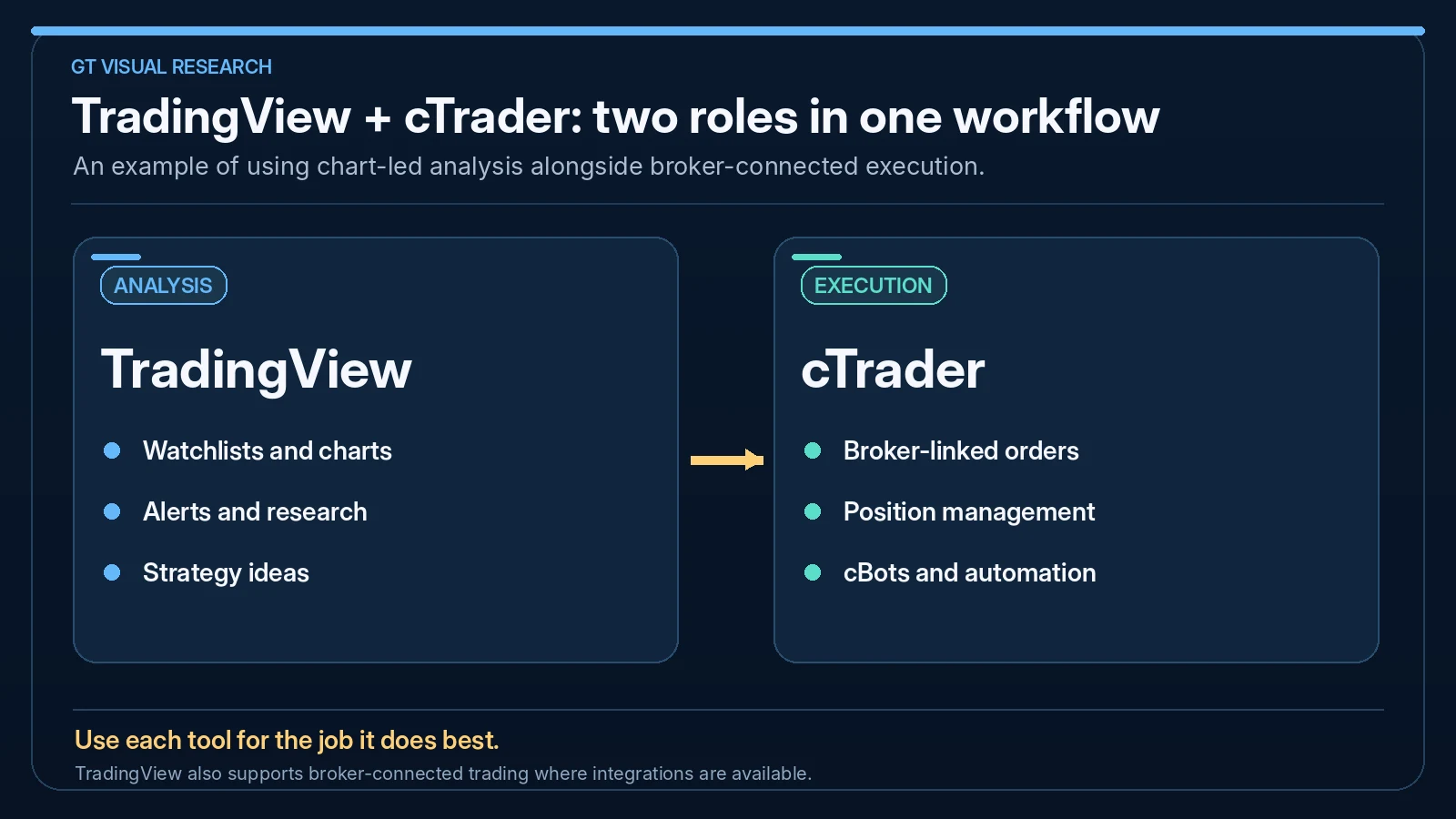
TradingView is strongest before the trade: analysis, alerts, watchlists, replay and market scanning. cTrader is strongest around the trade: broker connection, execution, platform workflow, cBots and account-level trading tools.
A trader can analyse on TradingView, then execute on cTrader. That may be a better workflow than forcing one platform to do everything.
Charting And Analysis
TradingView usually has the stronger charting and research ecosystem. It offers a broad range of chart tools, indicators, layouts, alerts, community scripts, screeners and market coverage.
cTrader also has strong charts, but its charting is part of a broker-connected trading platform. That makes it practical for execution and account management, but traders who live inside charts all day may still prefer TradingView as their main analysis screen.
| Charting Need | TradingView | cTrader | Best Fit |
|---|---|---|---|
| Multi-market research | Very strong | Broker-symbol dependent | TradingView |
| Execution charts | Depends on broker integration | Strong inside supported broker accounts | cTrader |
| Alerts and watchlists | Very strong | Useful but less central | TradingView |
| Chart trading | Possible with supported brokers | Core platform feature | cTrader |
Execution And Broker Access
cTrader has the clearer execution role because it is a broker trading platform. If a trader’s broker offers cTrader, then the platform can be used for order placement, account management and trading workflow directly.
TradingView also supports broker integrations, and its broker integration pages highlight chart trading through supported brokers. But not every broker or account type is available through TradingView, so execution access depends heavily on the trader’s broker.
For GradTraders, the clean split is this: TradingView for analysis first, cTrader for execution where broker support and account conditions fit.
Automation: Pine Script Vs cTrader Algo
TradingView and cTrader approach automation differently. TradingView’s scripting ecosystem is built around Pine Script, custom indicators, strategies, alerts and research. cTrader Algo is built around cBots, indicators and plugins using C# or Python.
Traders who want to research or alert from chart conditions may prefer TradingView. Traders who want platform-native trading robots inside cTrader may prefer cTrader Algo.
| Automation Need | TradingView | cTrader | GradTraders View |
|---|---|---|---|
| Custom indicators | Pine Script indicators and community scripts | cTrader Algo indicators | Both can work depending on preferred ecosystem. |
| Trade alerts | Very strong alert workflow | Possible through platform/algorithmic tools | TradingView usually wins for alerts. |
| Trading robots | Not the same as broker-native bots for most users | cBots inside cTrader Algo | cTrader wins for cBot automation. |
| Strategy research | Pine strategies and Bar Replay | cBot backtesting and optimisation | Use the platform that matches the final execution route. |
Backtesting, Replay And Practice
TradingView’s Bar Replay is useful for visual review and practising how price unfolded historically. It is especially helpful for traders who want to replay sessions, review setups and practise chart-based decision-making.
cTrader’s backtesting is more relevant to cBots and algorithmic trading. cTrader Algo documentation describes backtesting and optimisation workflows for cBots, which makes it more suitable when the trader wants to test a cTrader robot rather than simply replay charts visually.
In practice, a trader could use TradingView for visual replay and cTrader Algo for cBot testing. They are different kinds of practice.
Which Is Better For Beginners?
TradingView is usually easier for beginners to understand because the first job is charting, learning price movement, watching markets and setting alerts. It gives beginners a cleaner way to build market awareness before worrying about execution platforms and automation.
cTrader can still be beginner-friendly if the trader’s broker offers it and the trader wants a modern execution platform. But if the beginner is still learning what a chart, trend, pullback, stop loss and trade plan are, TradingView is usually the better first software layer.
Which Is Better For Prop Firm Traders?
Prop firm traders should separate analysis from execution. TradingView can be excellent for building watchlists, reviewing levels, setting alerts and practising setups. cTrader can be useful if the prop firm or broker environment supports it and the trader needs a cTrader-native execution workflow.
The key question is not which platform looks better. The key question is which platform the firm allows, how execution works, what symbols are available, whether cBots or copy tools are restricted, and whether the trader can control risk inside the rules.
Best Workflow: TradingView For Analysis, cTrader For Execution
Many traders do not need to choose one platform only. The strongest workflow may use each platform for its natural role.
| Workflow Step | Best Tool | Why | Risk Check |
|---|---|---|---|
| Market scanning | TradingView | Watchlists, screeners and charts make scanning easier | Do not chase every symbol that moves. |
| Chart analysis | TradingView | Strong drawing, layout and multi-market workflow | A good chart does not guarantee a good trade. |
| Alerts | TradingView | Alerts can reduce screen-staring | Alert first, plan second is still dangerous. |
| Execution | cTrader | Broker-connected execution is central to cTrader | Check spreads, commissions, symbol settings and order behaviour. |
| cBot automation | cTrader | cTrader Algo is built around cBots, indicators and plugins | Backtest and demo test before live risk. |
| Review | Journal or TraderSync | Neither platform replaces a proper trading journal | Record every trade, not only the good examples. |
Final Verdict
I favour TradingView when the work is mainly watching markets, analysing charts and managing alerts. I would favour cTrader when the broker-connected order workflow or cBot development is the central requirement. This is a judgement about platform roles, not a claim that I have personally tested every supported broker connection.
I would combine TradingView and cTrader only where the broker account genuinely supports that setup and the trader can manage the handoff cleanly. Otherwise, one well-understood platform and a proper trading journal may be the better, simpler arrangement.
Explore GradTraders Internationally
GradTraders has 20 dedicated international gateways with local livestream times, market context and country-specific routes into the wider research site.
Browse all 20 country gateways
Asia: Japan · South Korea · Taiwan · Hong Kong · India · Singapore · Thailand
Europe: Italy · Sweden · Switzerland · Germany · Norway
Americas: United States · Canada · Mexico
Middle East: United Arab Emirates · Saudi Arabia
Africa: South Africa
Oceania: Australia · New Zealand
TradingView Vs cTrader FAQ
Is TradingView better than cTrader?
TradingView is usually better for charting, alerts, watchlists and market analysis. cTrader is usually better for broker-connected execution, cBots and cTrader-native trading workflows.
Can I trade directly from TradingView?
Yes, TradingView supports trading through selected broker integrations, but access depends on whether the trader’s broker and account type are supported.
Is cTrader good for automated trading?
cTrader can be good for automated trading because cTrader Algo supports cBots, indicators and plugins. Traders still need testing, risk controls and monitoring.
Should beginners use TradingView or cTrader?
Beginners may find TradingView better for learning charts, alerts and market analysis. cTrader may make sense once the trader needs broker execution through a supported account.
Can I use TradingView and cTrader together?
Yes. Many traders can use TradingView for analysis and alerts, then use cTrader for execution if their broker supports cTrader.
Source note: this is a research-led GradTraders comparison based on editorial workflow analysis and current official product documentation checked on 10 October 2026. TradingView support documents Supercharts, integrated broker connections, chart trading and Bar Replay. cTrader documentation covers its multi-platform Trade environment, cTrader Algo, cBots, indicators, plugins, cTrader Copy and C# or Python algorithm development. Features, broker integrations, platform support and account availability can change, so check each provider directly before relying on a workflow.
Useful next reads: TradingView Review · TradingView Vs MT5 · cTrader cBots Explained · Best VPS For cTrader · Trading Software & Tools Map.