MT5 Expert Advisors Explained: How EAs Work In MetaTrader 5
MT5 Expert Advisors can analyse prices, generate signals, manage orders or execute trading rules inside MetaTrader 5. The Strategy Tester also supports testing, optimisation and forward testing. My priority is not finding an EA that can simply run unattended: it is defining the entry, exit and risk rules clearly enough to test before putting money behind them.
 , GradTraders
How Expert Advisors work in MetaTrader 5.
Build, test, then decide how it should run
This guide uses current MetaTrader 5 documentation for Expert Advisors, MQL5, Strategy Tester and virtual hosting. It does not assume that a third-party VPS is necessary for every EA.
Test the strategy and its risk controls first; choose MetaTrader virtual hosting or a separate VPS only when the actual running setup calls for it.
Disclosure & Risk Notice: This article is for educational and informational purposes only and should not be considered financial advice, investment advice, tax advice or a personal recommendation. Trading CFDs, spread betting, forex, futures, crypto CFDs and other leveraged products involves significant risk and may not be suitable for all traders. You may lose some or all of your capital. Expert Advisors, automated systems, trade copiers and algorithmic tools can fail, disconnect, overtrade, behave differently in live markets and breach broker or prop firm rules. Backtests and simulations do not guarantee future performance. Some GradTraders articles may contain affiliate links or references to partner offers. If you sign up, purchase or open an account through certain links, GradTraders may earn a commission at no additional cost to you. Commercial relationships do not determine the editorial conclusion or ranking.
Looking for GradTraders partner offers, broker discounts, prop firm promotions and trading platform deals? You can view the current offers and join the update list here: Access GradTraders Partner Offers.
Quick Verdict
An MT5 Expert Advisor is a trading robot that runs inside MetaTrader 5 and follows predefined logic. EAs can analyse prices, generate signals, place or manage orders and automate risk rules when automated trading is enabled.
The important workflow is strategy first, software second: define the rules, test the EA in MetaTrader 5’s Strategy Tester, use optimisation carefully, compare forward-test behaviour with the backtest, and only then decide whether live automation is appropriate.
What Is An MT5 Expert Advisor?
An Expert Advisor, usually shortened to EA, is a MetaTrader application designed to automate analytical or trading processes. In MetaTrader 5, EAs are developed in MQL5 and can be built, tested, optimised and run inside the MetaTrader ecosystem.
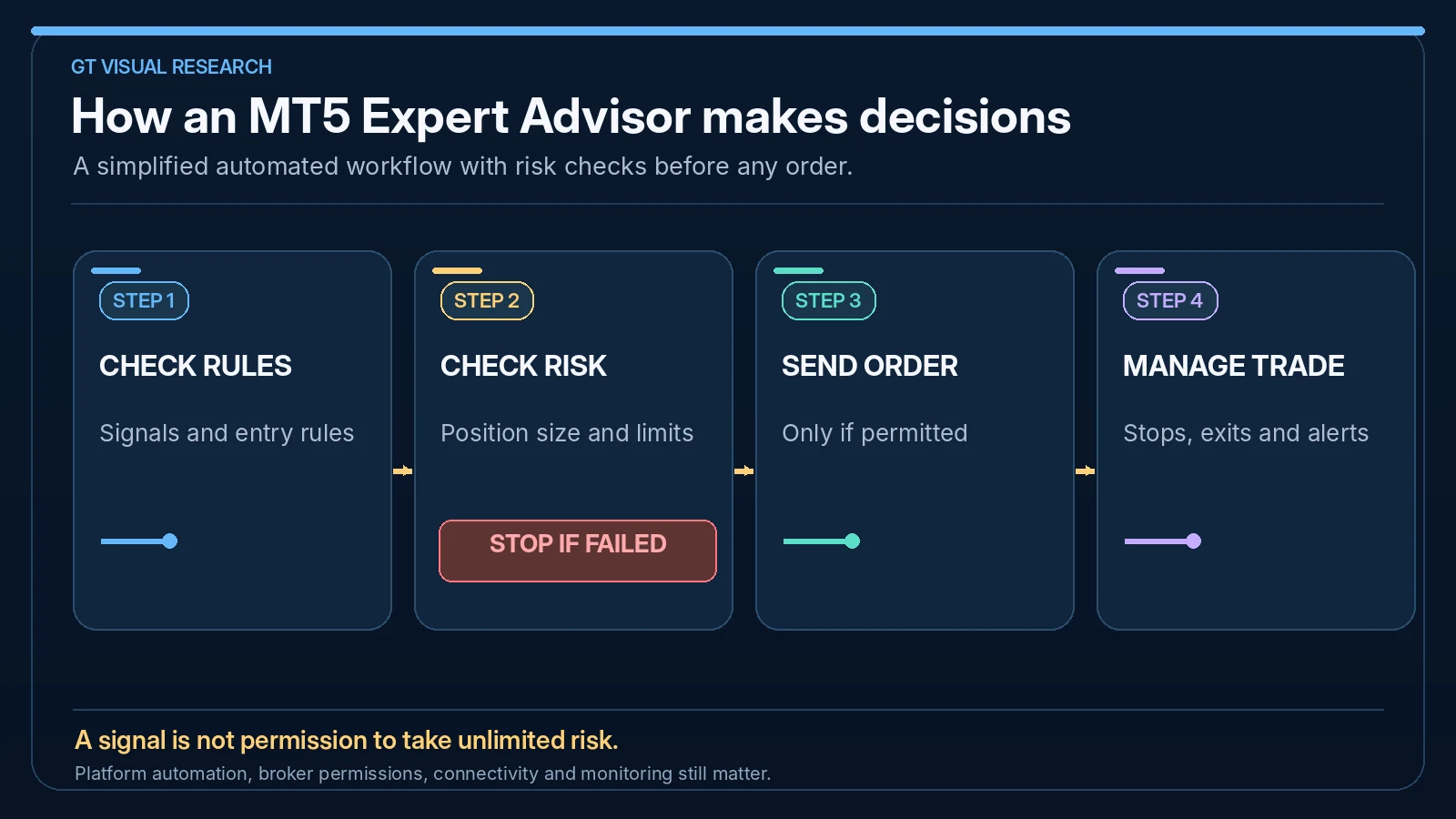
An EA can watch price, indicators, time, spreads or other conditions. Depending on its permissions and logic, it may only analyse and alert, or it may place and manage trades automatically. MetaTrader’s global Auto Trading control can prevent EAs from trading even while their analytical logic continues to run.
The software follows the algorithm it has been given. That means the quality of the strategy, position sizing and failure controls matter more than the fact that the process is automated.
What Can MT5 Expert Advisors Do?
EAs can be simple or complex. Some only help with trade management. Others try to run a full strategy from signal to exit.
Analyse Markets
An EA can monitor price, indicators, timeframes, volatility, spreads or other conditions.
Open Trades
An EA can place buy or sell orders when its rules are met, subject to broker and platform conditions.
Manage Exits
EAs can manage stop losses, take profits, trailing stops, break-even rules and partial exits.
Control Risk
A well-designed EA can calculate lot size, limit trades per day and stop trading after predefined losses.
Send Alerts
Some EAs are semi-automated and only notify the trader when a condition appears.
Run Continuously
With the right setup, an EA can monitor markets while the trader is away from the screen.
How MT5 Expert Advisors Work
The basic MT5 EA workflow is straightforward. The trader or developer defines the rules, the EA is built or installed, the settings are configured, automated trading is enabled, and the EA runs inside the MetaTrader platform.
| Stage | What Happens | Why It Matters |
|---|---|---|
| Strategy Rules | The trader defines entries, exits, stops, targets and filters | The EA cannot improve unclear logic. |
| EA Creation | The rules are coded in MQL5, built with a no-code tool or purchased from a market | The software must match the intended strategy exactly. |
| Backtesting | The EA is tested using historical data inside a strategy tester or external workflow | Backtesting helps find obvious weaknesses before live risk. |
| Demo Testing | The EA runs in current market conditions without real capital | Demo testing checks live-like behaviour, platform stability and execution assumptions. |
| Live Or Prop Use | The EA is used with real capital or an evaluation account only if suitable and permitted | Risk limits, rules and monitoring become critical. |
MT5 Expert Advisors Vs Indicators Vs Scripts
MetaTrader tools are often confused. Expert Advisors, indicators and scripts do different jobs.
| Tool | Main Purpose | Can It Trade Automatically? | Typical Use |
|---|---|---|---|
| Expert Advisor | Automated or semi-automated trading logic | Yes, if permissions and settings allow it | Trading robots, order management, alerts and automation. |
| Custom Indicator | Visual or analytical market calculation | No, not by itself | Signals, overlays, filters and market analysis. |
| Script | One-time action or command | Usually not as a continuous strategy | Closing orders, placing orders, exporting data or platform tasks. |
| Library | Reusable code functions | No, not alone | Supporting EAs, scripts and indicators. |
MT5 EAs Can Be Dangerous If Used Poorly
An EA can remove hesitation, but it can also remove common sense. If the bot is allowed to keep trading during bad conditions, high spreads, news events or emotional recovery attempts coded into the logic, the losses can build quickly.
Some of the riskiest EAs use grid, martingale or averaging behaviour. These systems may look smooth for long periods, then fail badly when the market trends strongly or volatility changes. Traders should understand exactly how an EA behaves before relying on it.
Backtest Overfitting
An EA can be optimised until it looks perfect on old data but fails in current markets.
Lot Size Errors
A small mistake in position sizing, compounding or account settings can create much larger risk than intended.
Broker Differences
Spreads, symbols, execution, swaps, commissions and server times may differ between brokers. For a broker shortlist, see our best MT5 brokers comparison; EA compatibility and execution conditions still need checking for the exact account.
VPS Or Platform Failure
If the trading platform freezes, disconnects or is misconfigured, the EA may not behave as expected.
Prop Firm Restrictions
Some firms restrict certain EAs, copy systems, third-party tools or prohibited strategy types.
Weak Monitoring
Automation still needs review. “Set and forget” trading is one of the biggest traps with EAs.
Ways To Get An MT5 Expert Advisor
Traders usually get MT5 Expert Advisors in one of four ways: build one, use a no-code builder, buy or rent one, or hire a developer. Each route has trade-offs.
| Route | Best For | Strength | Risk |
|---|---|---|---|
| Code It Yourself | Technical traders who know MQL5 | Maximum control over logic and testing | Coding mistakes can affect trading behaviour. |
| No-Code Builder | Traders with rules but limited coding skill | Can turn strategy logic into an EA more quickly | Still requires clear rules and proper testing. |
| Buy Or Rent An EA | Traders evaluating existing systems | Fastest route to a ready-made tool | Marketing claims may not match live performance. |
| Hire A Developer | Traders with a specific strategy brief | Custom build around your rules | Poor instructions lead to poor software. |
Backtesting MT5 Expert Advisors
MetaTrader 5 includes a built-in Strategy Tester for evaluating Expert Advisors on historical quotes before real-money use. It supports multiple testing modes, visual testing and optimisation of input parameters.
The current tester also includes forward testing, which separates part of the historical sample so that optimised settings can be checked on data that was not used for the optimisation itself. MetaTrader also provides a Random Delay mode to model execution delays more realistically. These features improve the testing process, but they still do not guarantee future performance.
Use Enough Data
Short samples can hide losing regimes, unusual volatility and long drawdowns.
Model Trading Costs
Spreads, commissions, swaps and execution assumptions can materially change short-term systems.
Review Drawdown
Total return is only one output. Losing streaks and worst drawdown are often more important to risk planning.
Avoid Curve Fitting
Optimisation can produce attractive historical settings that do not generalise to future conditions.
Use Forward Testing
Compare optimised settings on a separate period rather than judging only the data used to find them.
Demo And Journal
Compare backtest assumptions with current-market behaviour before taking serious risk.
Do MT5 Expert Advisors Need A VPS?
An EA that needs continuous market access requires a continuously available MetaTrader environment. That can be a local computer, MetaTrader 5’s own virtual hosting service, or a third-party VPS depending on the workflow.
MetaTrader’s official virtual hosting can keep EAs and signal subscriptions running when the local computer is off. A third-party Windows VPS may make more sense when the trader needs a full remote desktop, several terminals, external applications or more control over the operating environment.
Continuous Hosting Makes Sense When
- The EA must monitor markets when the local computer is off.
- The strategy genuinely depends on continuous execution or trade management.
- The trader uses several terminals or external tools.
- The hosting route has been tested before serious risk is used.
It May Be Unnecessary When
- The EA is only used for alerts or occasional manual support.
- The strategy does not need continuous monitoring.
- The EA is still in development or early demo testing.
- The trader has not yet established that the automation itself is reliable.
For traders who specifically want a third-party VPS rather than MetaTrader’s integrated virtual hosting, GradTraders currently provides ForexVPS and FXVM routes for comparison. Hosting supports uptime and environment control; it does not improve the underlying trading logic.
Affiliate note: GradTraders may earn a commission if you purchase through either third-party VPS link, at no additional cost to you.
MT5 Expert Advisors And Prop Firms
Prop firm traders should be careful with EAs. Some firms allow certain automated systems, while others restrict third-party EAs, copy trading, account management tools, news trading, latency arbitrage, martingale methods, high-frequency behaviour or shared strategies.
The danger is not only losing money. A trader could breach rules and fail the account even if the EA is profitable. Always check the current firm rules directly before using any EA on a challenge or funded account.
MT5 Expert Advisor Safety Checklist
Before using an MT5 Expert Advisor with real money or a prop firm account, check the basics.
Rules Understood
You can explain exactly why the EA enters, exits and sizes trades.
Risk Limited
Lot size, daily loss, maximum drawdown and max open trades are controlled.
Backtest Reviewed
The EA has been tested across enough history without relying on perfect cherry-picked settings.
Demo Tested
The EA has been watched in current market conditions before live use.
VPS Checked
The hosting setup, platform permissions and restart behaviour have been tested.
Kill Switch Ready
You know how to disable automated trading, remove the EA or close risk quickly.
Final Verdict
MT5 Expert Advisors are useful for turning explicit trading rules into repeatable software behaviour. MetaTrader 5 gives traders the tools to build EAs in MQL5, test them on historical data, optimise parameters and use forward testing before considering live automation.
The decision rule is to separate strategy quality from infrastructure. First prove that the EA’s logic and risk controls are credible. Only then decide whether it should run locally, through MetaTrader virtual hosting or on a third-party VPS.
Source note: GradTraders evaluates EA strategy rules, testing discipline, risk controls and hosting requirements using the documented MetaTrader 5 platform capabilities. MetaTrader describes Expert Advisors as trading robots used for analytical and trading operations, provides the MQL5 development environment, and includes Strategy Tester tools for testing, optimisation and forward testing.
Primary references: MetaTrader 5 algorithmic trading · MetaTrader 5 Strategy Tester · MetaTrader 5 virtual hosting.
Useful next reads: EA Builder Pro Review · Best VPS For Automated Trading · What Is Backtesting? · Algorithmic Trading Explained · Trading Software & Tools Map.
Explore GradTraders Internationally
GradTraders has 20 dedicated international gateways with local livestream times, market context and country-specific routes into the wider research site.
These country links are for site navigation only; trading software availability, broker connections, account eligibility and applicable terms must be checked separately.
Browse all 20 country gateways
Asia: Japan · South Korea · Taiwan · Hong Kong · India · Singapore · Thailand
Europe: Italy · Sweden · Switzerland · Germany · Norway
Americas: United States · Canada · Mexico
Middle East: United Arab Emirates · Saudi Arabia
Africa: South Africa
Oceania: Australia · New Zealand
MT5 Expert Advisors FAQ
What is an MT5 Expert Advisor?
An MT5 Expert Advisor is an automated trading program used in MetaTrader 5. It can analyse market conditions, manage orders and potentially trade according to predefined rules.
Can MT5 Expert Advisors trade automatically?
Yes, an MT5 Expert Advisor can trade automatically if automated trading is enabled and the EA settings allow trading. Traders should test and monitor EAs carefully.
Do MT5 Expert Advisors guarantee profits?
No. Expert Advisors do not guarantee profits. Results depend on strategy quality, market conditions, risk settings, execution, broker conditions, platform stability and monitoring.
Can beginners use MT5 Expert Advisors?
Beginners can learn from EAs, but they should be careful with live automation. Understanding risk, backtesting, position sizing and platform settings should come first.
Do MT5 Expert Advisors need a VPS?
Not necessarily. An EA that must run continuously needs an always-available MetaTrader environment, which can be a local computer, MetaTrader 5 virtual hosting or a third-party VPS. The right route depends on whether the workflow needs a full remote desktop, multiple terminals or external software.