What Is A Trading Platform? A Plain Beginner Guide
A trading platform is the software a trader uses for charts, orders and position management, but I would not choose one by its charting features alone. Check whether the order ticket makes position size, margin, stops and possible losses understandable; then confirm which broker account, products and protections are actually available in the trader’s country. The platform interface and the company holding the account are two different decisions.
 ,
GradTraders
Live trading on YouTube
,
GradTraders
Live trading on YouTube
Software Is A Tool, Not An Edge
A trading platform provides charts and order controls, but it cannot replace risk management or a tested process.
Disclosure & Risk Notice: This article is for educational and informational purposes only and should not be considered financial advice, investment advice, tax advice or a personal recommendation. Trading leveraged products, futures, forex, indices, commodities and crypto-related products can involve significant risk. You may lose money.
GradTraders may earn commission from some links without affecting the independent educational view. Readers comparing relevant providers or current partner routes can use the Exclusive Discounts & Updates page.
Quick Beginner View
A trading platform is a tool, not an edge.
Beginners often think the right platform will make trading easier. A good platform can help with charts, orders and organisation, but it cannot provide patience, discipline, risk control or judgement.
The platform may make trading accessible. It does not make trading suitable.
Main Purpose
A platform helps with charts, watchlists, order tickets, alerts, stop losses, account screens and trade management.
Main Limitation
A platform cannot provide discipline, patience, risk management or a genuine trading edge by itself.
Where To Compare Next
Use the platform guide, TradingView review and broker table only after the risk basics make sense.
What is a trading platform?
A trading platform is the software a trader uses to view prices, analyse charts, manage watchlists, place orders and monitor open positions. It can be a web platform, desktop program, mobile app or a combination of all three.
Some platforms are built by brokers themselves. Others are third-party platforms that connect to different brokers. Examples that many beginners come across include TradingView, MetaTrader 4, MetaTrader 5 and cTrader.
The important beginner point is simple: the platform is not the market. It is the screen through which the trader interacts with the market or broker product.
What does a trading platform do?
A trading platform normally brings several functions together.
- Shows market prices.
- Displays charts.
- Allows technical analysis.
- Lets traders place buy and sell orders.
- Shows open trades and account balance.
- Allows stop losses and take-profit orders.
- Creates watchlists.
- May include news, alerts, indicators or economic calendars.
- May be available on desktop, web and mobile.
This can sound impressive, but most beginners only need a small part of it at first. More features do not automatically mean better decisions.
A platform is not the same as a broker
Beginners often mix these two things together.
A broker is the company that provides the account, market access, pricing, account entity, funding process and trading products. A platform is the software used to interact with that account or analyse the market.
Sometimes the broker and platform feel like the same thing because the broker has its own app. In other cases, the trader may use a third-party platform such as TradingView, MetaTrader or cTrader through a broker connection.
| Area | Broker | Platform |
|---|---|---|
| Main role | Provides the trading account and market access. | Provides the software interface for analysis or execution. |
| Controls | Account type, product range, costs, funding, regulation and leverage. | Charts, orders, watchlists, alerts and layout. |
| Beginner mistake | Choosing based on leverage or promotion. | Choosing based on excitement or features. |
GradTraders explains brokers separately in What Is A Trading Broker?.
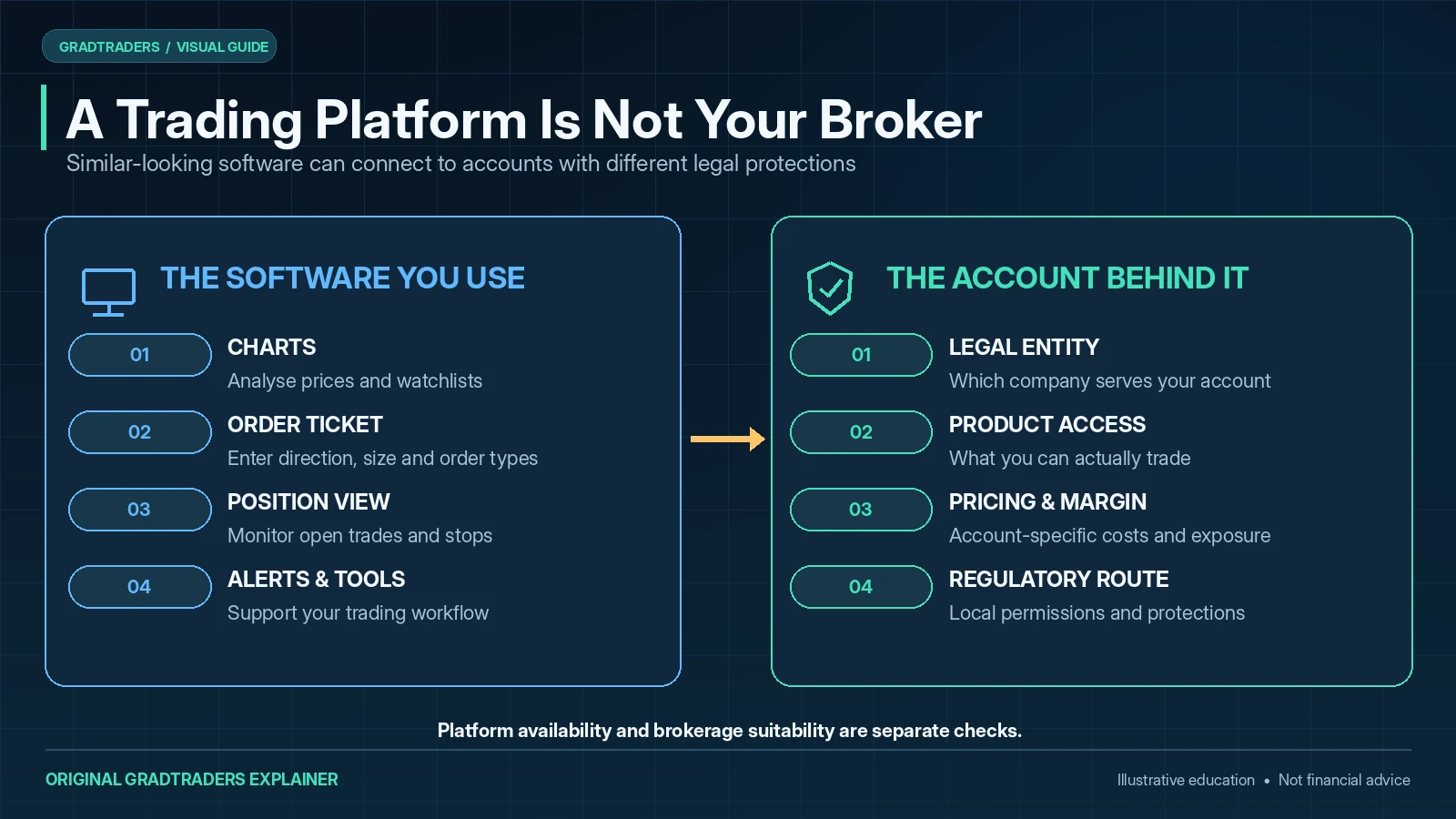
Platform Access Can Differ By Country And Broker Entity
A platform name does not guarantee that the same products, account types or broker connections are available everywhere. A global broker can operate through different legal entities, and each entity may support a different platform or product mix.
International readers should therefore check the exact broker entity and account route before choosing a platform. The software may be global while the trading product behind it is jurisdiction-specific.
Practical rule: choose the product and regulated account route first, then confirm that the platform you want is actually supported for that account.
The main types of trading platform
Different platforms suit different users. A beginner does not need to master all of them immediately.
Broker web platforms
Many brokers offer a web platform that runs in a browser. These can be simple and convenient. They are often enough for basic chart viewing, watchlists and placing trades.
Broker mobile apps
Mobile apps make trading accessible from a phone. That is convenient, but it can also encourage casual decisions. Beginners should be careful with trading from a phone, especially during emotional moments.
TradingView
TradingView is widely used for charting, watchlists, alerts and market analysis. Many traders use it for research even if they place trades through a separate broker platform.
MetaTrader 4 and MetaTrader 5
MetaTrader platforms are common in forex and CFD trading. MT4 is older and still widely recognised. MT5 is newer and supports a broader structure, but beginners may still find the interface less intuitive than modern web-based charting platforms.
cTrader
cTrader is used by some active traders who prefer a cleaner execution-focused platform. It can appeal to traders who dislike the feel of MetaTrader, but it still requires proper risk understanding.
What beginners actually need from a platform
Beginners do not need every indicator, plugin, robot, alert, scanner or advanced order type on day one. They need clarity.
A good beginner platform should make it easy to understand:
- What market is being viewed.
- Whether the price is buy, sell or mid-market.
- How to change timeframes.
- How to place a demo order.
- How to set a stop loss.
- How to close a trade.
- How to see account balance and margin.
- How much risk is being taken.
If a beginner cannot understand what the platform is showing, they should not use it for live trading.
Charts can help, but they can also mislead
Most trading platforms show charts. Charts are useful because they show price movement over time. They can help traders understand trend, range, volatility, support, resistance and market structure.
The danger is that charts can create false confidence. A beginner can draw lines, add indicators and convince themselves a trade is obvious. The market does not have to respect that view.
A chart is a record of what has happened. It is not a guarantee of what will happen next.
That is why every chart-based idea still needs risk management. The question is not only “does this look like a good trade?” The better question is “what happens if this trade is wrong?”
Indicators are not magic
Trading platforms often include indicators such as moving averages, RSI, MACD, Bollinger Bands, volume tools and many others.
Indicators can be useful. They can help organise information or highlight market conditions. But they do not remove uncertainty.
Beginners often keep adding indicators because they want certainty. This usually creates clutter. A chart with ten indicators may feel more scientific, but it can make decision-making worse.
A simple chart understood properly is usually better than a complicated chart used badly.
Order types beginners should understand
A trading platform is also where orders are placed. Beginners should understand basic order types before using a live account.
| Order type | Plain meaning | Beginner caution |
|---|---|---|
| Market order | An order to trade at the best available price now. | In fast markets, the execution price may not be exactly what the beginner expected. |
| Limit order | An order to trade at a chosen price or better. | The order may not be filled if price does not reach the level. |
| Stop order | An order triggered when price reaches a specified level. | Stops can be affected by gaps, fast moves and execution conditions. |
| Stop loss | An order intended to close a losing trade at a planned level. | It helps define risk, but it should not be used as an excuse to oversize. |
| Take profit | An order intended to close a winning trade at a planned level. | Profit targets should make sense in relation to the risk being taken. |
A beginner should practise these on a demo account before using real money.
Mobile trading is convenient, but dangerous for some beginners
A mobile trading app can be useful for monitoring markets or managing positions. But it can also make trading feel too casual.
The phone is full of distractions. Notifications, messages, social media, work and family life can all sit beside the trading app. That is not always a good environment for making risk decisions.
Beginners should be especially careful with mobile trading if they are prone to impulsive decisions. The easier it is to open a trade, the more important it becomes to have rules before opening the app.
Demo mode should come before live trading
A beginner should use demo mode before live trading. This is not because demo trading proves someone can trade profitably. It does not. Demo trading is useful because it allows the beginner to learn the platform without risking money.
Demo practice should include:
- Changing timeframes.
- Creating watchlists.
- Placing market orders.
- Placing limit orders.
- Setting stop losses.
- Setting take-profit orders.
- Closing trades manually.
- Checking position size.
- Understanding account balance, equity and margin.
A person who cannot use the platform calmly on demo should not use it live.
Platform features that beginners often overrate
Some platform features are useful later but distracting at the beginning.
- Too many indicators.
- Automated trading tools before understanding manual risk.
- Social trading feeds.
- Complex scanners.
- Very short-term charts.
- Hotkeys for rapid execution.
- High-leverage product access.
- Leaderboards or public performance features.
None of these are automatically bad. The problem is timing. A beginner should first learn what the platform is doing and what risk is being taken.
Platform features that beginners should value more
The useful beginner features are usually quieter.
- A clear demo account.
- Easy-to-read charts.
- Visible account balance and margin information.
- Simple order ticket layout.
- Clear stop loss and take-profit controls.
- Watchlists.
- Price alerts.
- Stable mobile and desktop access.
- Good educational support from the broker or platform provider.
A beginner platform should reduce confusion. It should not encourage constant action.
TradingView, MetaTrader and cTrader in plain terms
These names appear often, so beginners should understand the basic difference.
| Platform | Plain description | Beginner note |
|---|---|---|
| TradingView | A popular charting and analysis platform with watchlists, alerts, indicators and community features. | Useful for learning charts, but community ideas should not be copied blindly. |
| MetaTrader 4 | An older but still widely used forex and CFD trading platform. | Common, but the interface may feel dated to some new users. |
| MetaTrader 5 | A newer MetaTrader platform used across many forex and CFD brokers. | More modern than MT4 in structure, but still not automatically beginner-friendly. |
| cTrader | A trading platform often used by active traders who prefer cleaner execution and layout. | Can feel clearer than MetaTrader for some traders, but risk control still matters most. |
| Broker app | A broker’s own mobile or web platform. | May be simpler, but simplicity can also encourage casual trading. |
GradTraders compares some of these tools in more detail in TradingView vs MetaTrader 5.
The platform should not encourage overtrading
A good platform can make trading efficient. A dangerous platform experience can make trading feel like a game.
Beginners should be careful with anything that makes them trade more often without thinking more clearly. Fast execution, bright profit-and-loss displays, easy re-entry and constant alerts can all increase activity.
Activity is not skill. A trader who takes fewer, better-planned trades is usually in a healthier position than a beginner clicking constantly because the platform makes it easy.
Questions to ask before choosing a trading platform
- Can I use this platform on demo first?
- Can I clearly see position size and risk?
- Can I place stop losses easily?
- Do I understand the order ticket?
- Does the chart layout help me or distract me?
- Does the mobile app encourage impulsive trading?
- Is the platform connected to the broker I want to use?
- Do I need this many features at my current level?
- Can I use the platform calmly?
- Would I still make the trade if the platform looked less exciting?
A beginner who cannot answer these questions should practise more before trading live.
A sensible beginner approach
A sensible beginner does not need to find the perfect platform immediately.
A better path is:
- Learn what trading is.
- Understand brokers and trading products.
- Use a demo account.
- Learn basic chart navigation.
- Practise order types.
- Learn how stop losses and position size work.
- Keep the chart simple.
- Avoid live trading until the platform feels boring.
That last point matters. The platform should become familiar before money is at risk. A beginner should not be learning what a button does during a live trade.
Where This Fits In The GradTraders Research Hub
Trading platforms sit between beginner education and broker choice. The software may be available globally, but the broker connection, products, account terms and legal entity can differ by country, so international readers should confirm the local account route before treating a platform comparison as universal.
Compare Platform And Broker Routes
Readers ready to research providers can use the GradTraders 24-broker comparison table and the broker platforms and tools comparison.
Compare Prop Firm Platform Rules
Readers thinking about funded challenges should check the GradTraders prop firm comparison table, because platform choice, rules, drawdown and permitted products can vary by firm.
This guide also connects naturally with Best Trading Platforms For Beginners, TradingView Review, TradingView vs MetaTrader 5, Demo Trading Accounts, Risk Management, Position Sizing, Stop Losses, Leverage and Margin.
Final GradTraders View
A trading platform is important, but it is still only software. It can show charts, place orders, organise markets and help the trader monitor positions. It cannot make the trader sensible.
Beginners should choose clarity over excitement. They should learn slowly, practise on demo, understand order types and avoid confusing platform access with trading readiness.
Forewarned is forearmed. A platform opens the screen. It does not remove the risk behind it.
Further Reading on GradTraders
- How To Start Trading In 2026
- What Is A Trading Broker?
- TradingView Review
- TradingView vs MetaTrader 5
- Broker Platforms, Trading Tools, Demo Accounts And Mobile Apps Compared
Useful comparison hubs: Best Trading Platforms For Beginners · GradTraders 24-Broker Comparison Table · GradTraders Prop Firm Comparison Table.
Source note: This guide combines GradTraders editorial judgement with current platform and broker research. Platform support, broker connections, product access and account availability can vary by country and legal entity, so readers should verify current provider and account documents before opening a live account.
Useful official sources: TradingView Supercharts guide · MetaTrader 5 order and trading features · cTrader Web documentation · FCA retail CFD protections.
Explore GradTraders Internationally
GradTraders has 20 dedicated international gateways with local livestream times, market context and country-specific routes into the wider research site.
These country links are for site navigation only; broker availability, regulatory status and product eligibility must be checked separately.
Browse all 20 country gateways
Asia: Japan · South Korea · Taiwan · Hong Kong · India · Singapore · Thailand
Europe: Italy · Sweden · Switzerland · Germany · Norway
Americas: United States · Canada · Mexico
Middle East: United Arab Emirates · Saudi Arabia
Africa: South Africa
Oceania: Australia · New Zealand
Trading Platform FAQ
What is a trading platform?
A trading platform is the software used to view markets, analyse charts, place orders, manage watchlists and monitor open positions. It may be a broker app, broker web platform or third-party platform such as TradingView, MetaTrader or cTrader.
Is a trading platform the same as a broker?
No. A broker provides the trading account, market access, pricing, products, regulation and funding route. A platform is the software interface used for analysis or execution.
What should beginners look for in a trading platform?
Beginners should value clarity, demo access, simple order tickets, visible position size, stop loss controls, account balance, margin information and stable mobile or desktop access. More features do not automatically mean better decisions.
Are TradingView, MetaTrader and cTrader brokers?
Not usually in the same sense as a broker account provider. They are trading or charting platforms that may connect to brokers. The broker relationship still matters because it controls account terms, products, costs and regulation.
Should beginners use demo mode before live trading?
Yes. Demo mode helps beginners learn the platform, order types, stop losses, position size and account screens before real money is involved. Demo trading does not prove live trading skill, but it is a useful training step.