Best VPS For MT5 In 2026: Low-Latency Hosting For Automated Trading
MetaTrader 5 Expert Advisors need a dependable running environment, but that does not mean every trader needs to rent a separate Windows VPS. My priority is to establish what the EA actually uses: MetaTrader virtual hosting may suit a self-contained setup, while additional terminals, Windows tools or remote-desktop access can justify a dedicated VPS. Then compare broker proximity, uptime and resources—not just advertised latency.
 , GradTraders
Live trading on YouTube
, GradTraders
Live trading on YouTube
A quick guide to MT5 VPS hosting, low-latency setup, uptime and automated trading infrastructure.
ForexVPS is the primary GradTraders partner route for full Windows hosting, with FXVM as a second option. Match the server to the broker and workload.
Disclosure & Risk Notice: This article is for educational and informational purposes only and is not financial, investment, tax or personal advice. Trading CFDs, spread betting, forex and other leveraged products involves significant risk and may not be suitable for all traders. Software, automation and hosting can improve workflow or infrastructure, but they cannot make a weak strategy profitable or remove trading risk. GradTraders has commercial relationships with some providers mentioned in this article and may earn a commission from eligible links at no additional cost to you. Commercial relationships do not determine the editorial conclusion.
Looking for GradTraders partner offers, broker discounts, prop firm promotions and trading platform deals? You can view the current offers and join the update list here: Access GradTraders Partner Offers.
Quick Verdict
MT5 traders should first decide whether they need native MetaTrader virtual hosting or a full Windows VPS. MetaTrader’s own virtual-hosting service is designed to keep Expert Advisors and Signals running around the clock and can select a server close to the broker.
A full Windows VPS becomes more useful when the setup needs several terminals, broader remote-desktop control or additional Windows software. In that category, ForexVPS is the primary GradTraders partner route and FXVM is the second option to compare.
The decision rule is infrastructure first: match the hosting route, server location and resources to the broker and workload. A VPS can improve uptime and connectivity, but it does not improve the underlying strategy.
MT5 Hosting Routes At A Glance
The right route depends on whether you need simple 24/7 EA hosting or a full Windows environment. Plans, server locations and resources can change, so verify the current provider details before subscribing.
| Hosting Route | Best Fit | Main Strength | GradTraders View |
|---|---|---|---|
| MetaTrader Virtual Hosting | Simple EA or Signal hosting inside MT5 | Integrated into MetaTrader and designed for continuous platform operation | First route to compare when the whole workflow lives inside MT5. |
| ForexVPS | Full Windows hosting, multiple terminals or broader trading software | Trading-focused infrastructure and many financial data-centre locations | Primary GradTraders partner route when a full Windows VPS is genuinely needed. |
| FXVM | Traders comparing another Windows VPS route | Trading-focused Windows VPS plans with multiple server locations | Second partner route to compare against the exact workload and broker location. |
What Is A VPS?
A VPS, or Virtual Private Server, is essentially a remote Windows computer running inside a professional data centre. Instead of running MetaTrader 5 on your laptop or desktop computer, your trading platform runs on dedicated infrastructure designed to stay online around the clock.
You can connect to the VPS from anywhere using Remote Desktop and manage MetaTrader 5 almost as if it were installed on your own computer. For traders running automated systems, that can improve reliability because the platform is no longer dependent on your home internet connection, laptop battery, Windows updates or local power supply.
Why MT5 Traders Use A VPS
1. 24/7 Operation
Expert Advisors can continue monitoring markets and managing trades even when your personal computer is switched off.
2. Reduced Downtime
Professional data centres are generally more stable than home internet and consumer hardware setups.
3. Lower Latency
A broker-adjacent VPS can reduce the time it takes for orders and confirmations to travel between MT5 and the broker.
4. Cleaner Workflow
Keeping MT5 on a dedicated server can reduce the distractions and interruptions that happen on a normal computer.
5. Multiple Terminals
More powerful VPS plans can run several MT5 installations or several Expert Advisors at the same time.
6. Remote Access
You can manage the setup from another computer while the actual trading platform continues running on the server.
What Are Expert Advisors?
MetaTrader 5 is popular partly because it supports Expert Advisors, often shortened to EAs. Despite the name, an Expert Advisor is not a human expert. It is a computer program that follows predefined trading rules and can automatically analyse markets, open trades, close trades or manage positions.
For example, a trader might create an EA that buys when two moving averages cross, places a stop loss and closes the position when a profit target is reached. The EA can only act while MT5 is open, connected and running properly. That is why VPS hosting becomes important for traders who rely on automation.
1. ForexVPS.net – Best Overall MT5 VPS
ForexVPS.net has built a strong reputation among retail algorithmic traders because its infrastructure is aimed specifically at trading platforms rather than generic web hosting. The main appeal is the combination of broker-focused locations, low-latency routing and a setup designed for MetaTrader users.
Key Strengths
- Broker-adjacent hosting locations.
- Low-latency focus for trading applications.
- Windows Server environment.
- Useful for EAs, scalping-style systems and always-on MT5 setups.
- Strong overall fit for active automated traders.
Main Drawback
ForexVPS.net sits more in the premium category than the bargain category. That means it makes the most sense for traders who actually need the reliability and latency benefits, rather than beginners who are still testing a strategy casually.
2. Beeks Financial Cloud – Best Institutional Infrastructure
Beeks is better known for institutional and professional trading infrastructure than for being the cheapest retail VPS option. It operates in major financial data centres and is often associated with more serious execution infrastructure.
For most beginner MT5 users, Beeks may be more than they need. For professional traders, larger accounts or more complex requirements, it belongs on the shortlist because the infrastructure quality is the main attraction.
3. TradingFXVPS – Best For Processing Power
TradingFXVPS is worth considering for traders who run multiple MT5 terminals, heavier Expert Advisors or setups that need stronger CPU and memory resources. The appeal is less about being the simplest option and more about having enough power for demanding trading workloads.
This may suit traders who have moved beyond a single basic EA and now need more robust hardware to avoid platform freezing, lag or memory-related instability.
4. FXVM – Best For Beginners
FXVM is a practical option for traders who want a simpler and more affordable entry point into VPS-hosted trading. For a trader running one MT5 terminal and a small number of Expert Advisors, an entry-level plan may be enough.
The main risk with beginner VPS plans is underestimating resource needs. A low-cost VPS can become frustrating if the platform freezes, restarts or struggles with multiple charts and EAs.
5. MetaQuotes Hosting – Best Native MT5 Integration
MetaQuotes hosting is built directly into the MetaTrader ecosystem, which makes it convenient. The main advantage is ease of setup. Traders can subscribe to hosting from inside the platform and avoid some of the extra configuration steps involved with third-party providers.
The trade-off is that convenience should still be weighed against server location, broker latency, hardware resources and whether the hosting setup is suitable for the strategy being used.
Recommended VPS Specifications For MT5
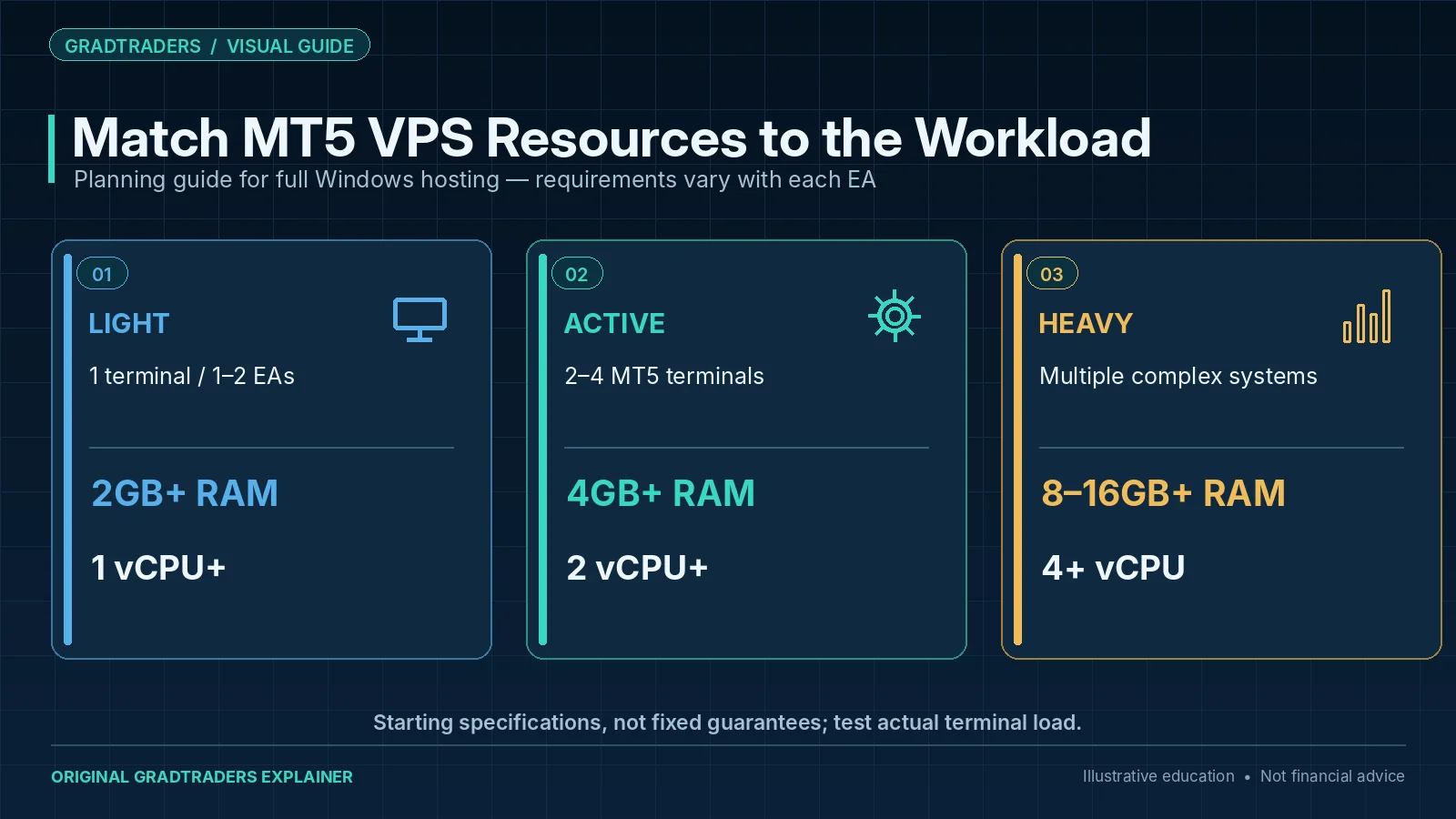
The right specification depends on the number of MT5 terminals, charts, indicators and Expert Advisors you plan to run. It is better to choose a stable setup than to force a trading system onto an underpowered server.
| Trading Setup | Recommended RAM | Recommended CPU | Best Fit |
|---|---|---|---|
| 1 MT5 terminal, 1–2 EAs | 2GB+ | 1 vCPU+ | Simple beginner automation setup. |
| 2–4 MT5 terminals | 4GB+ | 2 vCPU+ | Active EA traders running several systems. |
| Multiple terminals and complex EAs | 8GB–16GB+ | 4+ vCPU | Heavier automated trading workloads. |
VPS vs Running MT5 On Your Home Computer
Home Computer
- Cheaper if you already own the hardware.
- Simple for manual trading.
- Vulnerable to internet outages.
- Can be interrupted by updates, restarts and power cuts.
- Not ideal for always-on automated strategies.
Trading VPS
- Designed to stay online continuously.
- Can be located closer to broker infrastructure.
- Useful for Expert Advisors and algorithmic trading.
- Adds a recurring monthly cost.
- Needs monitoring and sensible security.
How To Reduce MT5 Trading Latency
One common mistake is choosing a VPS location without considering where the broker’s trading servers are located. A VPS in the wrong region may be reliable but still slower than it needs to be.
Before buying a VPS, check whether the provider offers a server location close to your broker’s infrastructure. London-based infrastructure may matter for some brokers, while New York or other financial data centres may be more relevant for others. The goal is to reduce the distance between your MT5 platform and the broker’s trading servers.
Common VPS Mistakes Traders Make
Choosing The Cheapest Option
Many generic VPS providers are cheap but not optimised for trading applications. A cheaper VPS can become expensive if poor connectivity leads to platform instability, slippage or missed trades.
Ignoring Hardware Requirements
Running multiple MT5 terminals on an underpowered VPS can cause freezing, memory problems and unreliable execution.
Ignoring Broker Location
A VPS should be chosen with broker-server location in mind. A powerful server in the wrong region may still create unnecessary latency. If you are still selecting the trading account, our MT5 broker comparison is a useful starting point before choosing a host.
Trusting Automation Too Much
A VPS can keep an EA online, but it cannot turn a poor strategy into a profitable one. Automated trading still needs testing, monitoring and risk control.
A Personal Observation
Over the years, I have met traders who lean heavily on automated systems because automation can remove some of the emotion from decision-making and help create consistency. For some traders, automation also provides practical benefits, allowing strategies to operate around work commitments or continue monitoring markets while they sleep.
That said, automation is not a shortcut to profitability. One of the fascinating aspects of trading is that there is no single path to success. Some traders rely heavily on automation, others avoid it entirely, and both approaches can work when they are built around discipline, testing and risk control.
Final Verdict
The most useful MT5 hosting decision is not “which VPS is best?” but “what does this setup actually need?” MetaTrader’s native virtual hosting can be enough for a straightforward EA or Signal workflow. A full Windows VPS makes more sense when you need additional software, several terminals or broader remote control.
If a full VPS is justified, ForexVPS is the primary GradTraders partner route and FXVM is the second option to compare. Choose the hosting layer only after the strategy, broker and workload are clear.
Source note: GradTraders compares MT5 hosting according to EA runtime needs, broker proximity, platform compatibility and the distinction between native virtual hosting and a full Windows VPS. Current platform-hosting facts were checked against MetaTrader 5’s official virtual-hosting documentation and current provider information. VPS plans, server locations, resource limits and pricing can change, so verify the provider and broker route before purchasing.
Primary checks: MetaTrader 5 virtual hosting · MetaTrader 5 Strategy Tester · ForexVPS · FXVM.
Explore GradTraders Internationally
GradTraders has 20 dedicated international gateways with local livestream times, market context and country-specific routes into the wider research site.
These country links are for site navigation only; VPS provider availability, hosting regions, broker compatibility and applicable terms must be checked separately.
Browse all 20 country gateways
Asia: Japan · South Korea · Taiwan · Hong Kong · India · Singapore · Thailand
Europe: Italy · Sweden · Switzerland · Germany · Norway
Americas: United States · Canada · Mexico
Middle East: United Arab Emirates · Saudi Arabia
Africa: South Africa
Oceania: Australia · New Zealand
Best VPS For MT5 FAQ
Do I need a VPS for MetaTrader 5?
You only really need a VPS if you run Expert Advisors, automated strategies or MT5 setups that need to stay online when your computer is off. Manual traders may not need one.
What is the best VPS for MT5?
ForexVPS.net is the strongest overall GradTraders pick for many retail MT5 traders because it is built around trading infrastructure, latency and uptime. FXVM is the second option for traders seeking a simpler setup, particularly for one MT5 terminal and lighter Expert Advisor use. The best choice still depends on broker location, budget and system requirements.
What is latency in MT5 trading?
Latency is the time it takes for information to travel between your trading platform and your broker’s servers. Lower latency can matter for scalping, fast execution and automated strategies.
Can a VPS make an Expert Advisor profitable?
No. A VPS can improve uptime and execution reliability, but it cannot make a weak trading strategy profitable. The strategy still needs testing, risk control and monitoring.
How much RAM do I need for MT5 on a VPS?
A simple one-terminal setup may work with 2GB RAM, while multiple terminals or complex Expert Advisors may need 4GB, 8GB or more depending on workload.