Global Market Radar: A Multi-Market Trading Dashboard Built For Real Trading Sessions
I have wanted a screen like this for about 20 years. What I was missing was not another chart, but a way to keep the markets I care about, session timing, price movement and activity in view without turning the trading desk into a mess of separate windows. Global Market Radar is the multi-market trading dashboard I eventually built around that need.
By Matthew Jackson Matthew JacksonFounder of GradTraders, GradTraders
A concise Global Market Radar summary covering Price Action, Participation, session timing and multi-market monitoring.
The Radar is an attention and workflow tool. It is designed to help you notice what has changed, then move to your normal chart and trading process.
Disclosure & Risk Notice: This article and the Global Market Radar are educational and informational tools, not financial advice, investment advice or trade recommendations. A VOLATILE, HIGH ACTIVITY or other status is an attention prompt, not a prediction that price will continue in the same direction.
Live prices and activity data are indicative. The current Radar uses Biquote as its live market-data provider, while market-hours, holiday and trader-alert logic are maintained separately. Broker dealing hours, spreads, liquidity and execution can differ from the underlying market context shown here.
Trading leveraged products involves substantial risk. Use the Radar as one part of a wider process that includes your own charts, risk limits and provider-specific information.
Quick Verdict: What Is Global Market Radar?
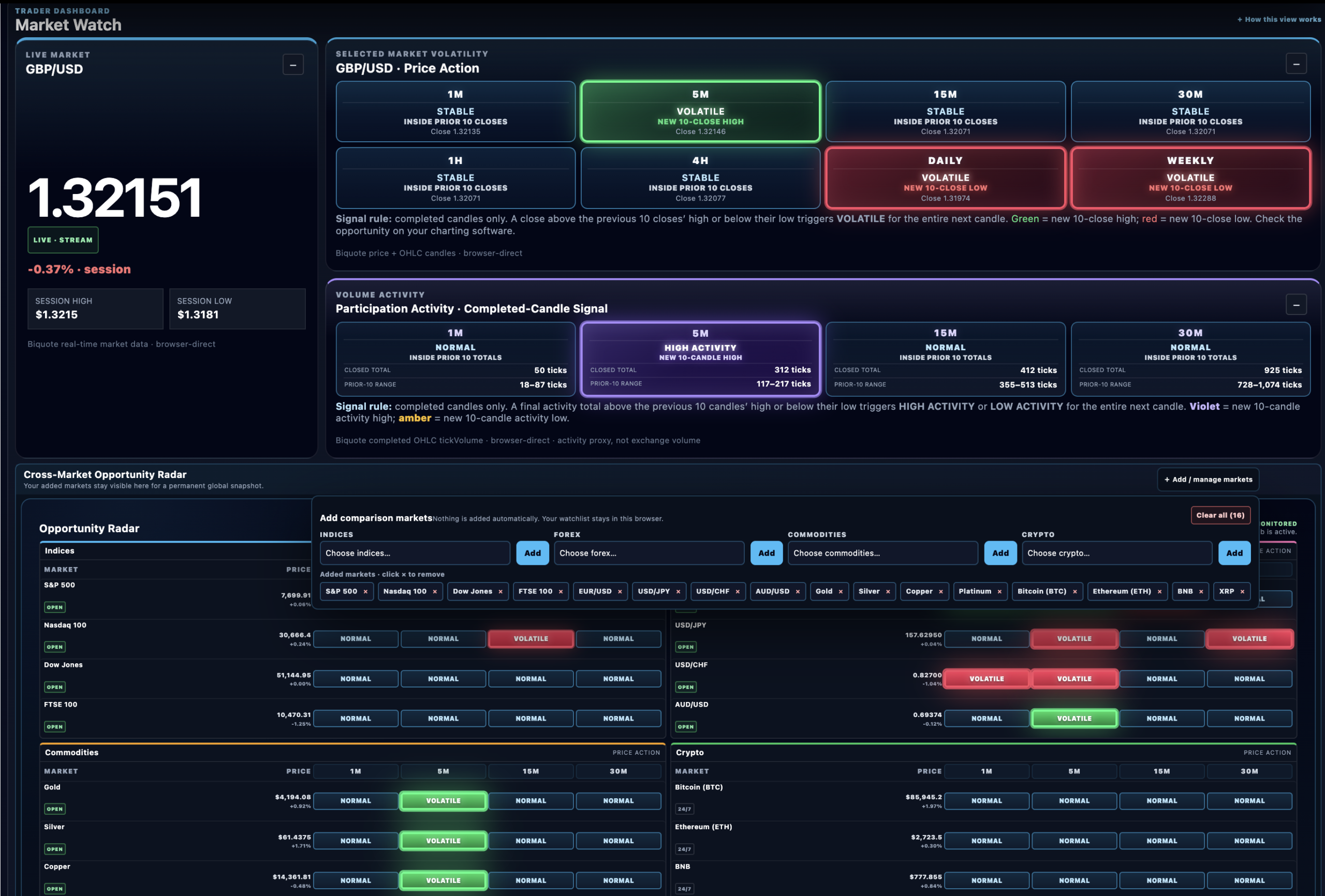
Global Market Radar is a free, desktop-first multi-market trading dashboard built to stay open during a real trading session. One selected market gets the deeper view, while a separate cross-market radar keeps the wider watchlist visible.
The current build covers 42 markets: 9 indices, 15 forex pairs, 8 commodities and 10 crypto markets. Price Action uses completed candles across eight timeframes, Participation focuses on completed 1m, 5m, 15m and 30m candles, and session context adds market hours, countdowns, holidays and alerts.
I did not build it to tell a trader what to buy or sell. I built it to answer a much more practical question: what deserves my attention now?
Why I Built The Global Market Radar
I designed Global Market Radar because I wanted signals that could support more than one style of trading without hiding the timeframe or logic behind them. I have tested a lot of global market alert systems over the years, and one frustration kept coming back: alerts could be triggered by a price point without making the relevant timeframe obvious. Even when the timeframe was stated, the maths behind the alert could still be difficult to understand.
That pushed me towards something more transparent. Price Action and Participation are tied to clearly defined completed-candle timeframes, so when the Radar changes state I can see which timeframe changed and what rule caused it. I do not want a trader reacting to a flashing label without knowing what sits underneath it.
I also wanted the design to work on a real trading desk. The Radar keeps one selected market, a customised cross-market watchlist, session timing, holidays and alerts together without making everything compete for attention. After trying many other systems, I set out to build the version I would genuinely keep open myself.
The Radar is not designed to replace the chart or act as a black-box signal service. I use it as a transparent monitoring layer that helps me decide where I need to look more closely.
How The Multi-Market Trading Dashboard Is Organised
The layout deliberately separates the market you are concentrating on from the markets you only want to keep in peripheral view. That gives the dashboard a clear hierarchy instead of making every market fight for the same space.
Selected Market
Choose the instrument you want to focus on. Its live price, session state and deeper Market Watch stay central.
Price Action
Eight timeframes show whether the latest completed close has made a strict new 10-close high or low.
Participation
Four short-term timeframes compare the latest completed activity total with the previous 10 completed candles.
Cross-Market Radar
Add the markets you care about and keep a snapshot of the world’s markets alongside the market you are focused on.
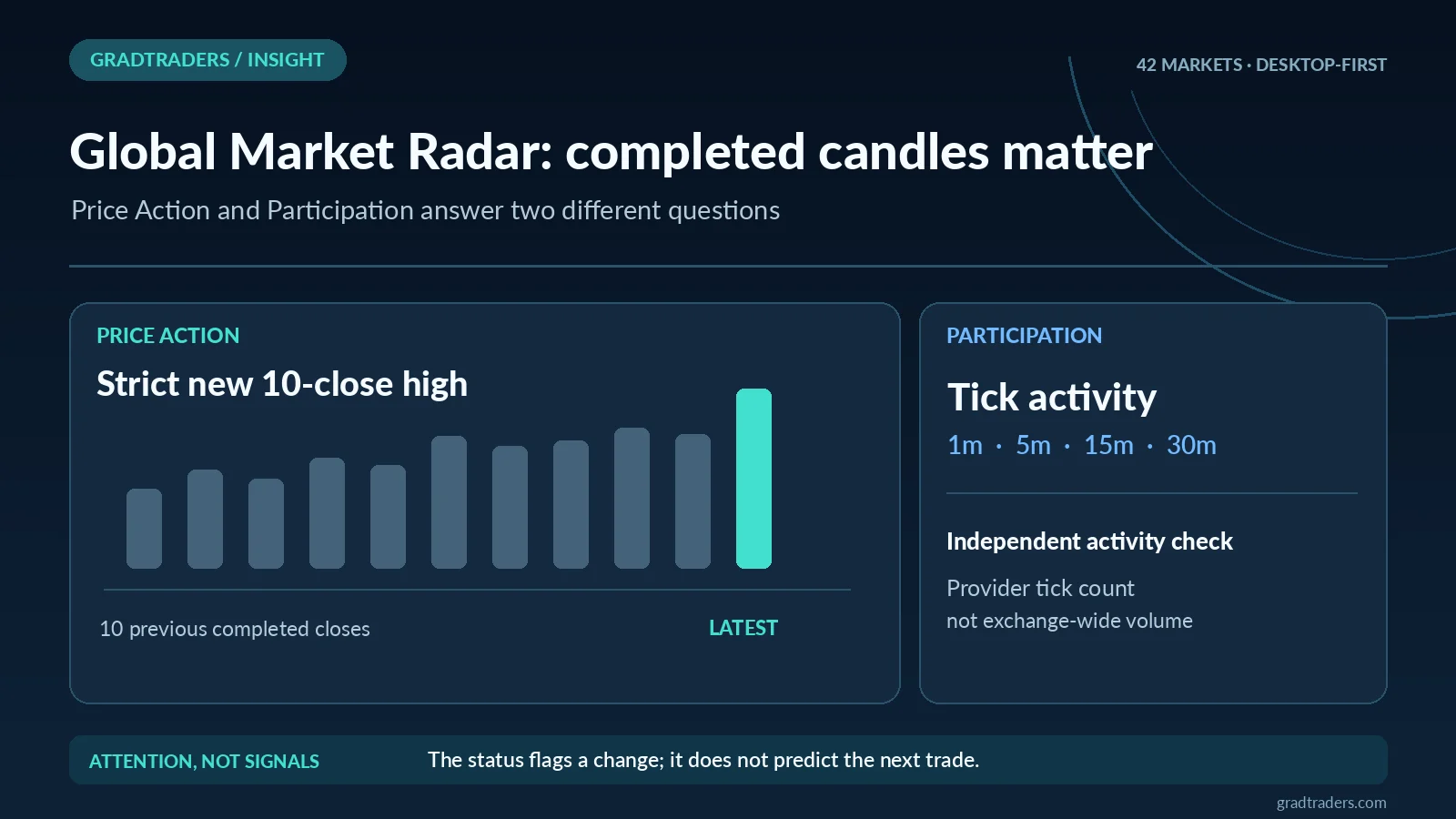
Price Action Uses Completed Candles, Not Every Intrabar Move
This is one of the parts I cared most about when building the tool. I did not want the Radar changing state every time price briefly poked above or below a level inside a candle that had not finished yet.
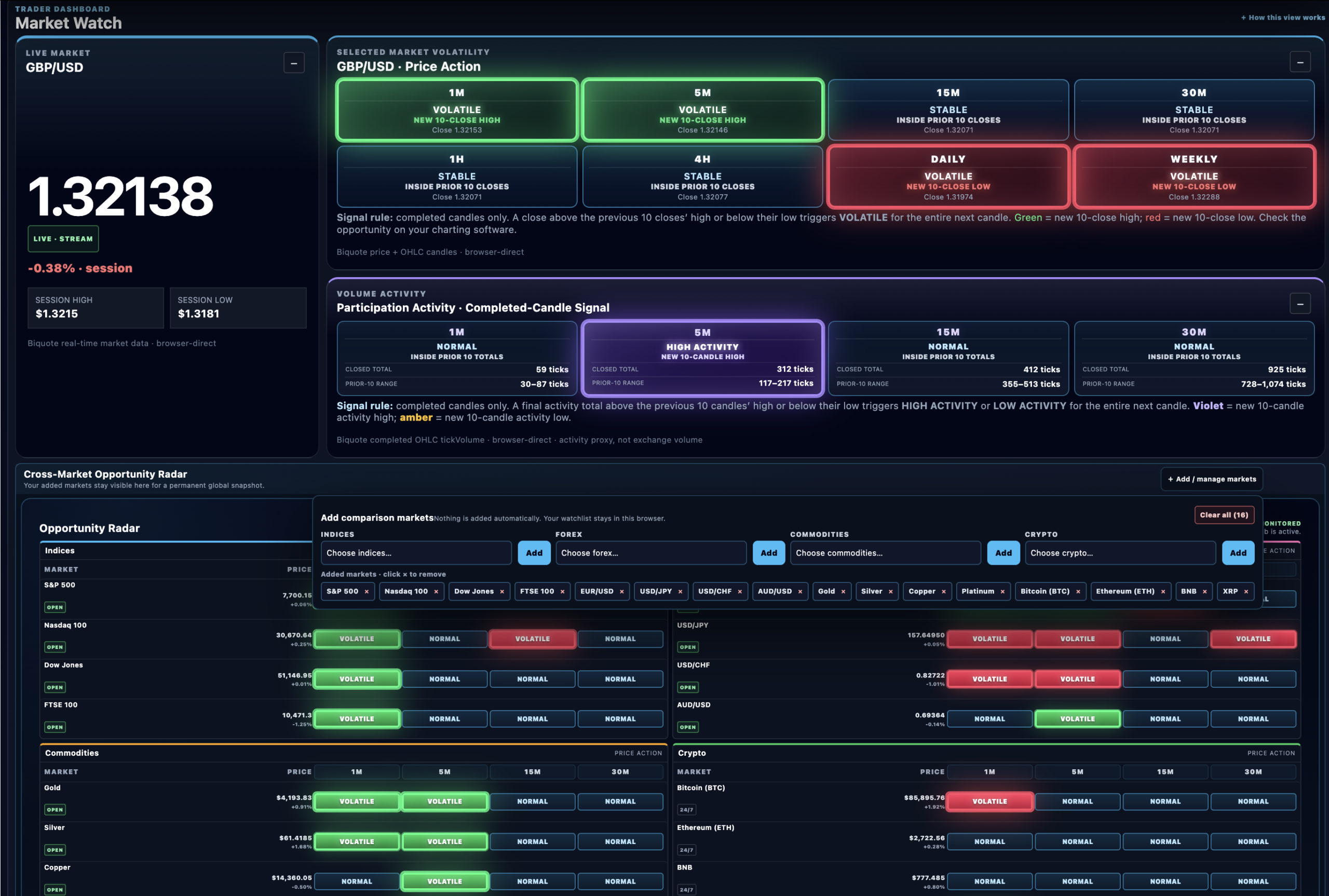
For each Price Action timeframe, the Radar takes the final closing price of the latest completed candle and compares it with the highest and lowest closes of the previous 10 completed candles. A strict new 10-close high or low changes the status to VOLATILE for the whole next candle.
Green: new 10-close high · Red: new 10-close low · STABLE: neither condition was triggered by the latest completed candle.
The timeframes are 1 minute, 5 minutes, 15 minutes, 30 minutes, 1 hour, 4 hours, Daily and Weekly. The same rule is used across them, which makes the screen much easier to scan.
VOLATILE does not mean “buy”, “sell” or “this market will keep moving”. It means the most recent completed close broke beyond the previous 10 completed closes and may deserve attention.
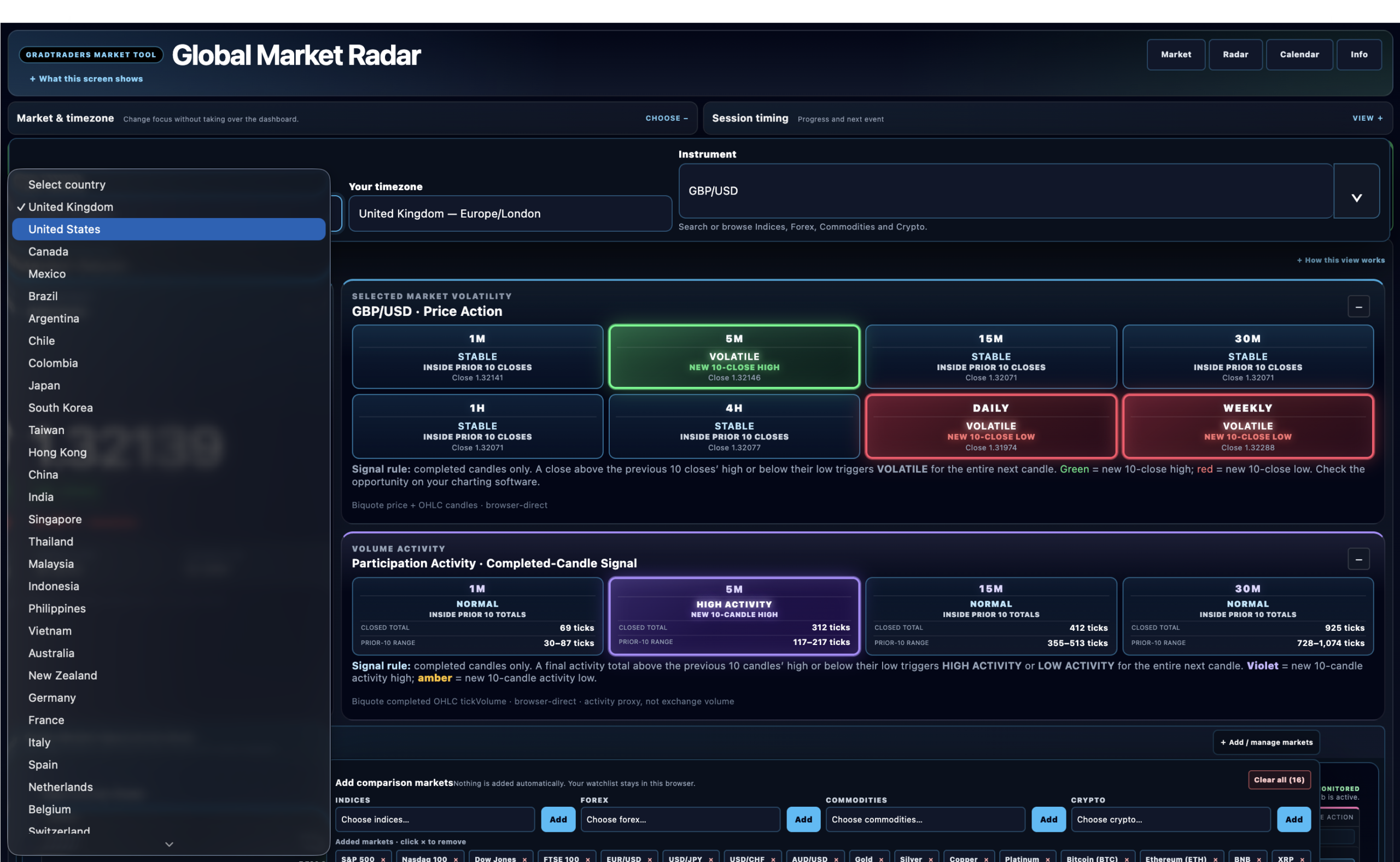
Participation Shows Whether Short-Term Activity Has Changed
Price can move sharply without the provider’s tick activity being unusually high, and tick activity can expand before the chart looks especially dramatic. I wanted that difference visible without pretending the data is something it is not.
Participation uses the final Biquote tickVolume value from the latest completed 1m, 5m, 15m or 30m candle. That completed activity total is compared with the previous 10 completed totals for the same timeframe.
Violet: strict new activity high · Amber: strict new activity low · NORMAL: neither extreme was triggered.
The important limitation is that Participation is based on the tick activity received by the Radar’s data provider. A different provider, broker or trading platform may see a different tick count because each feed reflects the activity reaching that service. Modern markets are heavily interconnected and a lot of trading is automated, so activity seen by one provider will often have some relationship with activity elsewhere, but that relationship is not guaranteed.
That is why I call it Participation rather than global volume. It is an activity proxy, not a claim to measure every trade taking place worldwide. Price Action is different: because it is based on completed price closes rather than provider-specific tick activity, price movement is generally much more closely aligned across international market feeds than tick counts are.
The combination is what interests me. If Price Action and Participation both become unusual on the same completed-candle timeframe, I treat that as stronger supporting evidence that something may be changing and worth checking on a chart. It still is not an automatic buy or sell signal.
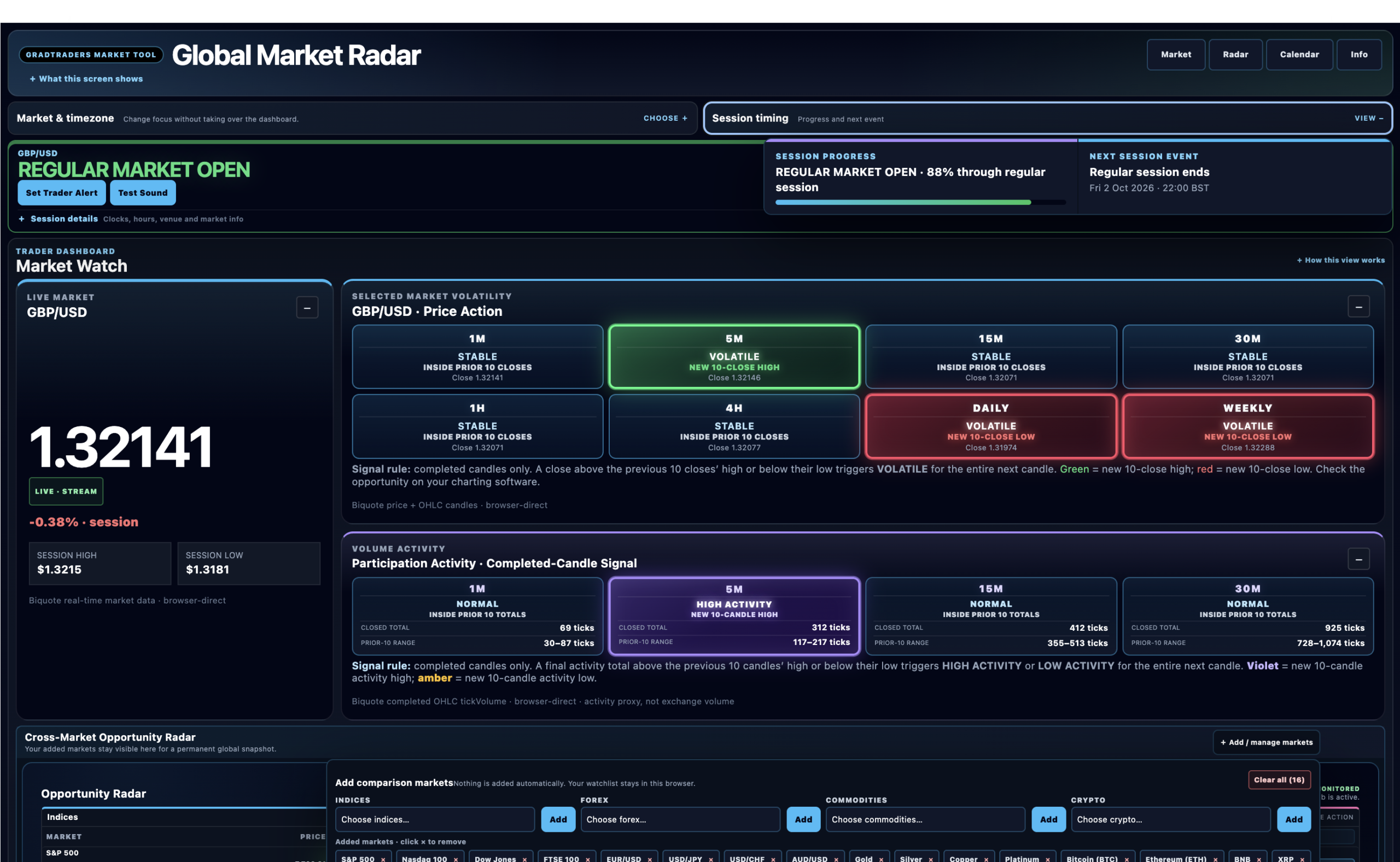
The Cross-Market Radar Keeps The Wider Session In View
This is the part that turns the page from a single-market checker into a genuine multi-market trading dashboard. You can build a comparison watchlist and keep it open while the selected instrument still gets the deeper Market Watch.
The aim is simple: keep a snapshot of the world’s markets in view while you concentrate on the market that matters most to you. The watchlist is there to add context, not to compete with the selected-market view.
This becomes especially useful when a trade lasts for hours or even days. You may have built the trade around higher-timeframe analysis or a particular news theme, but what happens elsewhere in the world can change the context quickly. A strong reaction can appear in one market before it becomes broader, or several markets can move at once and make it difficult to see where the clearest change is happening.
The Radar cannot prove that one market caused another to move, and it cannot know the meaning of breaking news before you do. What it can do is make cross-market movement easier to see, which may give you an earlier reason to reassess an open trade or investigate a market you were not watching closely.
For shorter-term traders, the same idea can sometimes surface a market worth checking sooner than you otherwise would. I would still open the chart before treating it as a scalping setup.
For example, a trader focused on the Japan 225 might still keep the S&P 500, Nasdaq 100, DAX 40, Hang Seng, USD/JPY, Gold, Bitcoin and a few other relevant markets visible. The point is not that those markets always explain one another. It is that unusual movement elsewhere is easier to notice while you are concentrating on one main market.
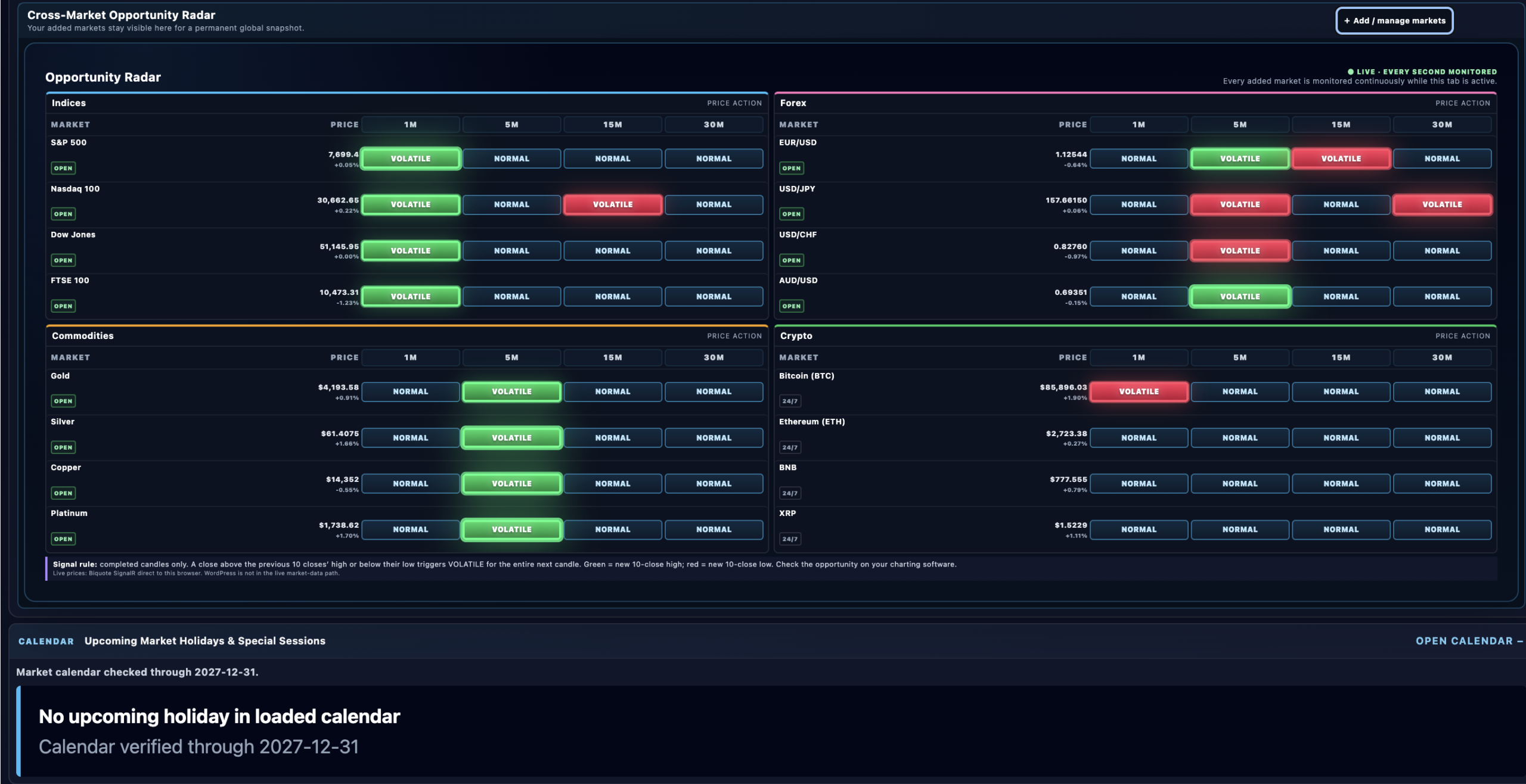
What Markets Are Covered?
Right now the Radar covers 42 instruments across four broad groups. The exact list can change as the tool develops, but the current split is:
| Market Group | Current Count | Role In The Radar |
|---|---|---|
| Indices | 9 | Major equity benchmarks including US, European and Asia-Pacific sessions. |
| Forex | 15 | Major and widely followed currency pairs across the global trading week. |
| Commodities | 8 | Key commodity markets for cross-asset context and focused monitoring. |
| Crypto | 10 | Continuous 24/7 markets kept separate from exchange-session logic where appropriate. |
The important part is not the largest possible instrument count. It is having enough coverage to build a useful personal watchlist while keeping the screen readable.
Market Hours, Holidays And Trader Alerts Sit Beside The Live Data
Aside from the market signals, this is one of the most practical parts of the Radar. If I am interested in a market, I want to know whether it is open now, when the next session event happens in my own timezone and whether an upcoming holiday or special session changes the normal schedule.
Session Context
Choose your country or timezone and the Radar shows the market state, converts the underlying schedule into local times and counts down to the next relevant session event.
Holiday Checks
Upcoming exchange holidays, special sessions and verified-through dates sit beside the regular schedule so the next unusual trading day is easier to spot.
Trader Alerts
Set a timer, alert at the next 1m, 5m, 15m or 30m candle open, or alert before the next market-session event. Repeating reminders can continue until you stop them.
It sounds simple, but when several markets are open across different parts of the world it saves a lot of separate checking. Browser notifications need permission and the page needs to remain open. The live market-data connections also pause when the tab is hidden, which avoids pointless background network activity when the Radar is not actually being viewed.
Why The Full Radar Is Desktop, Laptop And Tablet First
I could have forced the full dashboard onto a phone, but I think that would miss the point of the tool. The Radar is meant to show several layers of information at once. Shrinking all of that into a narrow mobile column would make it technically available while making the actual trading-session experience worse.
The full dashboard is therefore designed for tablet, laptop and desktop screens. Phones receive a larger-screen notice rather than a compromised version of the main interface.
In a multi-screen setup, I would give the Radar its own screen and keep the chart or execution platform beside it. That separation is deliberate: the Radar scans the wider picture, while the chart is where I do the deeper analysis.
Global Market Radar vs A Charting Platform
The Radar is not trying to replace TradingView, cTrader, MetaTrader or the charting inside a broker platform. Those tools are where you do the deeper analysis, draw levels, study structure, manage indicators or place trades.
For me, TradingView is the natural companion to the Radar. If the Radar highlights something interesting, I want to open the chart and check the move properly. That might mean looking at market structure first, then using indicators I already understand — MACD, RSI, Bollinger Bands or whatever belongs in the strategy I am actually testing.
Global Market Radar sits one step earlier in the workflow. Its job is to help me decide which market is worth opening up and analysing properly. The chart then has to confirm or challenge that first impression.
| Tool | Main Job | Best Moment To Use It |
|---|---|---|
| Global Market Radar | Multi-market monitoring, completed-candle attention prompts, activity context and session timing. | Keep it open while deciding which markets deserve a closer look. |
| Charting Platform | Detailed chart analysis, indicators, drawings, layouts and strategy work. | Open or refocus it after the Radar points you toward something worth analysing. |
| Broker / Execution Platform | Orders, positions, account controls and provider-specific dealing conditions. | Only when your own trading plan gives you a reason to act. |
How I Would Use The Radar During A Trading Session
I would keep the process simple. Keep the Radar open on one screen, let it narrow your attention, then move to the chart when something deserves a proper look. If the dashboard becomes another thing to constantly fiddle with, it is doing the opposite of what I built it for.
1. Pick The Main Market
Load the instrument you are actually trading or researching so its session context and deeper Market Watch stay central.
2. Build A Relevant Watchlist
Add the handful of indices, currencies, commodities or crypto markets that genuinely help you understand the session.
3. Leave It Alone
Let the completed-candle logic do its job. There is no need to react to every tick or constantly change the watchlist.
4. Investigate, Do Not Chase
If Price Action or Participation changes, move to your normal chart and work out whether the change matters to your setup.
5. Recheck Open Trades
If you are already in a trade for hours or days, use changes elsewhere as a reason to reassess the wider context rather than assuming the original setup is unchanged.
6. Use Session Context
Keep openings, closings, breaks and scheduled events in mind so a market-state change is not viewed without timing context.
If Price Action and Participation are both unusual on the same completed-candle timeframe, that gives me more reason to investigate, but it still does not turn the Radar into an entry signal. The chart has to do the next piece of work.
If you are new to that process, use a demo account and give yourself time to learn how the signals behave alongside your own chart setup. The Radar can provide supporting evidence; it cannot supply the experience, discipline or risk management that a trading strategy still needs.
What The Radar Does Not Tell You
A dashboard can become misleading if the labels start to feel more certain than they are. I have deliberately kept the wording descriptive.
- VOLATILE does not mean price will continue moving.
- STABLE does not mean a market is safe or low risk.
- HIGH ACTIVITY is not automatically bullish or bearish.
- LOW ACTIVITY does not mean nothing can happen next.
- Live indicative data is not the same thing as your broker’s executable price.
- Session context does not guarantee your broker offers the same dealing hours.
The Radar is there to improve attention, not replace judgement.
What Makes The Design Different?
My experience shaped the design. Some alert systems I tried were useful, others were not, and quite a few looked better in a quick demo than they felt during a real trading session. So I started from the workflow rather than from a list of widgets.
I think the Radar succeeds in design because it lets you customise a substantial group of markets on one screen while still keeping a clear hierarchy. Market Watch gets the main space, the cross-market view supports it rather than competing with it, temporary controls can collapse, and the full dashboard is allowed to use a proper screen instead of being squeezed into a phone layout.
For a trader using several screens, that can make the Radar a useful permanent part of the desk rather than another page you open once and forget. None of that guarantees better trading, but it does make the tool easier to live with for several hours at a time, which was the point of building it in the first place.
Final Verdict: The Radar Should Tell You Where To Look, Not What To Trade
I set out to build a multi-market trading dashboard that was a better fit for the way I actually trade than the global alert systems I had tested: clearly stated timeframes, visible completed-candle logic, a cross-market view and enough session context to stay useful throughout the trading day. I believe Global Market Radar now succeeds at that job.
Its value is not that every alert becomes a trade. It is that an unusual price move, a change in Participation, a reaction in another market or a session event can give you a reason to look again. Sometimes that may mean checking a potential short-term opportunity. Sometimes it may mean reassessing the risk around a trade you already have open.
That is why I see it as a companion to the chart rather than a replacement for one. The Radar narrows the field; TradingView or your preferred charting platform, your trading plan and your risk rules still do the serious decision-making.
Use the Radar to decide where to look. Use your chart, plan and risk rules to decide what — if anything — to do.
Source note: This guide was prepared from the live GradTraders Global Market Radar and the current v0.69.5 source package checked on 2 October 2026. The build covers 42 instruments across indices, forex, commodities and crypto. Price Action and Participation logic, Biquote live-data architecture, Cross-Market Radar behaviour, phone gate and session/alert behaviour were checked against that build.
GradTraders research: Global Market Radar · TradingView Review · How To Start Trading.
Market schedules, holiday calendars, live-data availability and tool coverage can change. The live Radar displays current market information and source links where applicable; always check your broker or venue for executable prices and provider-specific dealing hours.
Explore GradTraders Internationally
GradTraders has 20 dedicated international gateways with local livestream times, market context and country-specific routes into the wider research site.
These country links are for site navigation only; market access, broker services and trading permissions depend on the provider and jurisdiction.
Browse all 20 country gateways
Asia: Japan · South Korea · Taiwan · Hong Kong · India · Singapore · Thailand
Europe: Italy · Sweden · Switzerland · Germany · Norway
Americas: United States · Canada · Mexico
Middle East: United Arab Emirates · Saudi Arabia
Africa: South Africa
Oceania: Australia · New Zealand
Global Market Radar FAQ
What is the GradTraders Global Market Radar?
Global Market Radar is a free multi-market trading dashboard for monitoring a selected market alongside a user-built cross-market watchlist. It combines indicative live prices, completed-candle Price Action, Participation Activity, session timing, market holidays and trader alerts.
How many markets does Global Market Radar cover?
The current Radar covers 42 markets: 9 indices, 15 forex pairs, 8 commodities and 10 crypto markets. That coverage can change as the tool develops, so the live Radar is the current source of truth.
How does Price Action work?
Price Action uses completed candles only. The latest completed close is compared with the highest and lowest closes of the previous 10 completed candles. A strict new 10-close high or low triggers VOLATILE for the entire next candle on that timeframe.
How does Participation Activity work?
Participation compares the final Biquote tickVolume activity total of the latest completed 1m, 5m, 15m or 30m candle with the previous 10 completed totals for the same timeframe. A strict new high shows HIGH ACTIVITY, a strict new low shows LOW ACTIVITY and other readings remain NORMAL. The tick count reflects activity received by the Radar’s provider and can differ from another broker or data feed, so it is an activity proxy rather than centralized global volume.
Does VOLATILE mean I should enter a trade?
No. VOLATILE is an attention prompt showing that the latest completed close made a strict new 10-close high or low. It is not a buy signal, sell signal or prediction of what the next candle will do.
Can I customise the Cross-Market Radar?
Yes. You can build the watchlist around the markets that matter to you while keeping one selected market as the deeper focus. The aim is to keep a useful snapshot of the world’s markets in view without losing sight of the market you are analysing most closely.
Can I use Global Market Radar on a phone?
The full dashboard is intentionally designed for tablet, laptop and desktop screens. Phones receive a larger-screen notice because compressing the complete multi-market layout into a narrow phone view would compromise the main use case.
Does Global Market Radar replace TradingView or my broker platform?
No. The Radar is a monitoring and attention layer. When it highlights something interesting, use TradingView or another charting platform to check the move with the structure and indicators you already understand, then use your broker or execution platform for account-specific prices, orders and positions.