EA Builder Pro Review 2026: Is This No-Code EA Builder Worth Using?
EA Builder Pro offers a route from written MetaTrader rules to an Expert Advisor without starting in MQL. I would judge it by whether a trader can define entry, exit, position-sizing and failure conditions before using the builder: no-code construction can shorten development, but it cannot supply the missing strategy or validate live performance.
 , GradTraders
Live trading on YouTube
, GradTraders
Live trading on YouTubeOfficial product information confirms templates, an AI Agent, indicators, money-management tools, cloud backtesting and MetaTrader export. Published product features are not evidence of strategy profitability or independently measured live execution.
Disclosure & Risk Notice: This article is for educational and informational purposes only and is not financial, investment, tax or personal advice. Trading CFDs, spread betting, forex, futures, crypto CFDs and other leveraged products involves significant risk and may not be suitable for all traders. Automated trading can magnify errors when strategy logic, testing, monitoring or risk controls are weak. Some links are commercial partner links; GradTraders may earn a commission from eligible purchases at no additional cost to you. Commercial relationships do not determine the editorial conclusion.
Current partner offers and important offer changes are maintained on GradTraders Exclusive Discounts & Updates.
Quick Verdict
EA Builder Pro is useful when the strategy rules already exist and the coding does not. The platform is designed to turn rules into MetaTrader 4 or MetaTrader 5 Expert Advisors without requiring the trader to write MQL code manually.
Its current official workflow includes templates, an AI Agent, standard or custom indicators, trading conditions, money-management settings, cloud backtesting and export to MetaTrader. None of that proves a strategy has an edge: the quality of the rules, test data, risk model and monitoring still matters more than the builder.
My assessment separates documented EA-building and export features from the harder question of whether a strategy remains sound under realistic costs, data and risk controls. The product documentation does not establish live-account outcomes.
EA Builder Pro Rating
This rating is based on where EA Builder Pro fits in a practical trading software stack. It scores well as a no-code automation builder, but automated trading still depends heavily on strategy quality, testing discipline and risk control.
| Category | Rating | GradTraders View |
|---|---|---|
| No-Code Workflow | 9/10 | Strong for traders who want to build EA logic without writing MQL4 or MQL5 manually. |
| MT4 / MT5 Support | 9/10 | Useful because MetaTrader remains one of the main platforms for Expert Advisor trading. |
| Backtesting | 8/10 | Cloud backtesting is useful, but traders still need to understand test quality, market data and overfitting. |
| Risk Controls | 8/10 | Money management settings are important, but traders must avoid reckless lot sizing and automation abuse. |
| Beginner Suitability | 7/10 | Accessible interface, but beginners can easily automate weak strategies before they understand the risks. |
| Overall Rating | 8.4/10 | A strong no-code EA builder for structured traders, not a magic robot generator. |
What Is EA Builder Pro?
EA Builder Pro is a web-based no-code builder for creating Expert Advisors for MetaTrader 4 and MetaTrader 5. Traders can start from an empty build, a template or the current AI Agent, then define indicators, conditions and money-management rules before backtesting or exporting the EA.
The useful distinction is between building automation and proving a strategy. EA Builder Pro can make the first job faster. It cannot do the second job for you.
How EA Builder Pro Works
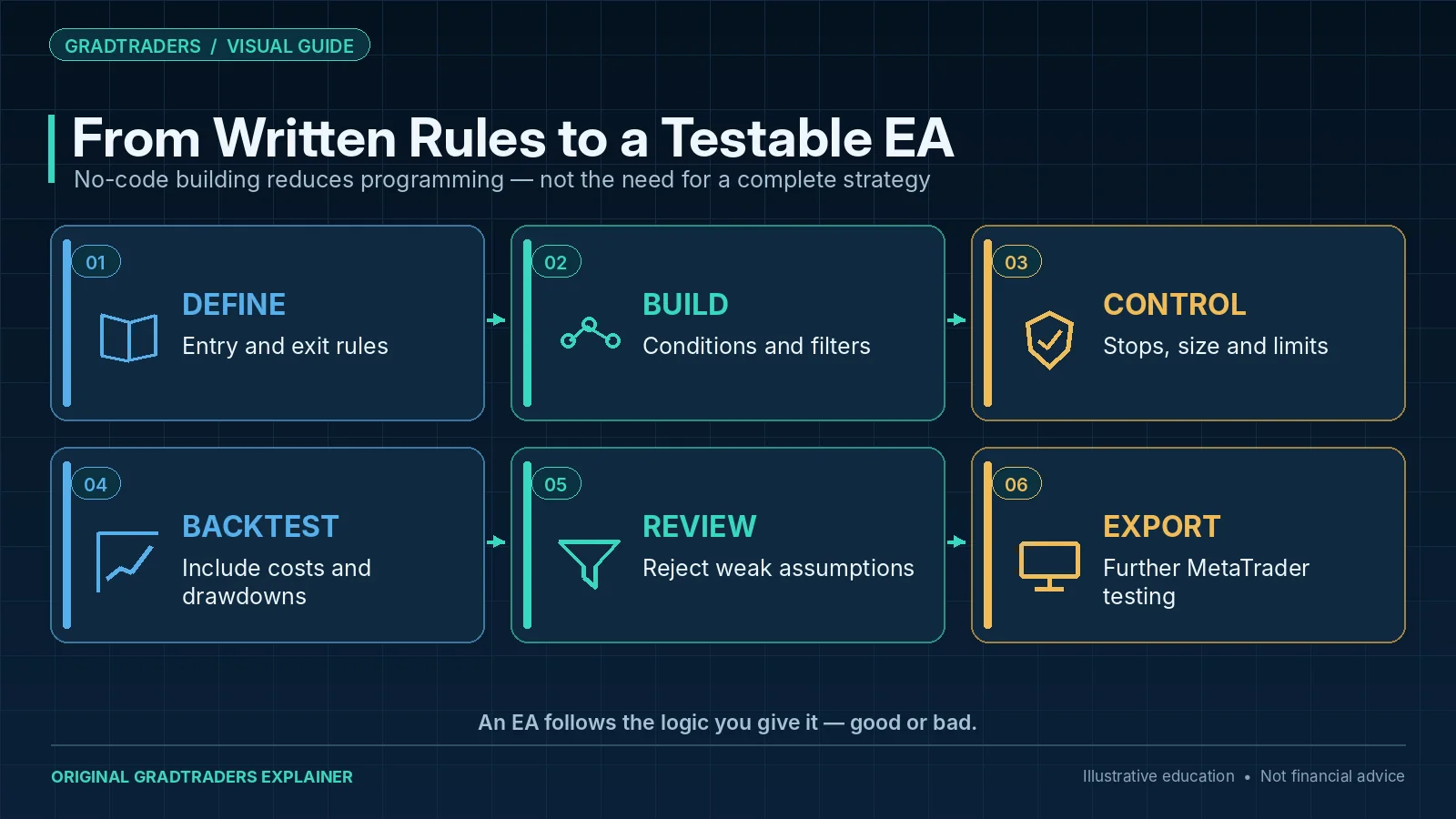
The current workflow moves from strategy description to testable EA without a traditional coding project. Traders choose MT4 or MT5, start from a blank build, template or AI Agent, add indicators and conditions, configure trade/risk logic, run a backtest and then export when the rules are ready.
1. Choose The Starting Point
Start empty, use a template or describe the idea to the AI Agent.
2. Define Indicators
Use supported MetaTrader indicators or compatible custom indicators as inputs.
3. Build Conditions
Create the rules that determine when the EA should enter, exit or manage a trade.
4. Add Management Logic
Set stop, target, timing and other trade-management conditions.
5. Configure Risk
Define money-management rules carefully rather than letting automation hide excessive position sizing.
6. Backtest And Export
Use the built-in backtester, then export to MetaTrader when the strategy is ready for further testing.
Key Features
No-Code EA Creation
Traders can build rule-based strategies without writing MetaTrader code manually.
MT4 And MT5 Support
The tool is built around MetaTrader 4 and MetaTrader 5, which remain widely used for Expert Advisors.
Custom Indicators
Traders can use built-in indicators and, depending on the plan and file type, custom indicator inputs.
Cloud Backtesting
Backtests can be run from the browser, helping traders test ideas before exporting them.
MetaTrader Export
When ready, traders can export the EA for use inside MetaTrader on their computer or VPS.
Web-Based Access
The platform runs in the browser, so the building process is not tied to one installed desktop application.
EA Builder Pro Pricing: Free vs Pro
EA Builder Pro currently lists a Free plan and a Pro plan. The free route is useful for learning the builder and testing whether the workflow suits you, while Pro removes major usage limits for traders building and testing more seriously.
| Plan | Best For | Current Official Positioning |
|---|---|---|
| Free | Trying the builder and learning the workflow. | Subject to limits such as EA count, daily exports and daily cloud backtests. |
| Pro | More serious EA building and testing. | The current pricing page advertises unlimited EAs, exports and backtesting, plus additional unlocked features. |
Prices and plan limits can change. Check EA Builder Pro directly before subscribing.
Do Not Treat EA Builders As Money Machines
The biggest danger with no-code automation tools is psychological. A trader can start believing that if a strategy is automated, it is somehow more professional or more likely to work. That is not true.
An Expert Advisor only follows rules. If the rules are weak, overfit, poorly tested or dangerous, the EA can execute bad decisions faster and more consistently than a human trader. That is why risk settings, demo testing, forward testing and realistic expectations matter so much.
Who Is EA Builder Pro Best For?
EA Builder Pro makes the most sense for traders who already think in rules. If your strategy depends on clear conditions, defined entries, exits, stop rules and money management, a no-code EA builder can help you test whether that logic can be automated.
Manual Traders With Rules
If your process is already structured, EA Builder Pro can help turn that logic into something testable.
MT4 / MT5 Users
The tool is most relevant to traders who already use MetaTrader or trade with brokers that support it.
Strategy Testers
Traders who want to test repeatable ideas may benefit from building small EAs and reviewing the results.
Prop Firm Traders
Some prop firm traders may use EAs for execution discipline, but only where automation is allowed by the firm rules.
VPS Users
Automated strategies often need a stable always-on environment, especially if the trader does not want to run a home computer all day.
Non-Coders
Traders who understand their strategy but do not want to learn programming may find this type of builder useful.
EA Builder Pro Pros And Cons
Pros
- No-code workflow for building MetaTrader Expert Advisors.
- Supports both MT4 and MT5.
- Useful for traders who already have clear strategy rules.
- Templates and AI-assisted creation can speed up early builds.
- Cloud backtesting helps test ideas before export.
- Web-based access means no dedicated builder software installation is needed.
- Free plan can be used to explore the tool before paying.
Cons
- No builder can make a weak strategy profitable.
- Beginners may automate too early before understanding risk.
- Backtest results can be misleading if traders overfit settings.
- MetaTrader setup and export may still feel technical for some users.
- Automated systems need monitoring, especially during volatile markets.
- Paid plan limits and pricing should be checked before subscribing.
EA Builder Pro vs Hiring A Programmer
One of the main alternatives to using EA Builder Pro is hiring a programmer to code a custom Expert Advisor. That can make sense if your logic is complex, highly specific or needs advanced custom functionality.
A no-code builder is usually better for traders who want to experiment quickly, test simple to moderately complex ideas or learn how automated trading logic fits together. A programmer may be better if the strategy requires complex custom rules, integration work or professional code review.
| Route | Best For | GradTraders View |
|---|---|---|
| EA Builder Pro | Testing rule-based ideas quickly without coding. | Good starting point for structured traders who want control over the build process. |
| Hiring A Programmer | Complex, custom or production-level automation projects. | Potentially better for advanced strategies, but usually more expensive and slower. |
| Manual Trading Only | Discretionary traders who rely heavily on context, judgement and live decision-making. | Still the right route for many traders; not every strategy should be automated. |
Does EA Builder Pro Work For Prop Firm Traders?
EA Builder Pro may be useful for some prop firm traders, but this depends entirely on the firm’s rules. Some firms allow Expert Advisors, some restrict certain types of automation, and some ban copy trading, latency arbitrage, high-frequency behaviour or shared strategies.
Before using any EA on a prop firm account, traders should check the exact rules around automation, trade copying, third-party bots, news trading, maximum risk and prohibited strategies. Passing a challenge with a rule-breaking EA can still lead to account denial or payout problems.
Partner Broker Options For EA Automation
EA Builder Pro can create the Expert Advisor, but the broker account and MetaTrader setup determine where that EA can actually run. For traders specifically looking for an MT4 or MT5 route for automation, two GradTraders commercial partners are especially relevant to compare.
IC Markets — 9.2/10 GradTraders Rating
IC Markets is the higher-scoring of the two and remains the GradTraders active-trader benchmark. Its platform range includes MT4 and MT5, making it a relevant route for Expert Advisors exported from EA Builder Pro. The score also benefits from direct GradTraders trading and withdrawal evidence.
Check the exact legal entity, leverage, account protections and automation terms that apply before opening or funding an account.
FP Markets — 9.0/10 GradTraders Rating
FP Markets is another broker rated 9.0/10 by GradTraders, with MT4 and MT5 support. Its current MT5 material explicitly supports algorithmic trading and Expert Advisors, while its published FAQ permits EA trading subject to account-activity limits.
Platform, entity, pricing and protection can vary by route, so confirm the exact account available in your jurisdiction.
Commercial note: IC Markets and FP Markets are commercial partners of GradTraders. If you later open an eligible account through a partner route shown in those reviews, GradTraders may earn commission at no additional cost to you. The 9.2/10 and 9.0/10 scores are editorial ratings and are not determined by those partnerships.
EA Builder Pro And VPS Hosting
After export, an EA still needs an active MetaTrader environment to keep monitoring and managing trades. That can be a local computer, MetaTrader’s own hosted environment where suitable, or a full Windows VPS when the trader needs broader remote control or additional software.
A VPS solves an infrastructure problem, not a strategy problem. It can improve uptime and remote access, but it cannot turn weak rules into a strong automated system.
Final Verdict
EA Builder Pro solves a specific problem well: it makes MetaTrader automation accessible to traders who can describe their rules but do not want to build the entire project in MQL.
The strongest use case is a trader who already has a structured idea, wants to test it repeatedly and is prepared to inspect the resulting EA rather than treating the AI Agent or no-code interface as a profit generator.
The decision rule is simple: automate only what you can explain, test and risk-control manually.
Source note: GradTraders evaluates EA Builder Pro by its rule-building workflow, testing provisions and export fit, keeping this independent assessment distinct from official product details checked against its official site, pricing page and documentation on 8 September 2026, including MT4/MT5 support, templates, AI Agent, cloud backtesting and current Free/Pro positioning. The broker-automation section was added on 20 September 2026 using the current GradTraders IC Markets and FP Markets reviews together with current FP Markets MT5 and EA-trading documentation.
Useful checks: Best VPS For MT5 · Forex Tester Review · TraderSync Review · Software & Tools Map.
Explore GradTraders Internationally
GradTraders has 20 dedicated international gateways with local livestream times, market context and country-specific routes into the wider research site.
These country links are for site navigation only; trading software availability, broker connections, account eligibility and applicable terms must be checked separately.
Browse all 20 country gateways
Asia: Japan · South Korea · Taiwan · Hong Kong · India · Singapore · Thailand
Europe: Italy · Sweden · Switzerland · Germany · Norway
Americas: United States · Canada · Mexico
Middle East: United Arab Emirates · Saudi Arabia
Africa: South Africa
Oceania: Australia · New Zealand
EA Builder Pro Review FAQ
What is EA Builder Pro?
EA Builder Pro is a no-code Expert Advisor builder for MetaTrader 4 and MetaTrader 5. It lets traders create rule-based trading robots without writing MQL code manually.
Is EA Builder Pro free?
EA Builder Pro offers a free plan that can be used to start building and testing EAs. Paid plans unlock higher limits and additional features. Always check current pricing and limits directly before subscribing.
Does EA Builder Pro work with MT4 and MT5?
Yes. EA Builder Pro is designed for MetaTrader 4 and MetaTrader 5 Expert Advisor creation and export.
Do I need coding skills to use EA Builder Pro?
No coding skills are required for the core workflow. Traders define indicators, conditions, signals, modules and money management settings through the builder.
Can EA Builder Pro make a profitable trading robot?
EA Builder Pro can help build and test an Expert Advisor, but it cannot guarantee profitability. Results depend on the strategy logic, market conditions, data quality, risk settings and live execution.
Should beginners use EA Builder Pro?
Beginners can explore it carefully, but they should not automate real-money trading before understanding risk, position sizing, backtesting limits and MetaTrader execution.