Forex Tester Review 2026: Is It Worth It For Backtesting?
Forex Tester is designed for repeated strategy practice on historical market data, but I would judge it by the quality of the trading process it helps a trader record. The important distinction is whether the trader needs a dedicated testing environment, rather than occasional chart replay, and whether its online or desktop workflow matches the way they actually practise.
 , GradTraders
Live trading on YouTube
, GradTraders
Live trading on YouTubeA concise summary of Forex Tester, structured backtesting, market replay and where alternatives such as TradingView, TraderSync and EA Builder Pro fit.
My assessment separates Forex Tester’s browser-based Online workflow from the separate desktop simulator, then considers where each fits relative to TradingView replay. Published product information describes capabilities; it cannot prove an individual trader’s future results.
Disclosure & Risk Notice: This article is for educational and informational purposes only and is not financial, investment, tax or personal advice. Trading CFDs, spread betting, forex, futures, crypto CFDs and other leveraged products involves significant risk and may not be suitable for all traders. Trading software, simulations, journals, automation and hosting can improve workflow or review quality, but they do not remove trading risk or guarantee profitable results. Some links are commercial partner links; GradTraders may earn a commission from eligible purchases at no additional cost to you. Commercial relationships do not determine the editorial conclusion.
Current partner offers and important offer changes are maintained on GradTraders Exclusive Discounts & Updates.
Quick Verdict
Forex Tester is most useful for traders who want deliberate practice rather than more chart time. It lets you replay historical markets, test entries and exits, record results and examine whether a strategy behaves consistently across different conditions.
It is not essential for every beginner. If you do not yet understand order types, risk or basic trading terminology, education and paper trading may be more valuable first. Once you have a defined idea to test, dedicated backtesting can become more useful.
The decision rule is simple: buy backtesting software only if you will use it to test written rules and review the results honestly.
My Forex Tester Rating
The existing 8.5/10 GradTraders rating is retained as an editorial score from the supplied review. It reflects the tool’s role in backtesting and deliberate practice, not a promise of trading performance.
| Category | Rating | GradTraders View |
|---|---|---|
| Backtesting Workflow | 9/10 | Strong for structured manual testing and replay practice. |
| Ease of Use | 8/10 | Specialised, but the Online product makes access simpler than the traditional desktop-only route. |
| Historical Data | 8/10 | Useful coverage; the current Online and Desktop products handle data access differently. |
| Beginner Suitability | 7/10 | Better once the trader understands the basics and has a setup to test. |
| Value For Money | 8/10 | Potentially useful when it replaces unstructured trial-and-error with regular testing. |
| Overall Rating | 8.5/10 | A strong specialist backtesting route for traders who will use it consistently. |
What Is Forex Tester?
Forex Tester is backtesting software that lets traders replay historical market data as though it were unfolding live. The purpose is to practise a defined strategy repeatedly without waiting for the next real-time setup.
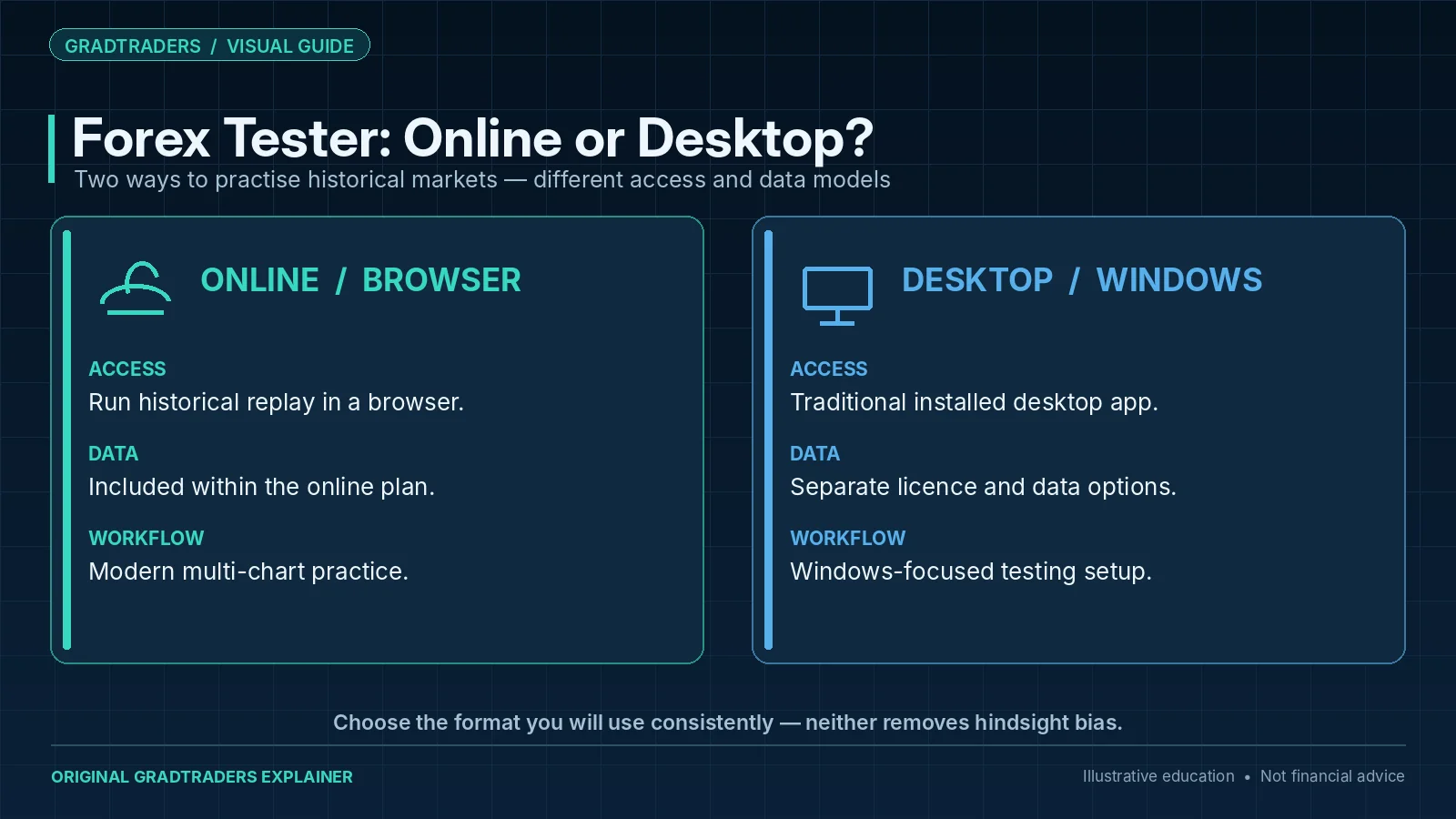
The current product family now has two distinct routes. Forex Tester Online runs in the browser and the official site says it works across Windows, macOS, Linux and mobile browsers. Forex Tester Desktop remains the traditional Windows-based application.
Forex Tester Online vs Desktop
| Version | Best Fit | Current Product Difference | GradTraders View |
|---|---|---|---|
| Forex Tester Online | Traders wanting browser-based access and a modern workflow. | Runs in the browser, includes historical data within the online plan and supports multi-chart backtesting. | The cleaner starting route for many new users. |
| Forex Tester Desktop | Windows users who prefer the long-established desktop application. | Uses a separate desktop licence and data-package structure. | Still relevant for traders who prefer the traditional application workflow. |
Key Forex Tester Features
The current Online product includes tick-level historical data, synchronised multi-chart workspaces, indicators, a trading journal and data export. The official site also lists automation and imported-trade analysis on higher-tier routes. Exact plan limits and included markets can change.
Historical Market Replay
Move through historical markets without seeing the future path, which makes the practice more useful than simply looking back at a completed chart.
Multi-Chart Testing
Use synchronised charts and timeframes to test how a setup behaves with broader market context.
Trading Journal
Record notes, screenshots and trade context so the backtest produces evidence rather than only a final profit figure.
Indicators & Tools
Apply technical tools as part of the same test instead of rebuilding the setup manually for each example.
Simulated Execution
Practise entries, exits, stops and trade management without live financial risk.
Data Export & Review
Export or analyse results so the strategy can be reviewed outside a single replay session.
Forex Tester Pricing And Data
Forex Tester pricing changes with plan, billing period and promotion, so this review does not hard-code a headline price. The important structural difference is that the current Online product includes its historical data within the subscription, while the Desktop route separates the software licence from Basic or Super Data options.
Forex Tester currently advertises a free Online demo and a 30-day money-back guarantee on the Online product. The Desktop product separately lists free Basic Data and paid Super Data routes. Taxes can apply according to the buyer’s country.
Check the current product page immediately before purchase because symbols, data depth, plan limits and promotional pricing can change.
Where Forex Tester Fits In The Trading Software Stack
Strategy Testing
Test whether written entry, exit and risk rules behave consistently across different market periods.
Trade Practice
Replay price action and practise execution without turning a live or paid challenge into the classroom.
Process Review
Record outcomes and look for drawdowns, rule breaks and conditions where the strategy becomes weaker.
Who Is Forex Tester Best For?
Manual Strategy Traders
Useful when a discretionary setup is clear enough to define and repeat across historical periods.
Developing Traders
Useful after the basic mechanics are understood and the next problem is lack of structured practice.
Prop Firm Traders
Useful for rehearsing personal loss limits, trade frequency and challenge-style rules before paying for an evaluation.
Strategy Builders
Useful for discovering whether an idea survives more than one favourable market example.
Risk-Focused Traders
Useful for seeing losing streaks and drawdowns before increasing real-money exposure.
Replay Learners
Useful for traders who learn by making decisions rather than only reading completed charts.
Forex Tester vs TradingView, TraderSync & EA Builder Pro
TradingView remains the broader charting and analysis platform. Forex Tester is the more specialised backtesting environment. If you only need occasional visual replay, TradingView may be enough; if testing itself is the main job, dedicated software can justify the extra layer.
Two other GradTraders software partners are also relevant comparisons. TraderSync combines trading-journal and performance-analysis tools with market replay and backtesting, so it overlaps more directly with Forex Tester’s practice-and-review workflow. EA Builder Pro approaches testing from the automation side, allowing traders to build and backtest rule-based strategies before using them with MT4 or MT5. In simple terms, Forex Tester is the dedicated replay/backtesting specialist, TraderSync combines replay with journaling and analytics, TradingView is charting-first with replay tools, and EA Builder Pro is automation-first.
Forex Tester For Prop Firm Preparation
Prop-firm evaluations add rules around daily loss, total drawdown, consistency and trading conduct. Backtesting can help a trader see whether a strategy naturally fits those boundaries before the evaluation fee is paid.
That is preparation, not a pass guarantee. The live rulebook still controls the programme and may change.
Forex Tester Pros And Cons
Pros
- Dedicated backtesting and simulation environment.
- Online browser route alongside the traditional Windows desktop product.
- Can make practice more structured than random chart scrolling.
- Supports trade journaling and review inside the current Online workflow.
- Useful for testing discipline before live trading or paid evaluations.
Cons
- Does not turn poor strategy logic into an edge.
- Can encourage overfitting if the trader keeps changing rules after seeing outcomes.
- Paid plans may be unnecessary for casual traders.
- Online and Desktop product structures require careful comparison.
- Backtesting still needs forward testing and live discipline afterwards.
Do Not Confuse Backtesting With Guaranteed Results
A backtest can create false confidence when the rules are vague, the sample is cherry-picked or costs and changing market conditions are ignored. The goal is not to prove that a strategy is perfect. The goal is to understand how it behaves.
Use written rules before the test, include losing periods and review whether the strategy still makes sense outside its best historical examples.
Final Verdict
Forex Tester is worth considering when your problem is not a lack of trade ideas but a lack of evidence. It gives traders a dedicated environment to test a process repeatedly, review losses and practise before increasing financial risk.
The useful decision rule is simple: define the strategy first, then choose the backtesting tool. If the rules are still changing every few trades, more software will not solve the underlying problem.
Source note: GradTraders assesses the suitability of dedicated backtesting and replay workflows using its software-comparison framework and Forex Tester Online, Desktop and support information checked on 8 September 2026. Product features, data coverage, prices and terms can change, so verify the current product page before purchasing.
Explore GradTraders Internationally
GradTraders has 20 dedicated international gateways with local livestream times, market context and country-specific routes into the wider research site.
These country links are for site navigation only; software availability, broker connections, eligibility and terms should be checked separately.
Browse all 20 country gateways
Asia: Japan · South Korea · Taiwan · Hong Kong · India · Singapore · Thailand
Europe: Italy · Sweden · Switzerland · Germany · Norway
Americas: United States · Canada · Mexico
Middle East: United Arab Emirates · Saudi Arabia
Africa: South Africa
Oceania: Australia · New Zealand
Forex Tester Review FAQ
What is Forex Tester?
Forex Tester is backtesting and trading simulation software that lets traders replay historical market data, place simulated trades and test strategies before risking real capital.
Is Forex Tester good for beginners?
Forex Tester can be useful for disciplined beginners who already understand basic orders and risk management. Complete beginners may be better learning those foundations first.
Is Forex Tester better than TradingView?
Forex Tester is more specialised for structured backtesting and simulated practice, while TradingView is broader charting and analysis software. Many traders can use them for different jobs.
Can Forex Tester guarantee profitable trading?
No. Backtesting can improve evidence and practice, but it cannot guarantee future results or turn a weak strategy into a profitable one.
Is Forex Tester useful for prop firm traders?
It can be useful for testing strategy behaviour and challenge-style risk limits before paying for an evaluation, but it cannot guarantee a pass or payout.