TradingView vs MetaTrader 5 (MT5): Which Trading Platform Is Better In 2026?
I use TradingView regularly for chart-led market analysis, so my preference is to separate the work a platform does best rather than declare one universal winner. TradingView is the clearer fit for charts, watchlists and alerts in a discretionary workflow; MetaTrader 5 deserves closer attention when broker execution, native Expert Advisors and strategy testing are central. A trader can also use both, provided the account and integration support the intended workflow.
 , GradTraders
Live trading on YouTube
, GradTraders
Live trading on YouTube
Many traders do not need to choose one. TradingView can handle analysis and alerts while MT5 handles execution, EAs or testing.
Disclosure & Risk Notice: This article is for educational and informational purposes only and is not financial, investment, tax or personal advice. Trading CFDs, spread betting, forex and other leveraged products involves significant risk and may not be suitable for all traders. Software, automation and hosting can improve workflow or infrastructure, but they cannot make a weak strategy profitable or remove trading risk. GradTraders has commercial relationships with some providers mentioned in this article and may earn a commission from eligible links at no additional cost to you. Commercial relationships do not determine the editorial conclusion.
Looking for GradTraders partner offers, broker discounts, prop firm promotions and trading platform deals? You can view the current offers and join the update list here: Access GradTraders Partner Offers.
Quick Verdict
TradingView is the better fit for most chart-led discretionary traders; MetaTrader 5 is the better fit for traders who need native Expert Advisors, strategy testing and terminal- or VPS-hosted automation.
TradingView is not limited to manual charting: its alerts work across web, desktop and mobile, and Pine Script can power custom alert and strategy logic. MT5 goes further on native robot execution and testing through Expert Advisors and its Strategy Tester.
The practical decision is therefore about workflow rather than declaring one universal winner. Many traders can sensibly analyse and set alerts in TradingView while using MT5 or another broker platform for execution or automation.
TradingView vs MT5 At A Glance
The table below shows the broad GradTraders view. It is not saying one platform is universally better. It is showing where each platform tends to feel strongest for most retail traders.
| Category | Likely Winner | Why It Matters |
|---|---|---|
| Charting | TradingView | Cleaner chart layouts, stronger visual workflow and extensive analysis tools. |
| Ease of use | TradingView | Usually easier for beginners and discretionary traders to learn. |
| Mobile experience | TradingView | Strong app experience and cloud-synchronised watchlists and layouts. |
| Browser access | TradingView | The browser-first workflow is one of TradingView’s biggest strengths. |
| Automation | MT5 | MT5 is built around automated systems, scripts and Expert Advisors. |
| Backtesting | MT5 | Strategy testing is a major part of the MetaTrader ecosystem. |
| Expert Advisors | MT5 | EA support remains one of the biggest reasons traders use MetaTrader. |
| Beginner friendly | TradingView | The interface feels more modern and less intimidating. |
| Broker support | MT5 | MT5 remains widely offered by forex and CFD brokers. |
| Overall for most retail traders | TradingView | Most manual traders spend more time analysing charts than building automated systems. |
What Is TradingView?
TradingView is primarily known as a charting and market analysis platform. Traders can analyse forex, indices, stocks, commodities and cryptocurrencies from a single browser-based interface, with layouts, watchlists and alerts synchronised across devices.
Its biggest strength is the user experience. Many traders view TradingView as the benchmark for modern charting software because it combines powerful technical analysis tools with a clean, intuitive interface.
Chart-First Workflow
TradingView is especially strong for traders who make decisions from charts, price action, structure, indicators and alerts.
Cloud Layouts
Saved layouts, watchlists and templates can follow you between desktop, laptop, tablet and mobile.
Large Indicator Library
TradingView includes built-in indicators and a large library of community-created scripts and tools.
What Is MetaTrader 5?
MetaTrader 5 is the successor to MetaTrader 4 and remains one of the most widely supported platforms offered by forex and CFD brokers. While TradingView is often viewed as a charting-first platform, MT5 is usually seen as an execution, automation and strategy-development environment.
MT5 may not feel as modern as TradingView, but that does not mean it is weak. Its appeal is different. It is built for traders who care about automated strategies, custom indicators, Expert Advisors, strategy testing and broker-side execution.
Traders running Expert Advisors continuously may also use a Virtual Private Server so MT5 can remain online when their home computer is switched off. That is an infrastructure decision rather than a reason to choose MT5 by itself, and it only becomes relevant when a strategy genuinely needs uninterrupted operation.
Expert Advisors
MT5 is widely used by traders who run automated trading systems and algorithmic strategies.
Strategy Testing
Backtesting and optimisation are central reasons many systematic traders continue to use MetaTrader.
Broker Compatibility
MT5 remains heavily supported by forex and CFD brokers, especially for execution-focused trading accounts.
What Traders Like About TradingView
The most common praise for TradingView centres around usability. Many traders describe the platform as easier to learn, cleaner to navigate and more visually appealing than traditional trading software.
Frequently Praised Features
- Excellent charting tools.
- Browser-based access.
- Cloud-saved layouts.
- Flexible alerts.
- Strong mobile app.
- Large indicator library.
- Community-created scripts.
The Important Point
One thing that stands out is how many traders use TradingView for analysis while still executing trades elsewhere. Many comparisons assume traders must choose one platform or the other. In reality, plenty of traders use TradingView for charting and their broker’s platform for execution.
What Traders Like About MT5
MetaTrader 5 receives praise for very different reasons. It is often described as powerful rather than elegant. Traders who prefer TradingView may still acknowledge that MT5 has serious advantages for automation and system development.
Frequently Praised Features
- Expert Advisor support.
- Automated trading.
- Strategy testing.
- Custom indicators.
- Broker compatibility.
- Advanced customisation.
- VPS-hosted trading systems.
The Important Point
The criticism of MT5 is rarely that it lacks functionality. The common criticism is that the interface feels less modern and less intuitive. In other words, MT5’s weakness is often presentation rather than capability.
Running MT5 Automation On A VPS
A VPS is most relevant when an Expert Advisor or automated MT5 strategy needs to stay connected continuously. It can reduce dependence on home internet, local power and computer restarts, while also allowing the trader to choose infrastructure closer to the broker’s servers.
A VPS cannot improve a weak strategy, and discretionary traders who open MT5 only when they are actively trading may not need one. For traders who do have a genuine automation or uptime requirement, GradTraders currently places ForexVPS first and FXVM second.
1. ForexVPS.net — Primary VPS Option
ForexVPS is the stronger overall choice for MT5 users who prioritise trading-specific infrastructure, financial data-centre locations and an environment designed around always-on trading platforms.
- Primary GradTraders option for serious MT5 automation.
- Trading-focused infrastructure and server-location choice.
- Best suited to traders who genuinely need uptime and low-latency routing.
- Confirm the nearest suitable location to your broker before subscribing.
2. FXVM — Second VPS Option
FXVM is the secondary option for traders comparing a simpler route into VPS-hosted MT5. It may suit a lighter setup, but the server location, memory and processor resources should still match the number of terminals and Expert Advisors being run.
- Second GradTraders option for simpler MT5 requirements.
- Potential fit for one terminal or a lighter automated workload.
- Check plan resources before running several EAs or platform instances.
- Broker-server proximity remains more important than choosing on price alone.
Affiliate note: GradTraders may earn a commission if you purchase through either VPS link, at no additional cost to you. ForexVPS remains the primary option and FXVM the second option.
TradingView vs MT5: The Real Difference
Most comparisons come down to one key distinction: TradingView focuses on analysis. MetaTrader 5 focuses on execution and automation.
TradingView Is Better If…
- You mainly analyse charts manually.
- You trade from price action, market structure or indicators.
- You want a cleaner mobile and browser experience.
- You value alerts, watchlists and synced chart layouts.
MT5 Is Better If…
- You run Expert Advisors.
- You build or test algorithmic strategies.
- You rely on VPS-hosted systems.
- Your broker execution workflow is built around MetaTrader.
Which Platform Is Right For You?
The right platform depends on your trading style. A beginner, a discretionary swing trader and an algorithmic trader may need very different things from their software.
| If You Are… | Likely Better Fit | Why |
|---|---|---|
| A beginner trader | TradingView | Cleaner interface, easier charting and a more intuitive learning curve. |
| A discretionary trader | TradingView | Stronger manual chart analysis and alert workflow. |
| A swing trader | TradingView | Useful for multi-timeframe analysis, saved layouts and market scanning. |
| A technical analyst | TradingView | Charting and visual workflow are TradingView’s main advantages. |
| An algorithmic trader | MT5 | MT5 is stronger for automation, strategy testing and systematic trading. |
| An Expert Advisor user | MT5 | Expert Advisors are one of the core reasons traders still use MetaTrader. |
| A strategy developer | MT5 | MT5’s ecosystem is better suited to building, testing and running systems. |
| A VPS-based trader | MT5 | MetaTrader is commonly used for VPS-hosted automated trading setups. |
Why Many Traders Use Both
One of the more important conclusions is that many experienced traders do not treat TradingView and MT5 as direct replacements. Instead, they use them together.
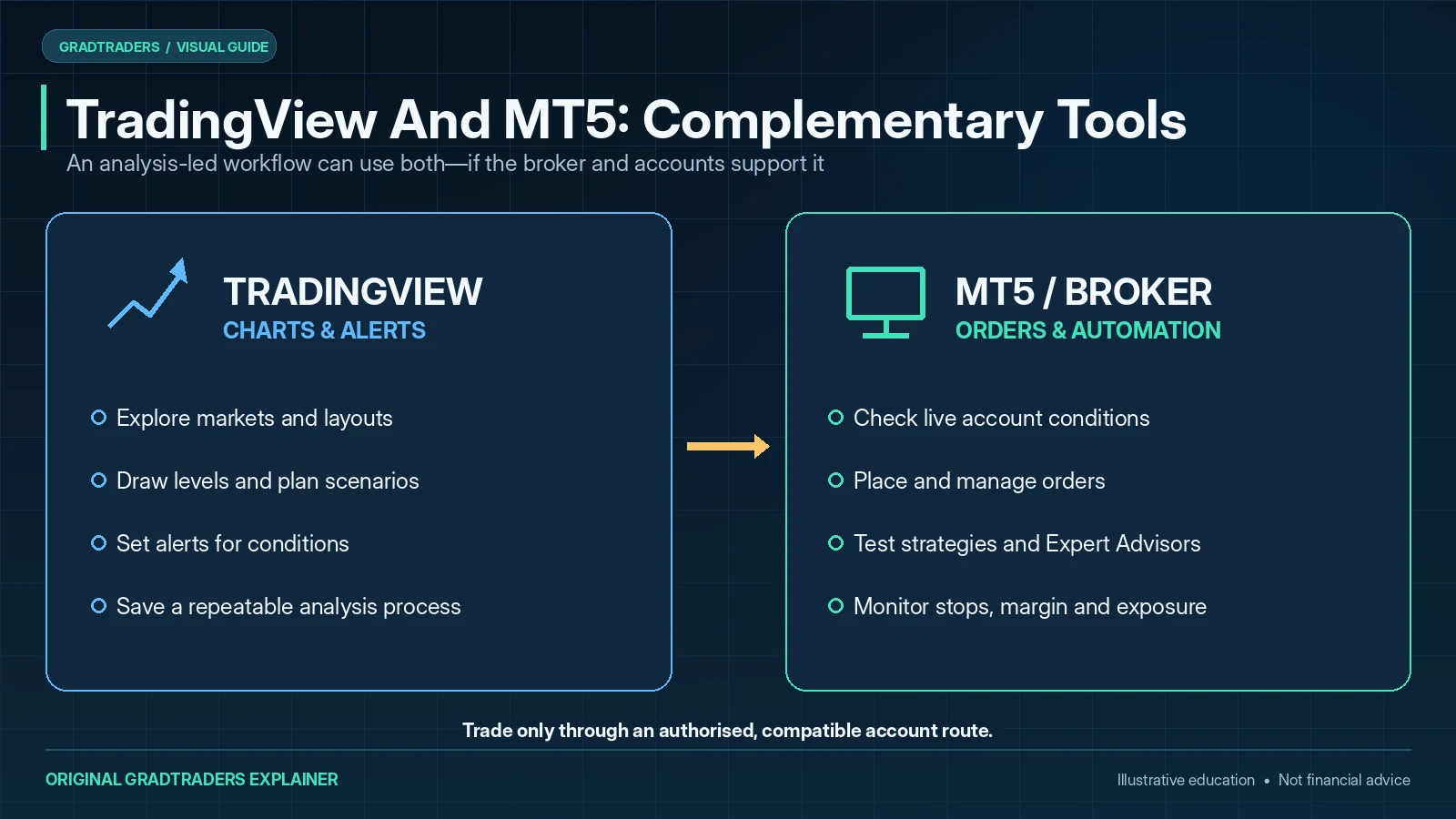
TradingView For Charts
Use TradingView to review markets, mark levels, set alerts and plan trades.
MT5 Or Broker Platform
Use MT5, cTrader or your broker platform for order placement, account management or execution.
MT5 For Systems
Use MT5 where Expert Advisors, backtesting or VPS-hosted strategies are part of the process.
For many traders, this combination offers the best of both worlds: TradingView’s charting experience and MetaTrader’s automation and execution ecosystem.
Do Not Choose A Platform Before Understanding Your Trading Style
A platform will not fix poor risk management, overtrading or a weak strategy. Beginners should be especially careful not to assume that professional-looking software will make trading easier. The platform should support the process, not replace the process.
Before paying for software, think about whether you actually need more indicators, more alerts, automation, backtesting, broker integration or simply more time practising on a demo account.
Final Verdict
TradingView and MT5 are strongest at different jobs. TradingView is the cleaner choice when the core task is chart analysis, alerts and cross-device preparation. MT5 is the stronger native environment when Expert Advisors, broker execution, testing and always-on automation are central to the setup.
The decision rule is simple: choose by the job the platform must perform, not by which interface has more features. If your workflow naturally splits analysis from execution, using both can be more sensible than forcing one platform to do everything.
Source note: I compare these platforms by charting workflow, alerts, execution connections, native automation and strategy-testing capability, using official TradingView and MetaTrader 5 documentation alongside GradTraders editorial judgement. Product features, broker integrations, paid plans and country access can change; confirm current availability with the platform and the broker before relying on a feature.
Primary checks: TradingView alerts documentation · MetaTrader 5 Strategy Tester · MetaTrader 5 virtual hosting.
Explore GradTraders Internationally
GradTraders has 20 dedicated international gateways with local livestream times, market context and country-specific routes into the wider research site.
These country links are for site navigation only; broker availability, regulatory status and product eligibility must be checked separately.
Browse all 20 country gateways
Asia: Japan · South Korea · Taiwan · Hong Kong · India · Singapore · Thailand
Europe: Italy · Sweden · Switzerland · Germany · Norway
Americas: United States · Canada · Mexico
Middle East: United Arab Emirates · Saudi Arabia
Africa: South Africa
Oceania: Australia · New Zealand
TradingView vs MT5 FAQ
Is TradingView better than MetaTrader 5?
TradingView is usually better for charting, usability, alerts and manual technical analysis. MetaTrader 5 is usually stronger for automation, Expert Advisors, backtesting and broker-based execution.
Is MT5 better than TradingView for automated trading?
Yes, for most retail traders MT5 is the stronger choice for Expert Advisors, automated strategies, strategy testing and VPS-hosted systems.
Should beginners use TradingView or MT5?
Most beginners will probably find TradingView easier to learn because the interface is cleaner and more modern. However, beginners who specifically want to learn automated trading may still need to understand MT5.
Can you use TradingView and MT5 together?
Yes. Many traders use TradingView for chart analysis and MT5 for execution, Expert Advisors or automated systems. The two platforms can serve different roles in the same trading workflow.
Which platform is better for technical analysis?
TradingView is generally the stronger platform for discretionary technical analysis, chart layouts, drawing tools, alerts and cross-device charting workflow.
Do I need a VPS to use MT5?
No. Manual MT5 traders can normally run the platform on their own computer. A VPS becomes more relevant when Expert Advisors or automated strategies need MT5 to remain online continuously.