Best Trading Software For Beginners 2026: Build A Simple Trading Workflow
My view is that a beginner’s trading workflow should be deliberately small: choose one clear charting setup, practise decisions without live financial risk, record every trade and review recurring mistakes. I would only add specialist backtesting, automation or journal software when it solves a problem the trader can already describe.
 , GradTraders
Live trading on YouTube
, GradTraders
Live trading on YouTubeA concise GradTraders guide to building a simple beginner trading workflow around charting, demo practice, risk control, journaling and review.
TradingView is the strongest first charting route for most beginners. Forex Tester, TraderSync and EA Builder Pro become more relevant only when the trader reaches the problem each tool solves.
Disclosure & Risk Notice: This article is for educational and informational purposes only and is not financial, investment, tax or personal advice. Trading CFDs, spread betting, forex, futures, crypto CFDs and other leveraged products involves significant risk and may not be suitable for all traders. Trading software, simulations, journals and backtesting can support learning, but they do not guarantee profitable trading. Some links are commercial partner links; GradTraders may earn a commission from eligible purchases at no additional cost to you. Commercial relationships do not determine the editorial conclusion.
Current partner offers and important offer changes are maintained on GradTraders Exclusive Discounts & Updates.
Quick Verdict
Beginners need a workflow before they need a software stack. A clean charting platform, simulated order practice and a simple review process cover most of the early work.
TradingView is the strongest first charting route for most beginners because it combines charts, watchlists, alerts and its own paper-trading environment. Once a trader has specific rules to test, Forex Tester can add structured historical practice; TraderSync becomes more useful when there is enough trade data to review; EA Builder Pro belongs later, after manual rules and risk are clear.
The aim is not to buy every tool. Add software only when it solves a problem you can name.
Best Trading Software For Beginners At A Glance
A beginner trading setup should stay simple. The table below separates the main tools by purpose, so new traders can understand what each tool is actually for.
| Software | Best Beginner Use | Main Benefit | GradTraders View |
|---|---|---|---|
| TradingView | Charts, watchlists, alerts and paper trading | Clean visual layout and easy access across web, desktop and mobile | Best first charting platform for most beginner traders. |
| Broker Demo Account | Practising orders, stops, limits and platform basics | Lets traders learn execution mechanics before risking capital | Essential before live trading, but demo fills can feel easier than real execution. |
| Forex Tester | Backtesting and structured historical practice | Helps test strategies and practise decision-making without live risk | Best upgrade once a beginner has basic rules to test. |
| TraderSync | Trading journal, performance review and mistake tracking | Turns trade history into patterns, statistics and review points | Useful when trading activity becomes consistent enough to review properly. |
| EA Builder Pro | Learning how automated rules are built | No-code Expert Advisor creation for MT4 and MT5 ideas | Interesting later, but not where most beginners should start. |
The Beginner Trading Software Stack
A beginner trader does not need every tool at once. A sensible software stack grows in stages: learn charts, practise execution, record trades, backtest ideas, then consider automation only after rules are clear.
1. Charting
Use charting software to read price, mark levels, build watchlists and practise market observation.
2. Demo Execution
Use a demo account to practise order types, position sizing, stops, targets and platform navigation.
3. Journaling
Record trades, screenshots, reasons, mistakes and emotional notes. Beginners improve faster when mistakes are visible.
4. Backtesting
Test trade ideas on historical data before assuming a strategy is worth risking money on.
5. Alerts
Alerts help beginners avoid staring at charts all day and chasing trades that are not part of the plan.
6. Automation Later
Automation should come after a trader understands rules, risk and testing. It should not be used as a shortcut around learning.
1. TradingView — Best First Charting Platform For Beginners
TradingView is the most natural first software choice for many beginners because its Supercharts combine watchlists, drawing tools, indicators and alerts across web, desktop and mobile. Its paper-trading account lets traders practise with simulated money without opening a live brokerage account.
TradingView also offers Bar Replay for historical practice. That replay environment is distinct from real-time Paper Trading, so beginners should understand which mode they are using rather than treating every simulation as the same thing.
The best beginner use is deliberately simple: one readable chart, a small watchlist, a few meaningful alerts and no pressure to fill the screen with indicators.
Strong starting point for chart reading, watchlists and alerts.
Paper Trading and replay tools support different kinds of simulated practice.
The same platform remains useful as analysis becomes more advanced.
2. Broker Demo Account — Best For Learning Order Execution
A charting platform helps a beginner analyse markets, but a broker demo account helps them understand execution. This is where beginners practise placing market orders, limit orders, stop losses, take profits and position sizes without risking real money.
Demo trading is not the same as live trading. The emotional pressure is different, and fills may feel easier than real market conditions. But a beginner who cannot use a demo platform calmly has no business rushing into live trading.
Demo accounts should be used to learn the mechanics: where orders go, how stops move, how margin is displayed, how spreads affect entries and how fast a losing trade can change account equity.
3. Forex Tester — Best For Beginner Backtesting
Forex Tester becomes useful once a beginner has a specific setup or rule set to test. Forex Tester Online currently provides browser-based historical testing with tick data, multi-chart replay and integrated journaling, allowing traders to practise without live market risk.
The important part is the process, not the amount of data. Start with one setup, one risk model and written rules. If the rules keep changing during the test, the result is not evidence.
4. TraderSync — Best Beginner Upgrade For Trade Journaling
A spreadsheet is enough for many beginners, but dedicated software starts to make more sense when there are enough trades to reveal patterns. TraderSync currently combines trade imports, analytics, journal notes, planning tools and replay features, with more advanced functionality varying by plan.
For a developing trader, the value is seeing behaviour clearly: trades outside the plan, sessions that underperform, repeated sizing errors and weak exit discipline. Paying for advanced analytics before a repeatable trading process exists is usually backwards.
5. EA Builder Pro — Best Later-Stage Tool For No-Code Automation
EA Builder Pro is not where most beginners should start. It becomes relevant later for traders who can already describe a rules-based strategy and want to understand how those rules translate into an MT4 or MT5 Expert Advisor.
The current builder supports templates, an AI Agent, indicators, conditions, money-management settings, cloud backtesting and MetaTrader export. Those features can make automation easier to build, but they do not remove the need to understand risk, test quality and live execution.
The sensible path is manual understanding first, structured testing second and automation only when the rules are stable enough to automate.
Beginner Trading Software Comparison Table
The table below shows how each tool fits into a sensible beginner workflow. The best beginner setup is usually simple, not expensive.
| Tool Type | Example | When To Use It | Beginner Mistake To Avoid |
|---|---|---|---|
| Charting Platform | TradingView | From the start, for charts, watchlists, alerts and market observation | Using too many indicators and constantly changing the chart. |
| Demo Account | Broker demo platform | Before live trading, to practise orders and platform mechanics | Treating demo profits as proof of live trading skill. |
| Backtesting Software | Forex Tester | Once you have a clear setup or rule set to test | Changing rules halfway through the test. |
| Trading Journal | TraderSync | Once you are taking enough trades to review patterns | Recording only winners and ignoring emotional mistakes. |
| Automation Builder | EA Builder Pro | Later, after rules are clear and tested | Using automation as a shortcut around learning risk. |
A Simple Beginner Setup
A realistic first setup might look like this:
Stage 1: First Month
- Use TradingView for clean chart reading.
- Open a broker demo account.
- Practise orders, stops and risk size.
- Keep a simple notes journal.
Stage 2: After Basic Practice
- Start backtesting one clear setup.
- Move trade notes into a structured journal.
- Review errors by setup, session and behaviour.
- Avoid live risk until the process is repeatable.
Stage 3: Serious Testing
- Use Forex Tester for historical practice.
- Use TraderSync or a spreadsheet for review.
- Track rule breaks and emotional errors.
- Compare backtested behaviour with demo behaviour.
Stage 4: Advanced Tools Later
- Consider alerts, screeners or automation only after rules are clear.
- Use EA Builder Pro only for tested ideas.
- Do not automate a strategy you cannot explain manually.
- Keep risk management at the centre of the process.
How Much Should Beginners Spend On Trading Software?
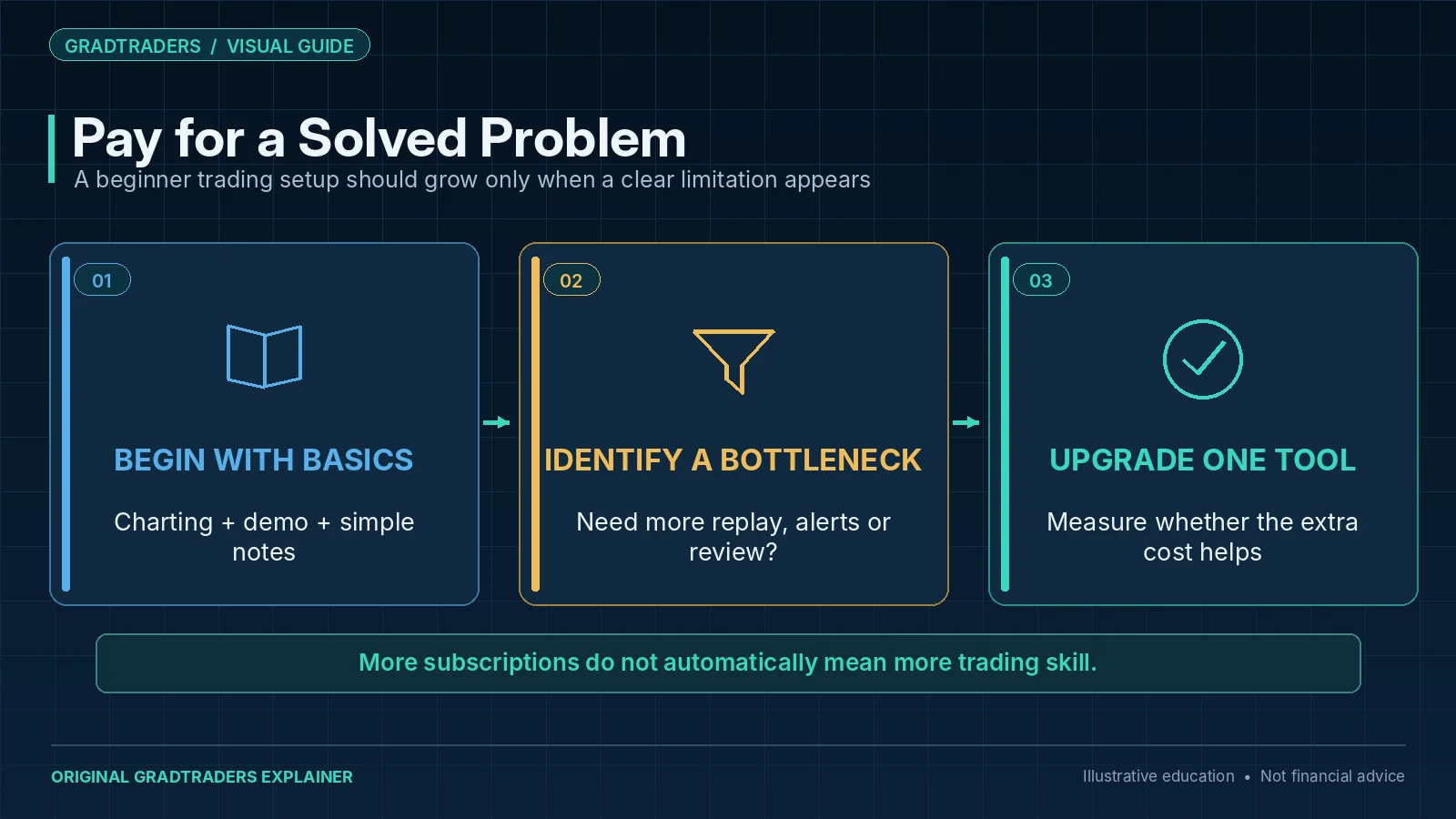
Beginners should be careful with subscription costs. A new trader can easily build a monthly bill before building any real skill. Paying for software makes sense only when it solves a real problem in the trading process.
A sensible approach is to start with free or low-cost tools, then upgrade only when the limitation is obvious. For example, upgrade charting if alerts and replay matter, upgrade journaling when manual tracking becomes messy, and upgrade backtesting when a setup is clear enough to test seriously.
The wrong approach is buying tools because they feel professional. Trading skill does not come from having a busy dashboard.
Beginner Traders Should Avoid Tool Overload
One of the biggest mistakes beginners make is thinking a better tool will fix an unclear process. More indicators, more alerts, more dashboards and more automation do not automatically create better trading decisions.
A beginner should be able to explain exactly why each tool exists in the workflow. If the answer is not clear, the tool is probably a distraction.
Final Verdict
The best beginner software stack is intentionally small. Start with charting and simulated execution, then add journaling and historical testing only when the trading process gives those tools something useful to measure.
TradingView is the strongest first charting route for most beginners. Forex Tester is the logical next step when there are written rules to test. TraderSync can add structure once trade volume justifies dedicated analytics. EA Builder Pro should come later, when automation is solving a defined workflow rather than replacing the learning process.
The decision rule is simple: add the next tool only when the current process has a clear limitation.
Source note: GradTraders compares these tools by the role each plays in a practical beginner workflow, distinguishing that editorial judgement from product features checked against official public information from TradingView, Forex Tester, TraderSync and EA Builder Pro on 10 October 2026. Features, plan limits and platform access can change.
Useful checks: TradingView Review · Forex Tester Review · TraderSync Review · EA Builder Pro Review · Software & Tools Map.
Explore GradTraders Internationally
GradTraders has 20 dedicated international gateways with local livestream times, market context and country-specific routes into the wider research site.
These country links are for site navigation only; trading software availability, broker connections, account eligibility and applicable terms must be checked separately.
Browse all 20 country gateways
Asia: Japan · South Korea · Taiwan · Hong Kong · India · Singapore · Thailand
Europe: Italy · Sweden · Switzerland · Germany · Norway
Americas: United States · Canada · Mexico
Middle East: United Arab Emirates · Saudi Arabia
Africa: South Africa
Oceania: Australia · New Zealand
Best Trading Software For Beginners FAQ
What is the best trading software for beginners?
For most beginners, TradingView is the best first charting platform because it is clean, accessible and powerful enough to grow into. Beginners should also use a broker demo account and a simple trading journal.
Do beginners need paid trading software?
Not immediately. Beginners should start with simple tools and upgrade only when a paid feature solves a real problem, such as alerts, replay, journaling, backtesting or data organisation.
Is TradingView good for beginners?
Yes. TradingView is beginner-friendly for charting, watchlists, alerts and visual market analysis. The key is to keep charts clean and avoid adding too many indicators too early.
Should beginners use backtesting software?
Beginners should first learn basic chart reading and risk management. Once they have a clear setup to test, backtesting software such as Forex Tester can help them practise and collect evidence before risking real money.
Should beginners use trading bots?
Most beginners should not start with trading bots. Automation can be useful later, but only after a trader understands manual rules, risk management, backtesting and strategy limitations.