Best VPS For MT4: Low-Latency Hosting For Automated Trading
I would choose an MT4 hosting solution only after checking the EA’s actual workload, the broker’s server location and whether the strategy needs constant unattended operation. A VPS can reduce dependence on home equipment and help with location-sensitive execution, but it cannot correct flawed trading rules or guarantee faster fills.
 , GradTraders
Live trading on YouTube
, GradTraders
Live trading on YouTube
For a simple Expert Advisor or copied Signal, compare MetaTrader’s native virtual hosting first. A full Windows VPS becomes more useful when you need several terminals, remote-desktop access or additional Windows software.
ForexVPS is the primary GradTraders partner route for full Windows hosting, with FXVM as a second option. The important decision is matching the server location and resources to the broker and workload.
Disclosure & Risk Notice: This article is for educational and informational purposes only and is not financial, investment, tax or personal advice. Trading CFDs, spread betting, forex and other leveraged products involves significant risk and may not be suitable for all traders. Software, automation and hosting can improve workflow or infrastructure, but they cannot make a weak strategy profitable or remove trading risk. GradTraders has commercial relationships with some providers mentioned in this article and may earn a commission from eligible links at no additional cost to you. Commercial relationships do not determine the editorial conclusion.
Looking for GradTraders partner offers, broker discounts, prop firm promotions and trading platform deals? You can view the current offers and join the update list here: Access GradTraders Partner Offers.
Quick Verdict
MT4 traders should first decide whether they need MetaTrader’s native virtual hosting or a full Windows VPS. MetaTrader 4 includes a virtual-hosting route designed to keep Expert Advisors and Signals running continuously, with servers selected close to the broker to reduce network latency.
A full Windows VPS becomes more useful when the setup needs several MT4 terminals, broader remote-desktop control, third-party software or workloads outside MetaTrader’s native hosting environment. In that category, ForexVPS is the primary GradTraders partner route and FXVM is the second option to compare.
The decision rule is infrastructure first: match the hosting type, server location and resources to the broker and workload. A VPS can improve uptime and connectivity, but it does not improve the underlying strategy.
MT4 Hosting Routes At A Glance
The right route depends on whether you need simple 24/7 EA hosting or a complete Windows environment. Plans, server locations and resources can change, so verify the current provider details before subscribing.
| Hosting Route | Best Fit | Main Strength | GradTraders View |
|---|---|---|---|
| MetaTrader Virtual Hosting | Simple EA or Signal hosting inside MT4 | Integrated into MetaTrader and designed for continuous platform operation | First route to compare when the whole workflow lives inside MT4. |
| ForexVPS | Full Windows hosting, multiple terminals or broader trading software | Trading-focused infrastructure and financial data-centre locations | Primary GradTraders partner route when a full Windows VPS is genuinely needed. |
| FXVM | Traders comparing another Windows VPS route | Trading-focused Windows VPS plans with multiple server locations | Second partner route to compare against the exact workload and broker location. |
What Is A VPS?
A VPS, or Virtual Private Server, is a remote computer hosted in a data centre. Instead of relying on your home computer to keep MetaTrader 4 open, a VPS can run the platform continuously on remote infrastructure.
For automated traders, this can reduce dependence on home internet, local power, laptop sleep settings and restarts. With a full Windows VPS, you normally connect by Remote Desktop and manage MT4 much like you would on a normal Windows computer.
Why MT4 Traders Use A VPS
1. 24/7 Operation
Expert Advisors can continue monitoring markets and managing trades while your personal computer is switched off.
2. Reduced Downtime
Remote infrastructure can reduce dependence on home broadband, local hardware and power interruptions.
3. Lower Latency
A server located closer to the broker’s trading infrastructure may reduce network delay between MT4 and the broker.
4. Cleaner Workflow
Keeping MT4 on a dedicated server can separate automated trading from everyday computer use.
5. Multiple Terminals
A suitably resourced VPS can run several MT4 installations or several Expert Advisors at the same time.
6. Remote Access
You can manage the server from another computer while the trading platform continues running remotely.
What Are Expert Advisors In MT4?
MetaTrader 4 supports automated trading through Expert Advisors, commonly shortened to EAs. These are programs written for the MetaTrader environment that can analyse markets, generate signals and manage trades according to predefined rules.
MT4 uses the MQL4 language for Expert Advisors, custom indicators, scripts and other trading tools. Because an EA normally needs the trading platform to remain connected and running, hosting becomes relevant when the strategy needs continuous operation.
1. ForexVPS.net – Strong Full Windows VPS Route For MT4
ForexVPS.net is built specifically around trading-platform hosting rather than general website hosting. Its appeal for MT4 users is the combination of Windows hosting, trading-focused infrastructure and a choice of locations intended to help traders place their server closer to broker infrastructure.
Key Strengths
- Trading-focused Windows VPS environment.
- Useful when running MT4 Expert Advisors continuously.
- Suitable for multiple terminals on higher-resource plans.
- Server-location choice can help reduce network distance to the broker.
- Primary GradTraders partner route for traders who genuinely need a full Windows VPS.
Main Drawback
A full trading VPS adds recurring cost and can be unnecessary if you only need a simple EA or Signal running inside MT4. Compare MetaTrader’s native hosting route before paying for more infrastructure than the setup requires.
2. MetaTrader Virtual Hosting – Best Native MT4 Route To Compare First
MetaTrader 4 has built-in access to virtual hosting for traders who want Expert Advisors or Signals to operate continuously. The platform can select a virtual server close to the broker, and the trading environment can be migrated from the local terminal to the hosted terminal.
This is especially relevant when the workflow stays entirely inside MT4. It is less flexible than a general Windows desktop environment, but that simplicity is also its main advantage.
3. FXVM – Alternative Full Windows VPS Route
FXVM is another trading-focused Windows VPS option to compare for MT4. It may suit traders who want full remote-desktop access and the freedom to run MT4 alongside other Windows applications.
The key check is not simply price. Compare the available server location, CPU and memory with the number of terminals, charts and EAs you intend to run.
4. Beeks Financial Cloud – Infrastructure Route For More Complex Needs
Beeks is known for financial-market infrastructure and data-centre connectivity. It is more relevant to professional or technically demanding setups than to a beginner running one simple MT4 EA.
For most retail traders, the native MetaTrader hosting route or a straightforward Windows trading VPS will be easier to compare first.
5. TradingFXVPS – Another Route For Heavier MT4 Workloads
TradingFXVPS is another provider traders may encounter when looking for Windows hosting for MetaTrader. It can be relevant where the workload involves several MT4 terminals, many charts or more resource-intensive automated systems.
As with any VPS, check current hardware allocation, data-centre location, support and pricing directly with the provider before subscribing.
Recommended VPS Specifications For MT4
There is no single correct VPS specification for every MT4 setup. Resource requirements depend on the number of terminals, charts, indicators, symbols and Expert Advisors being used.
| Trading Setup | Starting RAM Guide | Starting CPU Guide | Best Fit |
|---|---|---|---|
| 1 MT4 terminal, light EA use | 2GB+ | 1 vCPU+ | Simple automated setup with modest chart and indicator use. |
| 2–4 MT4 terminals | 4GB+ | 2 vCPU+ | Several EAs or accounts running simultaneously. |
| Multiple terminals and heavier automation | 8GB–16GB+ | 4+ vCPU | More demanding multi-terminal workloads. |
These are practical starting points rather than MetaTrader minimum requirements. Actual resource use varies by broker, EA, indicator set and number of charts.
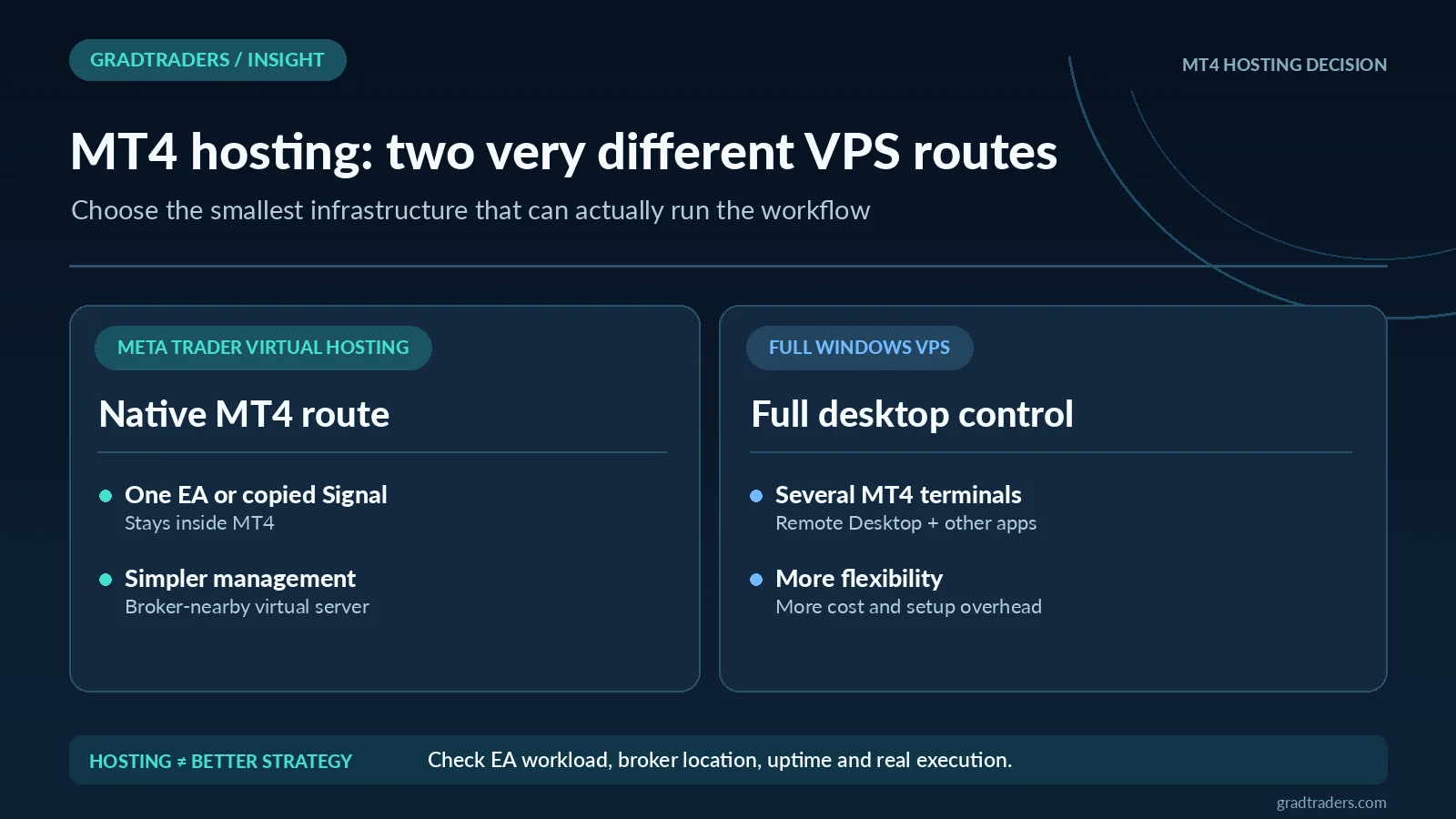
MetaTrader Virtual Hosting vs A Full Windows VPS
MetaTrader Virtual Hosting
- Integrated into the MetaTrader ecosystem.
- Designed for continuous operation of EAs and Signals.
- Server selection is built around proximity to the broker.
- Good fit when the entire workflow stays inside MT4.
- Less flexible than a general-purpose Windows desktop environment.
Full Windows VPS
- Remote-desktop access to a complete Windows environment.
- Can run multiple MT4 terminals.
- Can also run supporting Windows software.
- Requires you to choose resources and server location carefully.
- Adds a recurring cost and more administration.
How To Reduce MT4 Trading Latency
One of the most important checks is the location of the broker’s trading server. MetaTrader’s own virtual-hosting system is specifically designed to select hosting close to the broker, and third-party VPS users should think about the same principle.
Do not assume that the geographically closest VPS to you is automatically the best one. The more relevant distance is often between the VPS and the broker’s trading infrastructure.
Common MT4 VPS Mistakes
Buying More Than You Need
A trader running one simple EA may not need a full Windows VPS. Compare MetaTrader’s native virtual hosting before paying for broader infrastructure.
Under-Specifying The Server
Several terminals, charts and EAs can put pressure on CPU and memory. Monitor resource usage rather than choosing purely on the lowest price.
Ignoring Broker Location
A powerful VPS in the wrong data centre may still create unnecessary network delay. Check server location against the broker’s infrastructure.
Assuming A VPS Improves Strategy Quality
Hosting can improve uptime and connectivity, but it cannot turn an unprofitable trading system into a profitable one.
MT4 vs MT5 For VPS Users
Both MetaTrader 4 and MetaTrader 5 can use MetaTrader’s virtual-hosting ecosystem, and both can also run on third-party Windows VPS services. The main reason to choose an MT4-specific setup is normally compatibility with an existing MQL4 Expert Advisor, indicator or broker workflow.
If you are starting from scratch rather than supporting an existing MT4 system, compare the platform features and broker support available to you before deciding which MetaTrader version should sit at the centre of the setup.
A Personal Observation
Older does not automatically mean obsolete in trading software. Many traders continue using MT4 because they have established Expert Advisors, indicators or broker workflows built around MQL4.
The sensible approach is to treat the VPS as infrastructure rather than as part of the trading edge. If MT4 already does what the strategy needs, stable hosting may be more important than changing platform simply for the sake of using something newer.
Final Verdict
My first MT4 hosting decision is whether the trader actually needs a full Windows desktop environment. For a straightforward EA or Signal workflow I would compare MetaTrader’s native virtual hosting first; for several terminals, custom utilities and remote-desktop access, a complete Windows VPS may justify the extra complexity.
For a straightforward EA or Signal workflow, MetaTrader’s integrated hosting deserves comparison first. When you need multiple terminals, remote-desktop access or supporting Windows software, a full VPS becomes more appropriate. In that category, ForexVPS is the primary GradTraders partner route and FXVM is the second option to compare.
Choose the hosting layer only after the broker, strategy, server location and workload are clear.
Source note: on 11 October 2026 the official MetaTrader 4 native virtual-hosting terms and published ForexVPS and FXVM Windows VPS availability, supported terminals and server locations were fact-checked. No measured latency, actual uptime or comparative trading-performance claims are made. This is an independent GradTraders infrastructure assessment of hosting requirements, not a personal benchmark of every VPS provider. Previously reviewed MT4 hosting details were based on MetaTrader 4 official virtual-hosting documentation and MetaTrader VPS information; the 10 October editorial revision is not a fresh provider latency or pricing test. VPS plans, server locations, resource limits and pricing can change, so verify the provider and broker route before purchasing.
Primary checks: MetaTrader 4 virtual hosting · MetaTrader VPS · ForexVPS · FXVM.
Explore GradTraders Internationally
GradTraders has 20 dedicated international gateways with local livestream times, market context and country-specific routes into the wider research site.
These country links are for site navigation only; VPS provider availability, hosting regions, broker compatibility and applicable terms must be checked separately.
Browse all 20 country gateways
Asia: Japan · South Korea · Taiwan · Hong Kong · India · Singapore · Thailand
Europe: Italy · Sweden · Switzerland · Germany · Norway
Americas: United States · Canada · Mexico
Middle East: United Arab Emirates · Saudi Arabia
Africa: South Africa
Oceania: Australia · New Zealand
Best VPS For MT4 FAQ
Do I need a VPS for MetaTrader 4?
You mainly need hosting if an Expert Advisor, Signal or other MT4 workflow must remain online when your own computer is switched off. Manual traders may not need a VPS.
Does MetaTrader 4 have its own VPS?
MetaTrader 4 includes access to MetaTrader virtual hosting through the platform. It is designed for continuous operation of Expert Advisors and Signals and can select hosting close to the broker.
What is the best type of VPS for MT4?
A simple MT4-only EA or Signal setup may suit MetaTrader’s native virtual hosting. Traders needing several terminals, remote-desktop access or additional Windows software may be better suited to a full Windows VPS.
Can a VPS reduce MT4 latency?
It can reduce network latency when the VPS is located closer to the broker’s trading server than your normal connection. Server location should therefore be checked before subscribing.
Can a VPS make an MT4 Expert Advisor profitable?
No. A VPS can improve uptime and connectivity, but it cannot improve the underlying logic or risk management of an Expert Advisor.