cTrader cBots Explained: How Automated Trading Works In cTrader
cTrader cBots automate defined trading rules through cTrader Algo, with C# or Python development, desktop backtesting and optimisation, and local or cloud execution options. My starting point is the strategy and its risk controls: test those first, then decide whether cTrader Cloud meets the bot’s needs or a fuller local or VPS environment is justified.
 , GradTraders
A beginner-friendly cTrader cBots guide covering automation, C# and Python, cloud vs VPS execution, backtesting and risk.
Cloud first, VPS only when the workflow needs it
cTrader Cloud can run supported cBots 24/7 without the local device or a separate VPS. Local or VPS execution still matters when dependencies, external tools or a broader remote desktop environment are required.
A supported cBot may need no separate VPS; dependencies, external tools and the need for a remote desktop can change that decision.
Disclosure & Risk Notice: This article is for educational and informational purposes only and should not be considered financial advice, investment advice, tax advice or a personal recommendation. Trading CFDs, spread betting, forex, futures, crypto CFDs and other leveraged products involves significant risk and may not be suitable for all traders. You may lose some or all of your capital. cBots, automated systems, trading robots, cloud instances and VPS-hosted strategies can fail, disconnect, overtrade, behave differently in live markets and breach broker or prop firm rules. Backtests and simulations do not guarantee future performance. Some GradTraders articles may contain affiliate links or references to partner offers. If you sign up, purchase or open an account through certain links, GradTraders may earn a commission at no additional cost to you. Commercial relationships do not determine the editorial conclusion or ranking.
Looking for GradTraders partner offers, broker discounts, prop firm promotions and trading platform deals? You can view the current offers and join the update list here: Access GradTraders Partner Offers.
Quick Verdict
A cTrader cBot is an automated trading robot that follows rules inside the cTrader ecosystem. Current cTrader documentation says cBots can analyse conditions, place and manage trades, apply risk controls, and be built in C# or Python.
cBots make most sense after the strategy logic is explicit and has been backtested and forward-tested. cTrader Cloud can run supported cBots 24/7 without the local device or a separate VPS, while local or VPS execution remains useful for workflows that depend on unsupported packages, Windows-specific components or external tools.
What Is A cTrader cBot?
A cBot is a trading robot used within cTrader. Current cTrader documentation describes cBots as automated programs that can analyse market conditions, place or modify orders and manage risk according to rules in their code.
cTrader now supports cBot development in both C# and Python. Development, backtesting and optimisation are available in cTrader Windows and Mac, while cloud instances can be started across cTrader apps. Local instances run on Windows or Mac and depend on the app and device remaining available.
The important distinction is still the strategy logic. A cBot can follow good rules or bad rules with the same consistency, so automation does not remove the need for testing, risk limits and monitoring.
What Can cBots Do?
The exact behaviour depends on the code, settings, broker and permissions. In practical trading terms, cBots can support several jobs.
Generate Signals
A cBot can monitor price, indicators and conditions, then identify possible trading setups.
Place Orders
Where permitted, a cBot can place buy or sell orders according to its strategy rules.
Manage Risk
cBots can be designed to use stop losses, position size controls, trade limits and risk filters.
Backtest Strategies
cTrader Algo lets traders run cBots on historical data to see how the rules behaved in previous conditions.
Optimise Parameters
Traders can test different parameter combinations, although optimisation can become misleading if overused.
Run In The Cloud
Some cBot workflows can run in the cloud, while others may need local execution or VPS hosting depending on dependencies.
How cBots Work In cTrader
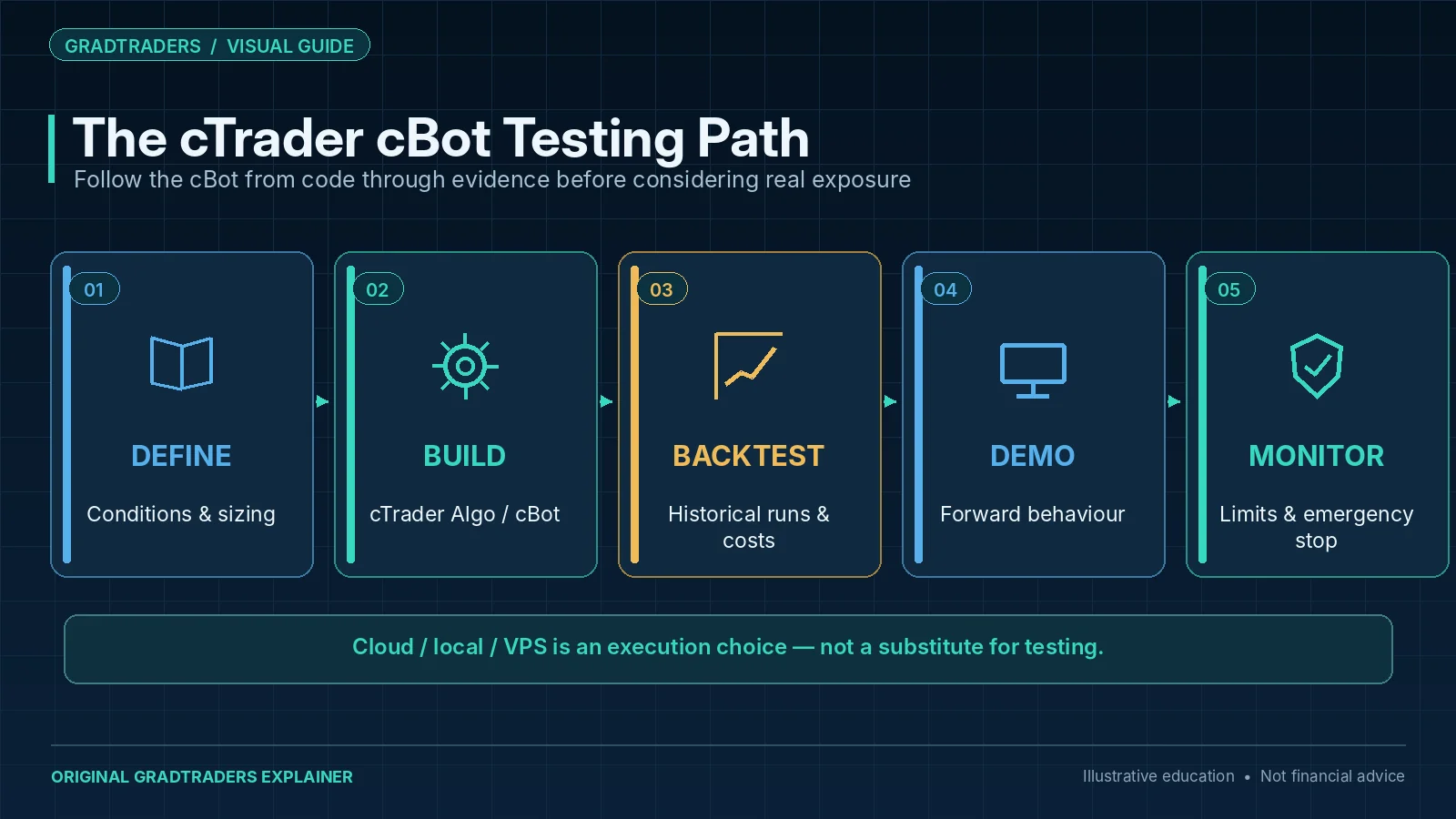
A cBot starts with trading logic. The trader or developer defines the market conditions, entry rules, exit logic, risk controls and any filters. The cBot then follows those rules inside the cTrader environment.
| Stage | What Happens | Why It Matters |
|---|---|---|
| Strategy Idea | The trader defines the setup, market logic and risk model | A cBot cannot improve vague or weak rules. |
| cBot Build | The logic is coded, configured or bought from a cTrader source | The bot must match the intended strategy exactly. |
| Backtesting | The cBot is tested on historical market data | Backtesting helps reveal obvious weaknesses before live risk. |
| Optimisation | Different parameter values are tested against historical data | Useful for research, but dangerous if settings are over-fitted. |
| Demo / Cloud / VPS Test | The cBot runs in current conditions before serious risk | Live-like testing checks behaviour, execution and platform stability. |
| Live Or Prop Use | The cBot is used only if the trader accepts the risk and the rules allow it | Rule breaches and drawdown still matter, even if the bot works. |
cBots Vs Expert Advisors
cBots and MetaTrader Expert Advisors are similar in purpose, but they belong to different trading ecosystems. The better choice depends on the trader’s platform, broker, programming comfort and workflow.
| Feature | cTrader cBots | MetaTrader Expert Advisors | GradTraders View |
|---|---|---|---|
| Platform | cTrader / cTrader Algo | MT4 / MT5 | Choose based on your broker and workflow. |
| Common Language | C# or Python / cTrader Algo | MQL5 in MetaTrader 5 | Developers may prefer one ecosystem over the other. |
| Backtesting | cBot backtesting and optimisation in cTrader Algo | Strategy Tester in MetaTrader | Both require realistic assumptions and forward testing. |
| Hosting | Cloud, local or VPS depending on workflow | Local, MetaTrader VPS or third-party VPS | Hosting matters if the system needs continuous uptime. |
| Risk | Bot follows its rules, good or bad | EA follows its rules, good or bad | The platform does not replace the trading edge. |
cBot Backtests Can Still Mislead Traders
cTrader Algo provides backtesting and optimisation tools for cBots, but a backtest is not a guarantee. A bot can look strong on historical data and still fail in live market conditions.
The biggest danger is over-optimisation. Testing many parameter combinations can produce a setting that fits old data very well but performs poorly when future conditions change.
Over-Fitting
Settings chosen only because they looked good on past data may be fragile in live markets.
Spread And Slippage
Live execution costs can reduce or remove the apparent edge from a backtest.
Data Assumptions
Historical data quality, session behaviour and symbol settings can affect results.
Cloud Limitations
Some external dependencies may not work in cloud execution if they are not compatible with the cloud environment.
Rule Breaches
Prop firm traders must check whether cBots, automation and strategy type are allowed by the firm.
Weak Monitoring
Automated trading still needs review, alerts, limits and a plan for stopping the bot quickly.
Cloud, Local And VPS Execution
cTrader gives cBot users more than one execution route. The default question should be whether the bot can run cleanly in cTrader Cloud or locally before adding a separate VPS.
| Execution Route | Best For | Strength | Limitation To Check |
|---|---|---|---|
| Local Execution | Development, testing and workflows run from cTrader Windows or Mac | Direct access to the local environment and dependencies | The device and cTrader app need to remain available while the cBot runs. |
| cTrader Cloud | Supported cBots that do not need incompatible external dependencies | Runs independently of the local device and can operate 24/7 without a separate VPS | Broker/account limits and cloud dependency/API restrictions still apply. |
| Trading VPS | External tools, broader remote-desktop workflows or dependencies the cloud cannot support | Full control over a remote operating environment | Adds cost, maintenance and another layer that must be monitored. |
| Hybrid Setup | Technical traders running several platforms or external processes | Flexible infrastructure around a more complex workflow | More components create more possible failure points. |
cTrader’s documentation specifically notes that cloud execution has dependency and API limits. Its free Cloud service currently allows up to 10 concurrent cBot instances on live accounts and one on demo accounts. Demo cloud instances stop automatically after seven days but can be restarted; limits can also vary by broker. For example, third-party Python packages are supported locally or on a VPS rather than in the cloud, and Windows-specific dependencies are not compatible with the Linux-based cloud environment. That is where a VPS can become a practical option rather than a default purchase.
Affiliate note: GradTraders may earn a commission if you purchase through either VPS link, at no additional cost to you. A VPS is infrastructure; it does not improve weak strategy logic.
Who Should Use cBots?
cBots may suit traders who already prefer cTrader, understand their strategy rules and want to automate or test parts of the trading process.
Good Fit
- cTrader users with clear rule-based strategies.
- Traders who want to backtest and optimise ideas.
- Developers comfortable with cTrader Algo and C#.
- Traders using automation only after proper testing.
- Prop firm traders whose firm specifically allows the method.
Poor Fit
- Beginners looking for a shortcut around learning.
- Traders who cannot explain the bot’s rules.
- Anyone using martingale or grid systems without understanding drawdown.
- Traders relying only on a good-looking backtest.
- Prop firm traders who have not checked cBot or automation rules.
cBots And Prop Firms
Prop firm traders should be careful with cBots. Some firms allow automated systems, while others restrict third-party bots, copy trading, high-frequency behaviour, news trading, arbitrage, martingale methods or strategies that exploit platform conditions.
A cBot can be profitable and still create problems if the method breaches firm rules. Traders should check the current prop firm rules directly before running any cBot on a challenge or funded account.
cBot Safety Checklist
Before using a cBot with live risk, use a basic safety checklist.
Rules Understood
You understand when the cBot enters, exits, sizes positions and stops trading.
Backtest Reviewed
The cBot has been tested across enough historical conditions without relying on one perfect period.
Optimisation Controlled
Parameters have not been tuned so tightly that the bot only fits old data.
Demo Tested
The cBot has run in current market conditions before serious capital is used.
Hosting Checked
Cloud, local or VPS execution has been tested before relying on it.
Kill Switch Ready
You know how to stop the cBot and manage any open positions manually.
Final Verdict
cTrader cBots are useful when the trading rules are clear enough to turn into code and evaluate through backtesting, optimisation and live-like testing. The key advantage is disciplined execution of defined logic; the main weakness is that the robot will also execute flawed logic consistently.
The practical decision rule is simple: use cTrader Cloud when the cBot is compatible with it, use local execution while developing or testing, and add a VPS only when the workflow genuinely requires dependencies, external tools or a broader remote environment that cloud execution cannot support.
Source note: GradTraders’ assessment compares what cTrader Cloud can run with the dependencies and operating controls that can justify local or VPS execution. Current cTrader documentation describes cBots as automated trading programs, supports C# and Python development, provides backtesting and optimisation on desktop, and offers cloud execution for supported cBots. Cloud execution is 24/7 and device-independent, but dependency and API restrictions still apply.
Primary references: cTrader cBots documentation · cBot backtesting · cBot optimisation · cTrader Cloud · Cloud requirements.
Useful next reads: Best VPS For cTrader · Algorithmic Trading Explained · Automated Trading Explained · Trading Software & Tools Map.
Explore GradTraders Internationally
GradTraders has 20 dedicated international gateways with local livestream times, market context and country-specific routes into the wider research site.
These country links are for site navigation only; trading software availability, broker connections, account eligibility and applicable terms must be checked separately.
Browse all 20 country gateways
Asia: Japan · South Korea · Taiwan · Hong Kong · India · Singapore · Thailand
Europe: Italy · Sweden · Switzerland · Germany · Norway
Americas: United States · Canada · Mexico
Middle East: United Arab Emirates · Saudi Arabia
Africa: South Africa
Oceania: Australia · New Zealand
cTrader cBots FAQ
What is a cTrader cBot?
A cTrader cBot is an automated trading robot used inside cTrader Algo. It can automate trading strategy rules, manage orders or help test rule-based systems.
Can cBots trade automatically?
Yes. cBots can be built to place and manage trades automatically if the strategy logic, permissions and platform setup allow it.
Can cBots be backtested?
Yes. cTrader Algo supports cBot backtesting using historical market data, and it also supports optimisation workflows for testing different parameter values.
Do cBots need a VPS?
Not always. Supported cBots can run in cTrader Cloud 24/7 without the local device or a separate VPS. A VPS can still be useful when the workflow needs unsupported external packages, Windows-specific dependencies or other remote tools.
Are cBots allowed on prop firm accounts?
It depends on the prop firm. Traders should check the firm’s current rules before using any cBot, EA, copier or automated strategy on a challenge or funded account.