Best VPS For cTrader In 2026: Top Low-Latency Hosting For cBots
cTrader cBots can run through different hosting routes, so I would not buy a Windows VPS before checking cTrader Cloud. For supported cBots, the built-in cloud option may remove the need to keep a separate computer running. A dedicated VPS becomes a more practical choice when the strategy needs unsupported dependencies, external tools or a full remote Windows environment.
 , GradTraders
Live trading on YouTube
, GradTraders
Live trading on YouTube
When cTrader Cloud is enough — and when a VPS still makes sense for cBots, local execution and low-latency hosting.
If a full Windows VPS is genuinely needed, ForexVPS is the primary GradTraders partner route and FXVM is the second option.
Disclosure & Risk Notice: This article is for educational and informational purposes only and is not financial, investment, tax or personal advice. Trading CFDs, spread betting, forex and other leveraged products involves significant risk and may not be suitable for all traders. Software, automation and hosting can improve workflow or infrastructure, but they cannot make a weak strategy profitable or remove trading risk. GradTraders has commercial relationships with some providers mentioned in this article and may earn a commission from eligible links at no additional cost to you. Commercial relationships do not determine the editorial conclusion.
Looking for GradTraders partner offers, broker discounts, prop firm promotions and trading platform deals? You can view the current offers and join the update list here: Access GradTraders Partner Offers.
Quick Verdict
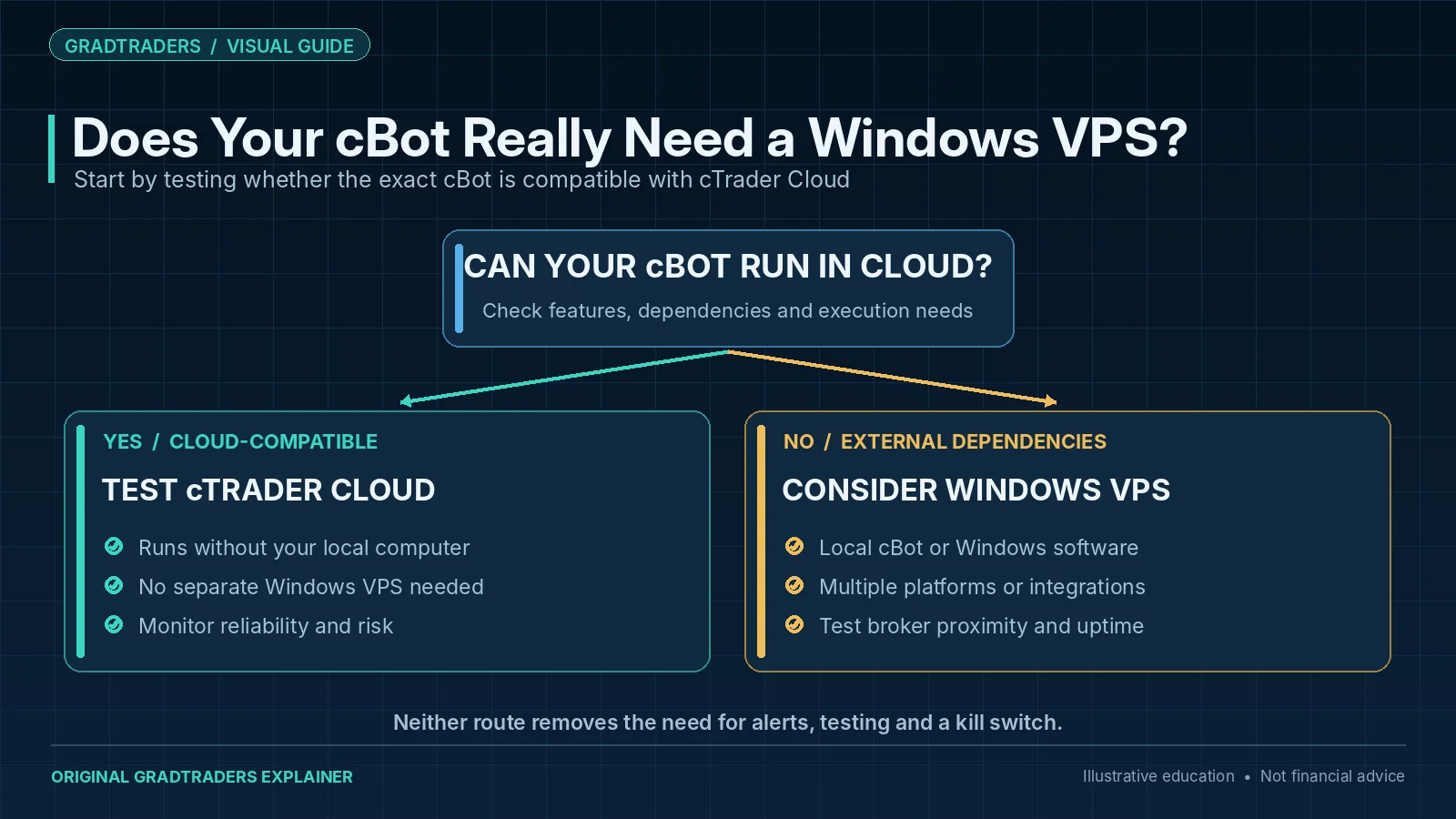
For a standard cBot that can run as a cTrader Cloud instance, test cTrader Cloud before paying for a VPS. cTrader’s official cloud execution can run compatible cBots independently of your device, so not every automated cTrader setup needs a Windows VPS. Cloud hosting is free, but cTrader currently permits up to 10 concurrent instances on live accounts and one on demo accounts; demo instances stop after seven days and can be restarted. Limits can vary by broker, and some cBots with unsupported external dependencies cannot run in the cloud.
A full Windows VPS still has a role when the workflow requires local cTrader execution, additional Windows applications, broader remote-desktop control or a multi-platform setup. In that narrower case, ForexVPS is the primary GradTraders partner route and FXVM is the second option to compare.
The decision rule is simple: use cTrader Cloud when it supports the exact cBot workflow; add a VPS only when you can identify a requirement that Cloud does not cover.
cTrader Hosting Routes At A Glance
cTrader now supports both cloud and local cBot instances. That makes the first decision a hosting-route question rather than a provider ranking.
| Hosting Route | Best Fit | Main Strength | GradTraders View |
|---|---|---|---|
| cTrader Cloud | Standard cBots that can run as cloud instances | 24/7 execution independent of the trader’s device | First route to test before paying for external hosting. |
| ForexVPS | Local execution, additional Windows software or multi-platform workflows | Trading-focused Windows infrastructure and many data-centre locations | Primary partner route when a full Windows VPS is genuinely required. |
| FXVM | Traders comparing another full Windows VPS route | Trading-focused Windows VPS plans and multiple locations | Second partner route to compare with the exact broker and workload. |
What Is cTrader?
cTrader is a trading platform developed by Spotware. It allows traders to analyse markets, place trades, manage orders and run automated trading systems. Compared with older retail trading platforms, many traders see cTrader as cleaner, more modern and more transparent in its workflow.
Modern Interface
cTrader has a cleaner feel than many legacy platforms, which can make manual trading and platform navigation easier.
Advanced Orders
Active traders often like cTrader because of its order management tools, market depth features and platform transparency.
cBot Automation
cTrader supports automated strategies through cBots, which can execute predefined trading rules without constant manual input.
MetaTrader remains more widely used overall, but cTrader has developed a strong following among active traders, scalpers and traders who prefer a more modern trading environment.
What Is A cBot?
A cBot is an automated trading program for cTrader. It follows predefined rules and can analyse conditions, open or manage positions and repeat a process without constant manual input.
Current cTrader supports two execution modes. A cloud instance runs in cTrader’s hosted environment and can continue 24/7 without the trader’s device or cTrader app staying online. A local instance runs on the trader’s Windows or Mac device and stops when the local app or connection stops.
That distinction matters for VPS decisions. A trader using a compatible cloud cBot may not need external hosting at all; a trader who deliberately needs local execution or extra Windows software may still benefit from a VPS.
When A VPS Still Matters For cTrader
cTrader Cloud removes the old blanket requirement for a VPS in many automated setups, but it does not make Windows hosting irrelevant. A VPS can still be useful when the trading workflow depends on local execution, other Windows applications, several trading platforms, external integrations or remote-desktop access.
Local cBot Execution
If the exact cBot or workflow is being run locally rather than as a cloud instance, continuous Windows uptime can still matter.
Extra Trading Software
A full VPS can host tools outside cTrader, including other platforms or approved supporting applications.
Broker Proximity
When latency is genuinely relevant, a server close to the broker’s infrastructure can reduce one part of the network journey.
Why VPS Location Matters For cTrader
Latency is the time it takes information to travel between your trading platform and your broker’s trading servers. For manual swing trading, a few extra milliseconds may not matter much. For scalping, short-term execution and automated systems, latency can become more important.
Many trading VPS providers offer access to major financial data centre locations such as London and New York. Some cTrader broker infrastructure is commonly associated with London financial data centres, while other brokers may use different locations. The key is not to guess. Ask your broker where their relevant infrastructure is hosted, then choose a VPS location that sits as close as practical to that infrastructure.
| Question | Why It Matters | GradTraders View |
|---|---|---|
| Where is my broker’s server? | Server distance can affect execution delay. | Ask the broker before buying a VPS. |
| Does the VPS provider offer nearby locations? | Closer infrastructure can reduce latency. | Location can matter more than headline hardware specs. |
| How many cBots will I run? | More strategies require more CPU and RAM. | Do not underpower a live automated setup. |
Provider Notes
1. ForexVPS.net — Best Overall
ForexVPS.net is one of the best-known VPS providers for retail algorithmic traders. It is designed around trading applications, broker-adjacent hosting locations and low-latency infrastructure.
- Trading-focused infrastructure.
- Windows Server support.
- Strong uptime positioning.
- Better suited to serious automated setups than casual manual trading.
2. FXVM — Best Simpler Alternative
FXVM is the second GradTraders option for traders who want a straightforward VPS route for cTrader without immediately moving into a heavier multi-platform setup.
- Suitable for lighter cTrader and cBot workloads.
- A practical alternative for traders starting with one platform installation.
- Server location should still be checked against the broker.
- Choose enough RAM and CPU for the intended cBot workload.
3. VPSForexTrader — Best For Latency Testing
VPSForexTrader is worth comparing if your main concern is network performance, latency testing and proximity to broker infrastructure.
- Trading-specific VPS focus.
- Useful for traders testing broker connectivity.
- Potentially attractive for cTrader latency optimisation.
- Check locations against your own broker before subscribing.
4. TradingFXVPS — Best For Multi-cBot Environments
TradingFXVPS focuses heavily on hardware performance, which may appeal to traders running multiple cBots, complex indicators or several platform instances.
- Hardware-focused positioning.
- Useful for heavier automated workloads.
- Worth comparing if platform freezing is a concern.
- Do not buy more power than your strategy realistically needs.
5. NYCServers — Best For US-Based Traders
NYCServers may be worth reviewing if your trading setup is more US-focused or your broker infrastructure is closer to New York than London.
- Trading-focused setup.
- Potentially useful for US infrastructure routes.
- Check compatibility with your broker and platform setup.
- Best viewed as a location-specific alternative.
Recommended VPS Specifications For cTrader
The right VPS specification depends on how many cBots, charts, indicators and platform instances you intend to run. The figures below are a practical starting point, not a rule for every trader.
| Trading Setup | Suggested RAM | Suggested CPU | Notes |
|---|---|---|---|
| Manual cTrader use | Around 4GB | Dual-core CPU | Often unnecessary unless you specifically need remote access or continuous uptime. |
| 1–3 cBots | Around 4GB | Dual-core CPU | A sensible starting point for lighter automation. |
| 5+ cBots or heavier workloads | 8GB+ | Quad-core CPU or better | More indicators, watchlists and strategies usually require more breathing room. |
VPS vs Running cTrader On Your Home Computer
Many traders begin with a home PC. For manual trading, that may be perfectly adequate. For automated trading, however, a home setup introduces several avoidable risks.
Home Computer Risks
- Internet outages.
- Power failures.
- Hardware faults.
- Windows updates.
- Accidental shutdowns.
VPS Advantages
- Remote platform access.
- Continuous operation.
- Data centre-grade infrastructure.
- Better uptime potential.
- Lower latency if located near broker servers.
Common Mistakes When Choosing A cTrader VPS
The cheapest VPS is not always the best VPS. A low-cost generic server can become expensive if poor connectivity, weak hardware or platform instability leads to missed trades, slippage or strategy downtime.
Choosing Only On Price
Cheap hosting can be tempting, but trading automation needs reliability, not just a low monthly bill.
Ignoring Hardware
Multiple cBots on an underpowered VPS can lead to freezing, lag and unstable performance.
Forgetting Uptime
Automated strategies need the platform online. Uptime and stability should come before saving a few pounds.
A Personal Observation
My research suggests that many active traders are drawn to cTrader because it feels cleaner and more professional than older platform environments. Some traders begin with MetaTrader because it remains the industry standard, but later prefer cTrader’s workflow, transparency and order management tools.
The same pattern appears with automation. The traders I have met who use automated systems successfully are usually not searching for a magical trading robot. They are trying to refine a process, control risk and execute a method more consistently. Automation becomes a tool for discipline, not a substitute for discipline.
Whether a trader chooses MetaTrader, cTrader or manual execution, the platform is rarely the deciding factor by itself. Long-term progress still depends on risk management, emotional control, sensible position sizing and a strategy that suits the trader’s personality.
Final Verdict
cTrader Cloud has changed the hosting decision. For many standard cBots, the sensible first step is to use the platform’s own 24/7 cloud execution rather than buying a VPS automatically.
A full Windows VPS becomes relevant when your exact workflow requires local execution, additional software, multi-platform control or another infrastructure need that Cloud does not cover. In that narrower use case, ForexVPS is the primary GradTraders partner route and FXVM is the second option to compare.
The final rule is to buy infrastructure only when you can name the problem it solves. Hosting can improve reliability and workflow, but it cannot create a trading edge by itself.
Source note: GradTraders assesses cBot hosting by first checking native Cloud support, then the strategy dependencies, broker connection and Windows tools that may make a dedicated VPS necessary. Current cBot-hosting facts were checked against cTrader’s official cloud-execution documentation and current provider information. VPS plans, server locations and compatibility can change, so verify the exact cBot, broker and hosting route before paying for infrastructure.
Primary checks: cTrader Cloud documentation · cTrader cBot instances · ForexVPS · FXVM.
Explore GradTraders Internationally
GradTraders has 20 dedicated international gateways with local livestream times, market context and country-specific routes into the wider research site.
These country links are for site navigation only; VPS provider availability, hosting regions, broker compatibility and applicable terms must be checked separately.
Browse all 20 country gateways
Asia: Japan · South Korea · Taiwan · Hong Kong · India · Singapore · Thailand
Europe: Italy · Sweden · Switzerland · Germany · Norway
Americas: United States · Canada · Mexico
Middle East: United Arab Emirates · Saudi Arabia
Africa: South Africa
Oceania: Australia · New Zealand
Best VPS For cTrader FAQ
Do I need a VPS for cTrader?
Not necessarily. cTrader Cloud can run compatible cBot cloud instances 24/7 independently of your device. A VPS is more relevant when you need local execution, extra Windows software, multi-platform hosting or another requirement that Cloud does not cover.
What is a cBot?
A cBot is cTrader’s version of an automated trading strategy. It follows predefined rules and can open, manage or close trades without constant manual input.
Which VPS is best for cTrader?
If your cBot can run in cTrader Cloud, compare that first because it may remove the need for external hosting. When a full Windows VPS is genuinely required, ForexVPS is the primary GradTraders partner route and FXVM is the second option to compare.
Does a VPS reduce latency?
A VPS can reduce latency if it is located close to your broker’s trading infrastructure. The physical distance between the VPS and broker server often matters more than headline server specifications.
Will a VPS make my trading strategy profitable?
No. A VPS can improve reliability and execution conditions, but it cannot turn a poor strategy into a profitable one. Strategy quality, risk management and discipline still matter most.