TraderSync Vs Spreadsheet Trading Journal 2026: Which Is Better?
I would start most traders with a journal they can maintain consistently, even if that is a spreadsheet. TraderSync earns consideration when imported trades, screenshots, setup tags and performance reviews have grown too time-consuming to handle manually. The key question is whether software saves enough review effort to justify a subscription, not whether it offers more features.
 , GradTraders
TraderSync vs spreadsheet trading journal in 59 seconds.
Active traders who have outgrown manual logging
TraderSync becomes more useful when trade imports, screenshots, tags, filtering and performance reports start saving more time than a spreadsheet takes to maintain.
A spreadsheet still makes sense for beginners, low-frequency traders and anyone who wants to keep the process simple.
Disclosure & Risk Notice: This article is for educational and informational purposes only and should not be considered financial advice, investment advice, tax advice or a personal recommendation. Trading CFDs, spread betting, forex, futures, crypto CFDs and other leveraged products involves significant risk and may not be suitable for all traders. You may lose some or all of your capital. A trading journal can improve review and discipline, but it cannot guarantee profitable trading. Some GradTraders articles may contain affiliate links or references to partner offers. If you sign up, purchase or open an account through certain links, GradTraders may earn a commission at no additional cost to you. Commercial relationships do not determine the editorial conclusion or ranking.
Looking for GradTraders partner offers, broker discounts, prop firm promotions and trading platform deals? You can view the current offers and join the update list here: Access GradTraders Partner Offers.
Quick Verdict
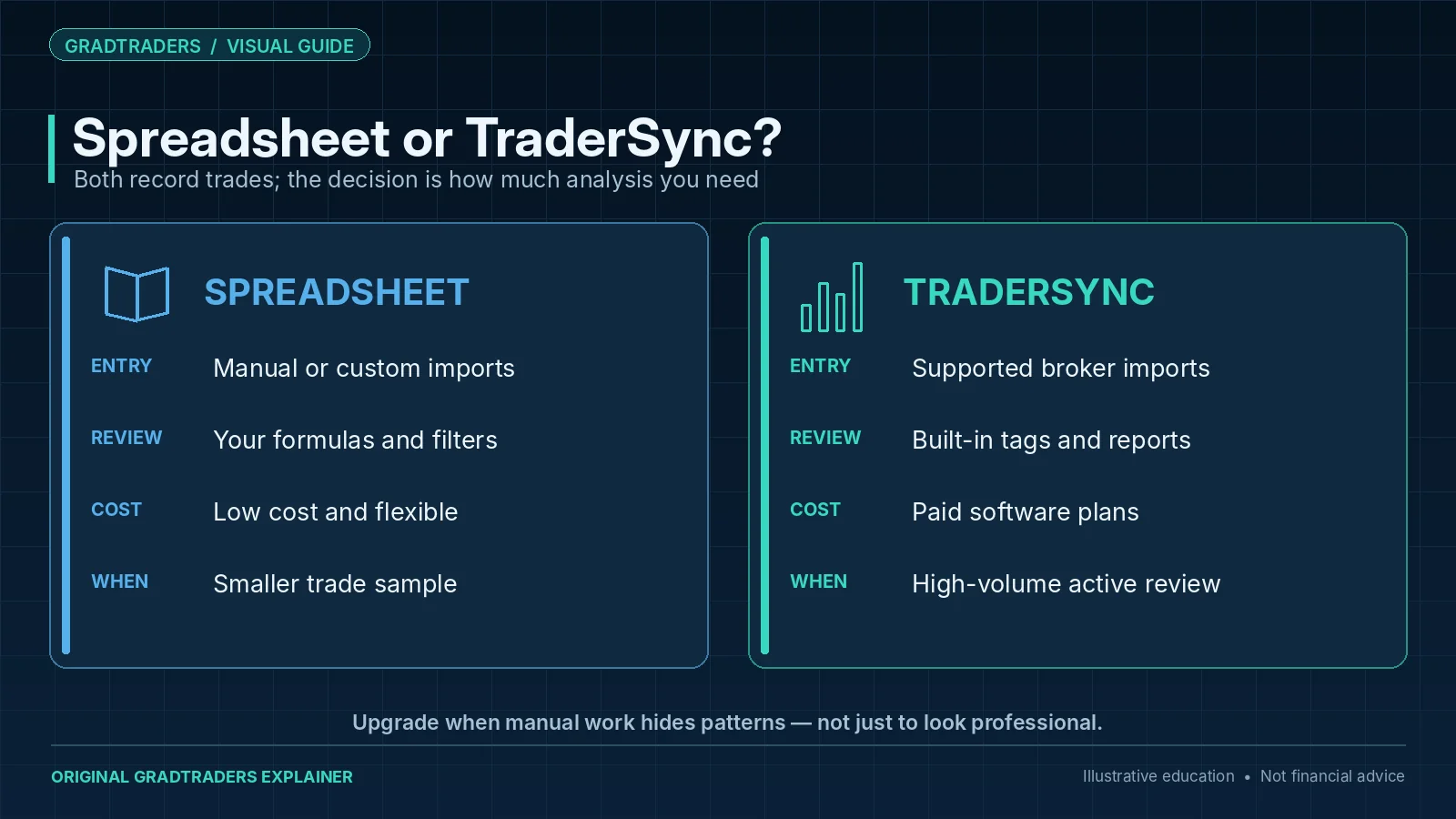
TraderSync is better for active traders who want automated imports, deeper analytics, screenshots, tagging, reports and a more professional trading journal workflow. A spreadsheet is better for beginners who want a simple, flexible and low-cost way to start tracking trades.
The GradTraders view is that most traders should start journaling in the simplest way they will actually maintain. Once trade volume, strategy testing or prop firm discipline becomes more serious, moving from a spreadsheet to dedicated trading journal software can make sense.
TraderSync Vs Spreadsheet Journal At A Glance
A spreadsheet and TraderSync can both work. The real question is whether the trader needs a basic record or a deeper review system.
| Feature | TraderSync | Spreadsheet Journal | GradTraders View |
|---|---|---|---|
| Ease Of Starting | Quick once the account and import workflow are set up | Very easy to start manually | Spreadsheet wins for absolute simplicity. |
| Trade Imports | Designed for importing or syncing trades from brokers and platforms | Manual entry unless the trader builds import templates | TraderSync wins for active traders. |
| Analytics | Built-in reports, trade analytics, tagging and performance review | Depends on formulas, charts and manual structure | TraderSync wins for depth. |
| Cost | Subscription software | Usually free or very low cost | Spreadsheet wins for budget. |
| Screenshots And Notes | Supports notes and screenshot attachment workflows | Possible, but often messy unless organised carefully | TraderSync is cleaner for long-term review. |
| Best User | Active trader, prop firm trader, serious journal user | Beginner, low-frequency trader, budget-conscious trader | Use the tool that you will maintain honestly. |
What Is TraderSync?
TraderSync is dedicated trading journal software for traders who want to import trades, review performance, tag setups, track mistakes, attach notes and screenshots, and analyse results from multiple angles.
TraderSync currently positions itself as a multi-asset trading journal with trade importing or syncing, analytics, risk tracking, images, AI-assisted review and market-replay features, with plan access varying by subscription. Its current product pages also advertise connectivity across a large broker and platform list.
That makes TraderSync more than a simple log. It is designed to help traders move from recording trades to reviewing patterns, weaknesses, strengths and repeat behaviour.
What Is A Spreadsheet Trading Journal?
A spreadsheet trading journal is a manual trade log built in software such as Google Sheets, Excel or another spreadsheet tool. The trader creates columns for date, market, setup, entry, exit, stop loss, result, risk, screenshots and notes.
The strength is simplicity and control. A spreadsheet can be built exactly how the trader wants and usually costs nothing. It can also teach beginners what matters because they have to decide which fields to track.
The weakness is maintenance. Manual entry can become tiring, formulas can break, screenshots can become messy and deeper reporting often requires more spreadsheet skill than many traders want to use.
When TraderSync Is Better
TraderSync is usually better when the trader needs more than a basic record.
Active Trading Volume
Manual spreadsheet entry becomes harder as trade frequency increases.
Deeper Analytics
TraderSync can surface built-in analytics, risk and performance reports without requiring the trader to build spreadsheet formulas from scratch.
Setup And Mistake Tags
Tagging can help traders identify repeated mistakes, emotional patterns, setups and market conditions.
Screenshot Review
Attaching chart images inside a journal helps traders review what they saw at the time.
Prop Firm Discipline
Prop firm traders can use structured review to track risk behaviour, rule breaks and drawdown patterns.
Mentor Or Sharing Workflow
Dedicated journal software can make sharing performance and reports cleaner than sending spreadsheet tabs.
When A Spreadsheet Journal Is Better
A spreadsheet is still a sensible choice for many traders. The best journal is the one that gets used consistently.
Complete Beginners
Beginners can learn what matters by manually recording trades, risk and decisions.
Low Trade Frequency
A swing trader taking a few trades per month may not need dedicated journal software immediately.
Budget First
A spreadsheet is usually free, which matters if the trader is still testing whether they will journal consistently.
Custom Fields
Traders can build exactly the fields they want without depending on a software layout.
Learning Discipline
Manual entry forces the trader to look directly at risk, result, notes and repeated mistakes.
No Subscription
Some traders prefer to avoid recurring software costs until their process is more mature.
The Real Problem Is Usually Not The Tool
Traders often blame the journal format when the real issue is avoidance. A spreadsheet does not help if the trader skips losing trades. TraderSync does not help if the trader imports trades but never reviews the mistakes.
The journal has to become part of the trading process. Record every trade, review it honestly, tag mistakes, compare setups and use the data to change behaviour. Otherwise even the best software becomes an expensive archive.
TraderSync Vs Spreadsheet: Practical Workflow
The two workflows feel very different in practice.
| Workflow Step | TraderSync | Spreadsheet Journal | Best Fit |
|---|---|---|---|
| Entering Trades | Import, sync or manually add depending on broker/platform support | Manual entry or custom import process | TraderSync for higher volume; spreadsheet for low volume. |
| Adding Notes | Built-in notes and journal fields | Custom notes column | Both work if used consistently. |
| Reviewing Setups | Tags, filters and reports | Manual filters or pivot tables | TraderSync for easier analysis. |
| Tracking Emotions | Tags or custom fields | Emotion column or dropdown | Both work, but the trader must be honest. |
| Weekly Review | Reports and analytics can speed the review | Manual summary required | TraderSync for faster review. |
| Long-Term Scaling | Better suited to large trade histories | Can become difficult to maintain | TraderSync for serious active traders. |
Which Is Better For Prop Firm Traders?
Prop firm traders often need more structure than a casual spreadsheet. Daily loss limits, maximum drawdown, consistency expectations and repeated rule breaks need close review.
TraderSync may suit prop firm traders because tags, analytics and reports can make it easier to identify behaviour patterns. A spreadsheet can still work, but it needs to be well designed and updated every session.
Prop Firm Journal Fields
- Daily loss remaining before the trade.
- Total drawdown buffer.
- Risk per trade.
- Rule followed or broken.
- Setup quality and emotional state.
Prop Firm Review Questions
- Was the loss normal or a rule break?
- Did the trader increase size after losing?
- Was the account close to a limit?
- Did the trader stop after a mistake?
- Would the behaviour survive funded-stage pressure?
Which Is Better For Beginners?
Beginners can start with either, but a spreadsheet is often the best first step if the trader is not yet journaling consistently. It is low cost, flexible and teaches the habit.
TraderSync becomes more compelling once the trader is taking enough trades that manual tracking becomes slow, or once they want better analytics than a basic spreadsheet can provide.
| Beginner Stage | Best Journal | Reason |
|---|---|---|
| Not journaling yet | Spreadsheet | Start simple and build the habit. |
| Taking a few trades per week | Spreadsheet or TraderSync | Either can work if maintained consistently. |
| Trading actively | TraderSync | Imports, analytics and reports become more useful. |
| Preparing for prop firm rules | TraderSync or a very structured spreadsheet | Drawdown and rule behaviour need clear review. |
| Reviewing strategy performance | TraderSync | Setup tags and reports can speed pattern recognition. |
Best Setup: Start Simple, Upgrade When The Data Matters
The best route for many traders is simple. Start with a basic spreadsheet if that gets the habit going. Move to TraderSync when the journal becomes part of serious review, prop firm preparation or active trading.
Stage 1: Basic Log
Track date, market, setup, entry, exit, stop, risk, result and notes.
Stage 2: Screenshots
Add before and after chart screenshots so review is visual, not memory-based.
Stage 3: Tags
Track setup, mistake, emotion, session and market condition tags.
Stage 4: Reports
Review win rate, average R, drawdown, setup performance and repeated mistakes.
Stage 5: Weekly Review
Find one behaviour to improve rather than changing everything at once.
Stage 6: Software Upgrade
Use TraderSync when manual tracking slows down or analytics become more important.
Final Verdict
My preference is a spreadsheet for someone still building the habit of recording trades, risk and rule breaks. I would move towards TraderSync when frequent trading or multiple accounts make import and analysis materially more useful. A more expensive journal cannot compensate for incomplete records or a review process that never happens.
My decision rule is to upgrade only when the journal is already being used properly and manual maintenance becomes the limiting factor. Until then, consistency is more valuable than software complexity.
Source note: this is a research-led GradTraders comparison based on editorial workflow analysis and current official TraderSync information checked on 10 October 2026. TraderSync currently documents trade importing or syncing, analytics, reporting, risk tracking, images, AI-assisted review and broad broker/platform connectivity, while its pricing page separates features by subscription plan. A spreadsheet remains a user-built manual tool whose capability depends on the formulas, fields and review process the trader creates. TraderSync features, integrations and pricing can change, so check the provider directly before subscribing.
Useful next reads: TraderSync Review · Read What Is A Trading Journal? · What Is A Trading Journal? · Best Prop Firm Trading Tools · Trading Software & Tools Map.
Explore GradTraders Internationally
GradTraders has 20 dedicated international gateways with local livestream times, market context and country-specific routes into the wider research site.
These country links are for site navigation only; broker availability, regulatory status and account eligibility must be checked separately.
Browse all 20 country gateways
Asia: Japan · South Korea · Taiwan · Hong Kong · India · Singapore · Thailand
Europe: Italy · Sweden · Switzerland · Germany · Norway
Americas: United States · Canada · Mexico
Middle East: United Arab Emirates · Saudi Arabia
Africa: South Africa
Oceania: Australia · New Zealand
TraderSync Vs Spreadsheet Trading Journal FAQ
Is TraderSync better than a spreadsheet?
TraderSync is usually better for active traders who want imports, analytics, tags, screenshots and reports. A spreadsheet can be better for beginners who want a simple and low-cost journal.
Can beginners use TraderSync?
Yes. Beginners can use TraderSync, but they may want to start with a simple spreadsheet first if they are still building the habit of journaling consistently.
Is a spreadsheet enough for a trading journal?
A spreadsheet can be enough for low-frequency traders or beginners. It becomes harder to manage when trade volume, screenshots, analytics and setup review become more serious.
Why use trading journal software?
Trading journal software can save time, organise trades, show analytics, support tags, attach screenshots and make weekly or monthly review easier.
Which journal is better for prop firm traders?
TraderSync or a very structured spreadsheet may suit prop firm traders. The key is tracking rule breaks, risk, drawdown, daily loss behaviour and repeated emotional mistakes.