TradingView Paper Trading Explained 2026: Demo Trading, Practice And Risk
TradingView Paper Trading lets a trader practise order placement and chart-to-trade decisions with simulated money. My test is not whether the virtual account shows a profit: it is whether the trader can use a realistic position size, write down the reason for entry, set an invalidation point and review the decision afterwards. A simulation can build discipline, but it cannot reproduce all the pressure or execution conditions of live trading.
 , GradTraders
Practise The Process
Use Paper Trading as a controlled rehearsal rather than a scoreboard.
- Set a realistic starting balance and leverage.
- Use fixed risk and stop rules.
- Journal every valid trade and mistake.
- Do not reset away uncomfortable drawdown.
Simulation Is Training, Not Proof
Paper results are useful process evidence, but real-money psychology, liquidity and execution can still behave differently.
- Treat virtual profit as practice data.
- Compare results with backtesting and forward testing.
- Increase risk slowly if the process remains disciplined.
Disclosure & Risk Notice: This article is for educational and informational purposes only and is not financial, investment, tax or personal advice. Trading CFDs, spread betting, forex, futures, crypto CFDs and other leveraged products involves significant risk and may not be suitable for all traders. Paper trading, demo trading and simulated results does not guarantee profitable trading or future live performance. Platform behaviour, data, execution, alerts, simulations and third-party connections can differ from live conditions or fail unexpectedly.
Commercial disclosure: GradTraders may earn a commission if you purchase or sign up through certain links, including TradingView and TraderSync links on this page, at no additional cost to you. Commercial relationships do not determine the editorial conclusions. Current partner offers are listed at GradTraders Partner Offers.
Quick Verdict
TradingView Paper Trading is a simulated trading account inside TradingView. It lets traders practise buying and selling with virtual funds, place demo orders from charts, track positions and review simulated performance without depositing real money.
The GradTraders view is that Paper Trading is best used as a practice layer between chart study and live trading. It is not proof that a trader is ready for real capital. The trader still needs a trading plan, risk limits, a journal and realistic expectations.
What Is TradingView Paper Trading?
Paper Trading is TradingView’s simulated trading account. TradingView describes it as a risk-free trading simulator with no deposits and no real money involved, where traders can practise buying and selling assets with simulated funds.
It is designed to let traders test analysis, practise order placement and build confidence before using a live account. Traders can connect to Paper Trading from the Trading Panel inside TradingView Supercharts and use the platform’s charting tools while practising trades.
The value is not that simulated results prove profitability. The value is that traders can practise process, risk planning and execution without immediately exposing capital.
What Can You Practise With Paper Trading?
Paper trading can support several useful practice areas, especially for beginners and traders testing a new workflow.
Order Placement
Practise placing market, limit and stop-style orders in a simulated environment.
Risk Planning
Test stop placement, position sizing and risk-per-trade rules before real money is involved.
Strategy Practice
Apply a setup repeatedly and track whether the trader follows the rules honestly.
Chart-To-Trade Workflow
Move from analysis to simulated execution inside the same TradingView environment.
Demo Confidence
Build familiarity with how trades behave before adding real money pressure.
Journal Review
Record simulated trades and review whether the strategy or behaviour needs work.
The Main Danger: False Confidence
Paper trading removes real financial pressure. That is useful for learning, but it also changes behaviour. Traders may hold losers longer, take larger positions, ignore risk rules or restart after mistakes because the money is simulated.
A trader who performs well on Paper Trading has demonstrated practice performance, not live performance. Real money introduces emotions, execution differences, hesitation, slippage, account pressure and the temptation to interfere with trades.
Treat Paper Trading as a training ground, not a guarantee.
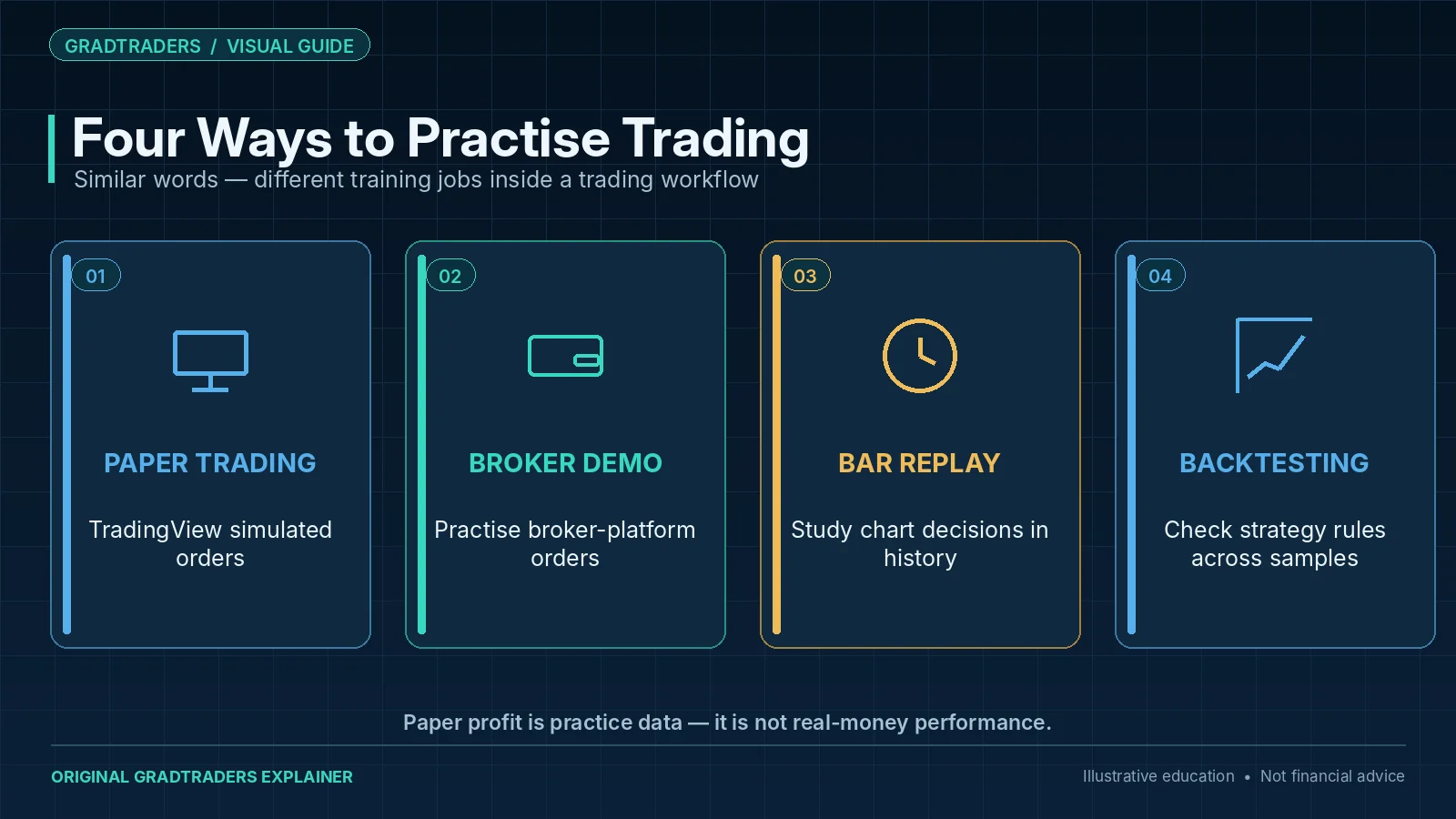
Paper Trading Vs Demo Account Vs Backtesting
These terms overlap, but they are not identical. Each tool belongs in a different part of the learning process.
| Tool | Purpose | Best Use | GradTraders View |
|---|---|---|---|
| TradingView Paper Trading | Simulated trading inside TradingView | Practising chart-to-trade workflow and order decisions | Good practice layer inside the TradingView ecosystem. |
| Broker Demo Account | Simulated trading inside a broker platform | Practising the broker’s actual platform and account conditions | Useful before live broker trading. |
| Backtesting | Testing a strategy on historical data | Checking whether the idea has historical logic before demo or live use | Should come before serious forward testing. |
| Bar Replay | Visual replay of historical price movement | Practising chart reading and setup recognition | Excellent for visual practice, but not a full journal by itself. |
How To Use TradingView Paper Trading Properly
Paper Trading is most useful when it is treated like a real process. The trader should not simply click around with virtual money and call it practice.
| Step | What To Do | Why It Matters |
|---|---|---|
| 1. Choose One Strategy | Practise a defined setup, not random trades | Random practice creates random lessons. |
| 2. Set Realistic Capital | Use a simulated balance close to your intended live or prop firm account size | Unrealistic balances distort risk behaviour. |
| 3. Define Risk Per Trade | Use fixed risk rules and stop placement before entry | Risk discipline is the main lesson. |
| 4. Journal Every Trade | Record setup, risk, result, screenshot and mistake notes | Practice without review is weak. |
| 5. Avoid Reset Abuse | Do not reset the account every time results are uncomfortable | Resetting hides drawdown and behaviour patterns. |
| 6. Move Slowly | Use paper results as evidence, then demo/live with smaller risk if appropriate | Simulated confidence should not become reckless live trading. |
Paper Trading And Leverage
TradingView support explains that Paper Trading can be configured with leverage settings, and that traders can change leverage in account settings. This can make simulated trading feel more realistic for margin-based markets, but it can also make bad habits easier to hide.
Leverage should not be used in paper trading to chase bigger screenshots. It should be used to understand how margin, position size, stop distance and account risk interact.
Good Leverage Practice
- Match the leverage style you expect to use later.
- Track risk as a percentage of account size.
- Use realistic stop losses and position sizes.
- Journal margin pressure and drawdown.
Bad Leverage Practice
- Using huge position sizes because losses are simulated.
- Resetting the account after large drawdowns.
- Ignoring what would happen with real slippage.
- Treating simulated profit as proof of skill.
TradingView Paper Trading For Beginners
Beginners can use TradingView Paper Trading to learn the mechanics of trading without rushing into live markets. That includes learning how orders work, how stops and targets behave, and how quickly a trade idea can change once money is on the line.
The danger is that beginners may focus on simulated profit rather than process. A beginner should judge Paper Trading by whether they followed the plan, controlled risk and learned from review, not whether a random account balance went up after a few trades.
Paper Trading For Prop Firm Preparation
Prop firm traders can use Paper Trading to practise discipline before paying for a challenge. The key is to simulate the rules realistically: daily loss limit, maximum drawdown, risk per trade, minimum trading days, news restrictions and consistency expectations where relevant.
Do not use Paper Trading as an excuse to over-risk. Use it to test whether you can follow the same rules under simulated pressure. A trader who cannot respect risk on a paper account is unlikely to become more disciplined just because a prop firm account is involved.
Paper Trading And Journaling
A paper trading account becomes far more useful when every trade is reviewed. Without a journal, the trader may remember the winners, ignore the losers and repeat the same mistakes.
A good paper trading journal should track setup quality, risk, stop placement, reason for entry, reason for exit, screenshot, emotional state and whether the trade would still make sense with real money.
Setup
Was the trade part of the tested strategy, or was it random?
Risk
Was the stop and position size defined before entry?
Execution
Was the trade placed cleanly, or did the trader hesitate and chase?
Management
Did the trader follow the exit plan or interfere emotionally?
Result
Was the outcome normal for the strategy or caused by a rule break?
Lesson
What one behaviour should improve before the next session?
When To Move From Paper Trading To Demo Or Live
There is no perfect number of trades, but a trader should not move on just because a few simulated trades went well. Look for process evidence.
| Checkpoint | Ready Sign | Warning Sign |
|---|---|---|
| Rule Following | Most trades follow the written plan | The trader keeps changing rules mid-trade |
| Risk Control | Losses stay within planned risk | Position size jumps after losses |
| Sample Size | Results include enough winners, losers and difficult periods | Confidence is based on one good week |
| Journaling | Every trade has notes and review | Only winners are remembered |
| Emotional Control | The trader stops after rule breaks | The trader resets or revenge trades after drawdown |
Final Verdict
TradingView Paper Trading is a useful practice tool for traders who want to learn order placement, test ideas, build routine and practise chart-to-trade workflow without risking real money.
The correct way to use it is with realistic capital, realistic risk, a written trade plan and a journal. The wrong way is to treat simulated profit as proof that live trading will be easy. Paper trading should build process, not fantasy confidence.
Source note: This GradTraders explainer uses current official TradingView documentation plus editorial analysis of how simulated practice fits into a trading workflow. TradingView describes Paper Trading as a demo account using simulated money with no deposits or real money involved. Its current documentation also allows leverage settings by asset class and explains that resetting an account deletes transaction history, active orders and open positions.
Official TradingView research: Paper Trading main functionality · Paper Trading leverage · account reset and currency.
Useful next reads: TradingView Review · TradingView Alerts Explained · Forex Tester Vs TradingView Bar Replay · TraderSync Vs Spreadsheet Journal · Trading Software & Tools Map.
Explore GradTraders Internationally
GradTraders has 20 dedicated international gateways with local livestream times, market context and country-specific routes into the wider research site.
These country links are for site navigation only; broker access, regulation and product eligibility must be checked separately.
Browse all 20 country gateways
Asia: Japan · South Korea · Taiwan · Hong Kong · India · Singapore · Thailand
Europe: Italy · Sweden · Switzerland · Germany · Norway
Americas: United States · Canada · Mexico
Middle East: United Arab Emirates · Saudi Arabia
Africa: South Africa
Oceania: Australia · New Zealand
TradingView Paper Trading FAQ
What is TradingView Paper Trading?
TradingView Paper Trading is a simulated trading account inside TradingView. It lets traders practise buying and selling with virtual funds and no real-money deposit.
Is TradingView Paper Trading good for beginners?
Yes, it can help beginners practise order placement, chart-to-trade workflow and risk planning. Beginners should still use a journal and avoid treating simulated profit as proof of skill.
Can you reset TradingView Paper Trading?
TradingView support explains that resetting a paper trading account can change settings such as balance and currency, but it also deletes transaction history, active orders and open positions.
Does TradingView Paper Trading use real money?
No. It uses simulated funds. That makes it useful for practice, but simulated results do not guarantee live trading performance.
Is paper trading the same as backtesting?
No. Backtesting usually tests a strategy on historical data. Paper trading practises simulated trading in a live or live-like platform environment.